
How can I clear storage space on my iPhone by moving data to iCloud?
iPhone storage is full and I have plenty of space on iCloud how can if offline data from my iPhone ?
[Re-Titled by Moderator]
iPhone 12 Pro Max, iOS 18
iPhone storage is full and I have plenty of space on iCloud how can if offline data from my iPhone ?
[Re-Titled by Moderator]
iPhone 12 Pro Max, iOS 18
You cannot increase storage of an iPhone. However, you can optimize iPhone Storage by using iCloud Storage. Save space on your device
Settings > [your name] > iCloud Tap Photos > Choose Optimize [device] Storage Set up and use iCloud Photos - Apple Support
You can buy iCloud Storage. --> Buy more iCloud storage - Apple Support
You can manage your storage --> How to check the storage on your iPhone, iPad, and iPod touch
Manage your Storage --> Manage your photo and video storage - Apple Support
Your photos are always available for both iPhone and iCloud. You delete it on the iPhone it is gone from iCloud and vice-versa. To save space on your iPhone use optimized iPhone storage. Remember, if you delete in one it is deleted everywhere.
Get started with iCloud Photos:
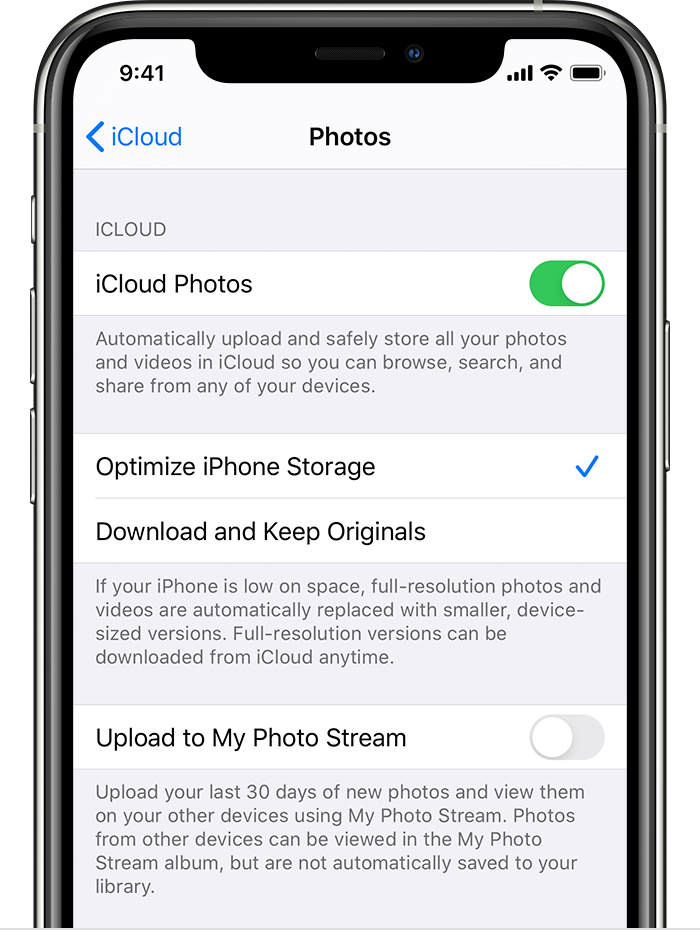
With Optimize Storage, smaller, space-saving photos and videos are kept on your device while all of your original, full-resolution versions are stored in iCloud. And as long as you have enough space in iCloud, you can store as many photos and videos as you want.
How to check the storage on your iPhone, iPad, and iPod touch
You cannot delete the photos from your iPhone after syncing them to iCloud. All your photos will be gone.
The difference between iCloud and iPhone storage for photos:
Storage Options for Your Photos:
Additional Option:
Choosing the Right Option:
The best option for you depends on your priorities and needs. If you value having high-resolution photos readily available on all your devices, even offline, and have a good internet connection, iCloud storage is a good choice. If storage space on your iPhone is a concern and you primarily use photos on your device, storing them on your iPhone might be sufficient. You can also use the "Optimize iPhone Storage" feature for a balance between quality and space efficiency.
"How can I clear storage space on my iPhone by moving data to iCloud?: iPhone storage is full and I have plenty of space on iCloud how can if offline data from my iPhone ?"
-------
Clearing Space on an iPhone:
Putting iCloud aside, try clearing the System Data on your iPhone: How to Clear "System Data" in your iPhone's Storage: - User Tip
How can I clear storage space on my iPhone by moving data to iCloud?

