
iPad stuck on "verifying" during an iOS 18.3.2 update
I received a update but it's stuck in verifying 18.3.2 and I cannot open it up or turn it off it just keeps spinning with the words verifying.
[Re-Titled by Moderator]
iPad, iPadOS 18
I received a update but it's stuck in verifying 18.3.2 and I cannot open it up or turn it off it just keeps spinning with the words verifying.
[Re-Titled by Moderator]
iPad, iPadOS 18
All system software updates are digitally signed. iPadOS 18.4 is now current, the digital signatures of either iPadOS 18.x updates now having been revoked.
You will need to perform a forced restart of your iPad - and then repeat the update process.
Force restart iPad (models with Face ID or with Touch ID in the top button)
If your iPad doesn’t have the Home button, do the following:
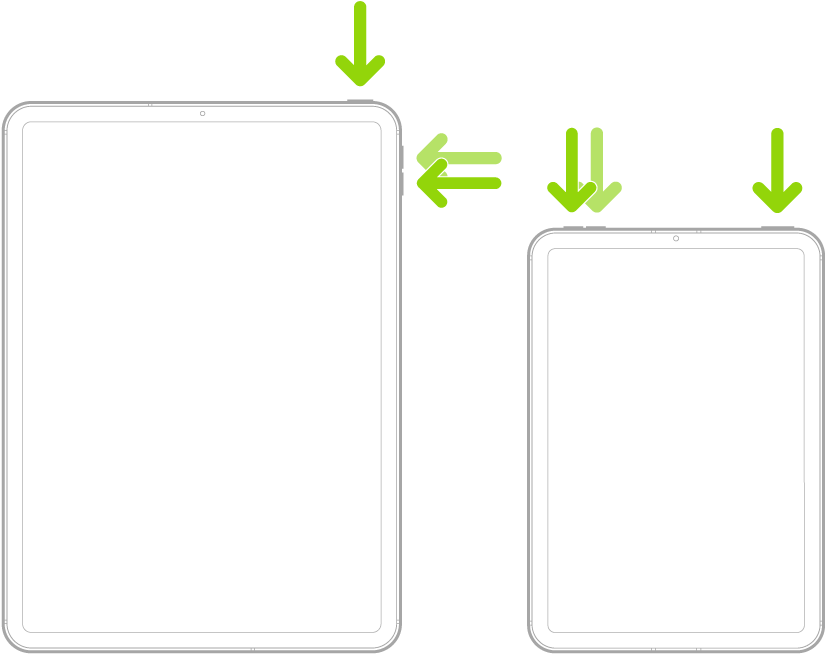
Force restart iPad (models with the Home button)
Press and hold the top button and the Home button at the same time. When the Apple logo appears, release both buttons.

All system software updates are digitally signed. iPadOS 18.4 is now current, the digital signatures of either iPadOS 18.x updates now having been revoked.
You will need to perform a forced restart of your iPad - and then repeat the update process.
Force restart iPad (models with Face ID or with Touch ID in the top button)
If your iPad doesn’t have the Home button, do the following:
Force restart iPad (models with the Home button)
Press and hold the top button and the Home button at the same time. When the Apple logo appears, release both buttons.
Probably because the 18.3.2 update is no longer available. The current version is 18.4.
Try going to Settings ➜ General ➜ iPhone Storage, find the update and delete it.
Then go back to Settings ➜ General ➜ software Update and see if it will download the newer version.
If it's still stuck verifying, then restart your iPhone.
click here ➜ Force restart iPhone - Apple Support
iPad stuck on "verifying" during an iOS 18.3.2 update

