Why is my iPhone listed twice for audio output in Control Center?

My device seems to appear twice on audio output device option list in control center even when I am playing media from iPhones built in audio source and there are no other external output sources connected to my device. The second option for iPhone which is referring to my device a second time for whatever reason, actually disappears from the list altogether when the second option for “iPhone” is clicked on…. Why/how is this happening?


[Re-Titled by Moderator]


iPhone 15

Posted on Apr 26, 2025 1:56 AM

Reply
3 replies

May 9, 2025 11:37 AM in response to hilllemd03

Do you own any other Apple device like a second iPhone or an iPad? If for example you own an iPad and you set up the iPad from the backup of your iPhone and your iPhone in Settings > General > About > Name was simply named iPhone, when you set up the iPad from the backup of your iPhone, it would show as another device as just iPhone. Thus, if you do happen to own another Apple Device like an iPad, open Settings > General > About > Name and give the other device a different name.

Apr 30, 2025 2:47 AM in response to hilllemd03

Change your Apple ID password immediately. Change your Apple Account password


If you need to change your Apple ID password, follow these steps immediately to secure your account:

  1. Change Your Apple ID Password:
    1. On your iPhone, iPad, or Mac, go to Settings (or System Settings on Mac).
    2. Tap your name at the top, then select Password & Security.
    3. Choose Change Password and follow the prompts to set a new, strong password.
  2. Sign Out Other Devices (If Prompted):
    1. When changing your password, you may be notified that other devices are signed in to your Apple ID.
    2. Select Log out of all other devices to ensure that any unauthorized access is removed.
  3. Update Your New Password on Your Devices:
    1. After changing the password, you may need to sign back in on your iPhone, iPad, Mac, and other Apple services like iCloud, iMessage, FaceTime, and the App Store.
  4. Enable Two-Factor Authentication (If Not Already On):
    1. Go to Settings > Your Name > Password & Security and enable Two-Factor Authentication for extra security.
  5. Check for Suspicious Activity:
    1. Review devices signed into your Apple ID by going to Settings > Your Name > Devices and remove any unrecognized ones.
    2. Check Recent Activity in your Apple ID account for any unusual sign-ins.


These steps ensure your Apple ID remains secure and prevent unauthorized access to your account.



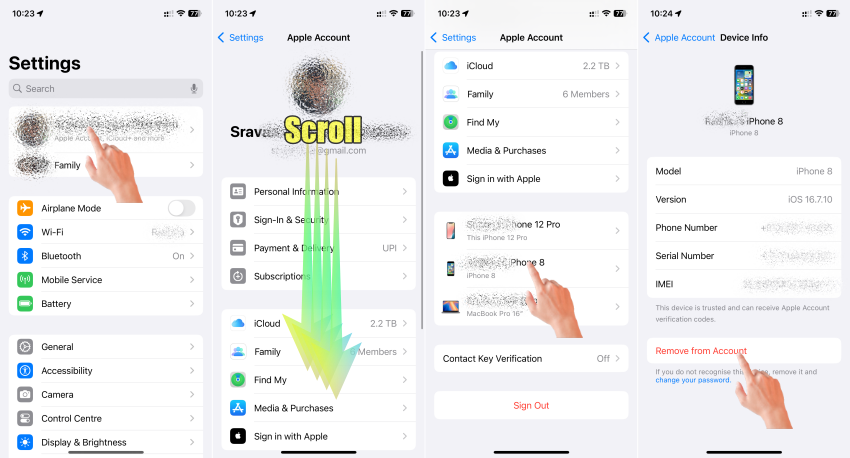
After this, if there are devices still showing under the Apple ID which you do not recognise, follow the process given below.


The pic below is self-explanatory.


May 9, 2025 11:31 AM in response to SravanKrA

Hi SravanKrA,


Thank you for taking the time to respond to my original question & concern regarding ‘’’multiple’’’ iPhone devices (‘multiple’ meaning 2 devices total in this scenario) being listed as available options for audio output source even though both iPhone devices being listed seem to refer to the same singular iPhone device)… While I do not doubt whatsoever that this could be a security breach issue, I am wondering if you are taking into consideration that both iPhone devices that are listed as available options to be used as an audio output source are still both referring to my own *singular* iPhone device…. I just do not understand how my ONE device can be listed as being available there not once, but TWICE…. since again of course, it is only one singular device. I do not think it is bad advice at all to ensure that my device is secure, but I still do not understand or have an answer as to why or how my device can be listed there more than 1 time? Any ideas? I’m stumped…..

This thread has been closed by the system or the community team. You may vote for any posts you find helpful, or search the Community for additional answers.

Why is my iPhone listed twice for audio output in Control Center?

Welcome to Apple Support Community
A forum where Apple customers help each other with their products. Get started with your Apple Account.

