Why is my iPad's AirPlay feature not working on my Samsung TV?

It worked 3 weeks ago. I was out of town for awhile but now back. Tried both ipad and iphone. Confirmed both devices and tv are on same wifi network. restarted everything. turned airplay off and on, on the tv. reset airplay connections. The phone and ipad both see the TV and its name. Then it just spins the little wheel and nothing happens. It used to turn on the tv if it was off. does not do that now either. Interestingly I connected the ipad to the tv via bluetooth and it happily plays audio but no video. If I had hair I would pull it out.

Suggestions appreciated. Just don't tell me to turn my router off and on.


[Re-Titled by Moderator]

iPad Air, iPadOS 18

Posted on May 19, 2025 9:42 AM

Reply
Question marked as Top-ranking reply

Posted on May 19, 2025 11:32 AM

Your issue is typical of your WiFi Router not reliably forwarding AirPlay traffic on your local network. A restart of your WiFi Router - followed by a restart of your TV and devices - will likely resolve the problem.


To restart your router, disconnect power from the router for at least 30 seconds - then reconnect power to restart. After your router reboots (which may take several minutes), force restart your iPad:


Force restart iPad (models with Face ID or with Touch ID in the top button)

If your iPad doesn’t have the Home button, do the following:

  1. Press and quickly release the volume button nearest to the top button.
  2. Press and quickly release the volume button farthest from the top button.
  3. Press and hold the top button.
  4. When the Apple logo appears, release the top button.


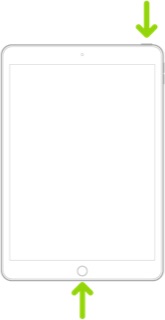
Force restart iPad (models with the Home button)

Press and hold the top button and the Home button at the same time. When the Apple logo appears, release both buttons.


If you continue to have difficulties, check to see if your iPad is using the WiFi Private Address feature. This feature is intended to provide additional privacy and security when using “public” (untrusted) WiFi networks.

Settings > WiFi > [Your WiFi Network / SSID] - tap the “i” icon - Private Address


The Private Address feature is largely unnecessary for your home WiFi network; if enabled, Private Addressing can cause issues if specific MAC addresses are expected by your WiFi Router. You may need to disable this feature - and can be enabled or disabled for each individual network.


Use private Wi-Fi addresses in iOS 14, iPadOS 14, and watchOS 7 - Apple Support

2 replies
Question marked as Top-ranking reply

May 19, 2025 11:32 AM in response to Robert Bogart1

Your issue is typical of your WiFi Router not reliably forwarding AirPlay traffic on your local network. A restart of your WiFi Router - followed by a restart of your TV and devices - will likely resolve the problem.


To restart your router, disconnect power from the router for at least 30 seconds - then reconnect power to restart. After your router reboots (which may take several minutes), force restart your iPad:


Force restart iPad (models with Face ID or with Touch ID in the top button)

If your iPad doesn’t have the Home button, do the following:

  1. Press and quickly release the volume button nearest to the top button.
  2. Press and quickly release the volume button farthest from the top button.
  3. Press and hold the top button.
  4. When the Apple logo appears, release the top button.


Force restart iPad (models with the Home button)

Press and hold the top button and the Home button at the same time. When the Apple logo appears, release both buttons.


If you continue to have difficulties, check to see if your iPad is using the WiFi Private Address feature. This feature is intended to provide additional privacy and security when using “public” (untrusted) WiFi networks.

Settings > WiFi > [Your WiFi Network / SSID] - tap the “i” icon - Private Address


The Private Address feature is largely unnecessary for your home WiFi network; if enabled, Private Addressing can cause issues if specific MAC addresses are expected by your WiFi Router. You may need to disable this feature - and can be enabled or disabled for each individual network.


Use private Wi-Fi addresses in iOS 14, iPadOS 14, and watchOS 7 - Apple Support

This thread has been closed by the system or the community team. You may vote for any posts you find helpful, or search the Community for additional answers.

Why is my iPad's AirPlay feature not working on my Samsung TV?

Welcome to Apple Support Community
A forum where Apple customers help each other with their products. Get started with your Apple Account.