Any way to pin a document on the desktop not in the document stack?

I like using stacks on the desktop but I have 2 documents I want to stand alone and not get stacked with the rest of them so that I can see them at a glance whenever I look at my desktop. Any ideas?

MacBook Air 15″, macOS 15.3

Posted on May 22, 2025 10:08 AM

Reply
Question marked as Top-ranking reply

Posted on May 22, 2025 11:36 AM

Everything is stacked or nothing is stacked. Since folders are not stacked, you can put those two files inside a custom named folder (e.g. Special_Files) on the Desktop. You then drag and drop that folder onto the Dock just to the left of the Trash.
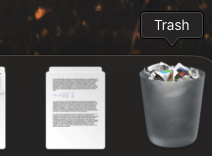


Now, right-click on that Dock icon and choose View Content as Grid. When you click on that Special_Files folder in the Dock, you will see per my example:



When you pass the pointer over the document icon, press the spacebar to open it in Quick Look. No need to click on the icon. If you do single-click the document, it will open in its default opening application.


8 replies
Question marked as Top-ranking reply

May 22, 2025 11:36 AM in response to kwc_maine

Everything is stacked or nothing is stacked. Since folders are not stacked, you can put those two files inside a custom named folder (e.g. Special_Files) on the Desktop. You then drag and drop that folder onto the Dock just to the left of the Trash.


Now, right-click on that Dock icon and choose View Content as Grid. When you click on that Special_Files folder in the Dock, you will see per my example:


When you pass the pointer over the document icon, press the spacebar to open it in Quick Look. No need to click on the icon. If you do single-click the document, it will open in its default opening application.


May 22, 2025 3:57 PM in response to tbirdvet

The document stack doesn't have that option - do you mean your Documents folder? Because that will fan. But the docs I'm talking about are actually residing on the desktop, not in the Documents folder.

I can see that an alternative would be to put all the docs I have on the desktop into the Documents folder. Then if I turned off stacking on the desktop, I could paste the documents there and they would stay.

May 22, 2025 4:26 PM in response to kwc_maine

ctrl click on the documents icon in the dock. You should see a menu on how to have your documents shown. Be sure to set view contents as Fan and test. If I copy a file to the desktop it stays there even after I work with it. If I work with any file in the documents folder it will end up in the documents icon in the dock. I have no issue with this process.

This thread has been closed by the system or the community team. You may vote for any posts you find helpful, or search the Community for additional answers.

Any way to pin a document on the desktop not in the document stack?

Welcome to Apple Support Community
A forum where Apple customers help each other with their products. Get started with your Apple Account.