
Images are blurry when taken from iPhone 15 Pro Max
Allies are low resolution
[Re-Titled by Moderator]
Original Title: blurry iphon 15 promax pics
iPhone 15 Pro Max
Allies are low resolution
[Re-Titled by Moderator]
Original Title: blurry iphon 15 promax pics
iPhone 15 Pro Max
Adjust the camera’s focus and exposure
Before you take a photo, the iPhone camera automatically sets the focus and exposure, and face detection balances the exposure across many faces. If you want to manually adjust the focus and exposure, do the following:
 up or down to adjust the exposure.
If your Photos and Videos are stored in iCloud and you share it before downloading the original then it may appear blurry but it is not.
Your photos and videos are stored on your device in their original, high-resolution version. This means that they use a lot of space on your iPhone, iPad, and iPod touch. With iCloud Photos, you can make more space available on your device and have your entire collection, everywhere you go.
Get started with iCloud Photos:
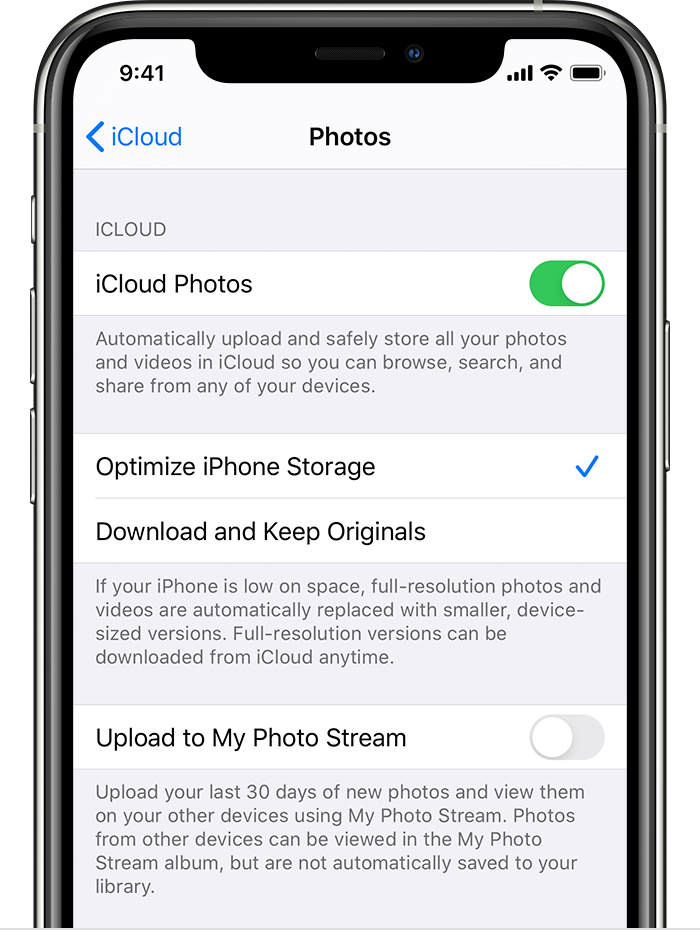
With Optimize Storage, smaller, space-saving photos and videos are kept on your device while all of your original, full-resolution versions are stored in iCloud. And as long as you have enough space in iCloud, you can store as many photos and videos as you want.
You may try some of these steps, please check after each step...
Adjust the camera’s focus and exposure
Before you take a photo, the iPhone camera automatically sets the focus and exposure, and face detection balances the exposure across many faces. If you want to manually adjust the focus and exposure, do the following:
up or down to adjust the exposure.
If your Photos and Videos are stored in iCloud and you share it before downloading the original then it may appear blurry but it is not.
Your photos and videos are stored on your device in their original, high-resolution version. This means that they use a lot of space on your iPhone, iPad, and iPod touch. With iCloud Photos, you can make more space available on your device and have your entire collection, everywhere you go.
Get started with iCloud Photos:
With Optimize Storage, smaller, space-saving photos and videos are kept on your device while all of your original, full-resolution versions are stored in iCloud. And as long as you have enough space in iCloud, you can store as many photos and videos as you want.
You may try some of these steps, please check after each step...
"Allies"...?
Put your iPhone in diagnostics mode - identify potential hardware and software issues
How to put your iPhone in diagnostics mode - Apple Support
If you still have an issue—
Follow the 3R 's- if a restart does not solve your problem proceed
Have you shutdown & restarted the iPhone ie power off/on...
Restart your iPhone - Apple Support
Reset or a Force Restart,
Force restart iPhone - Apple Support
Restore from backup, restore as new device.
Restore your iPhone, iPad, or iPod to factory settings using a computer - Apple Support
Verify your software is up to date
The current stable release of iOS including bug fixes, security updates is iOS 18.5
Update your iPhone or iPad - Apple Support
"Images are blurry when taken from iPhone 15 Pro Max: Allies are low resolution"
-------
What do you mean by "Allies"? "All these"?
Troubleshooting a Burry iSight Camera:
What to Try:
A. Try This - Disable then Enable Camera:
B. Restart iPhone:
Go Here: Restart your iPhone - Apple Support
C. Are you Using a Case?
Make sure that the back camera is not covered(somewhat) - For note: the microphone part is located between the lens and the flash. So, make sure all is not covered.
D. Update Using a Computer:
Have a Computer Handy? If so, try using a computer to update. Go here: Update your iPhone Using a Computer - User Tip
E. Report this Bug to Apple:
Do your Part: These are user-to-user forums. Apple rarely reads these forums on their own time as it is. So, provide Apple with feedback on this. Apple wont get back to you directly, but the more they hear of this, the more they will know what is going on, and what needs to be fixed.
To Provide Feedback:
Images are blurry when taken from iPhone 15 Pro Max


