iPhone 16e randomly types conversations in text messages

I just got this iPhone 16e from Boost mobile about 2-3 weeks ago brand new I was told at least. The last almost week, apps I was currently using would close out for no reason and I know I didn’t push anything that would have made the apps completely close out. It’s not only ONE app that has been crashing or closing itself but it’s been many.


Then we have what started happening this afternoon out of nowhere. I was with my daughter in my car and texting my husband who was working. I typed out what I wanted to say and send it but got distracted by my daughters questions leaving the phone unlocked screen on and ready to text my husband I’m he responded. It made me jump when I glance at my phone for a second and watched my phone typing a message to my husband without my hands on the keyboard. Then I noticed what was typed was the conversation with my daughter and I. I saw a new icon or whatever you call it and that was blue. It was top three right of the time in the upper left corner. I thought it was the voice over or something like that and I made sure nothing was on that wasn’t supposed to be. I did screenshot a picture of what the icon that had showed up out of nowhere looks like if anyone has answers!! And would greatly appreciate any theories or advice about my apps crashing lately too. Thanks!


[Edited by Moderator]

Original Title: iPhone 16e randomly started typing in my text message like it heard everything being said in my car! What is going on?

iPhone 16

Posted on Sep 3, 2025 12:09 AM

Reply
Question marked as Top-ranking reply

Posted on Sep 3, 2025 12:45 AM

To fix the typing in messages: To turn it off, go to Settings > Accessibility and disable Voice Control. The blue icon should disappear.


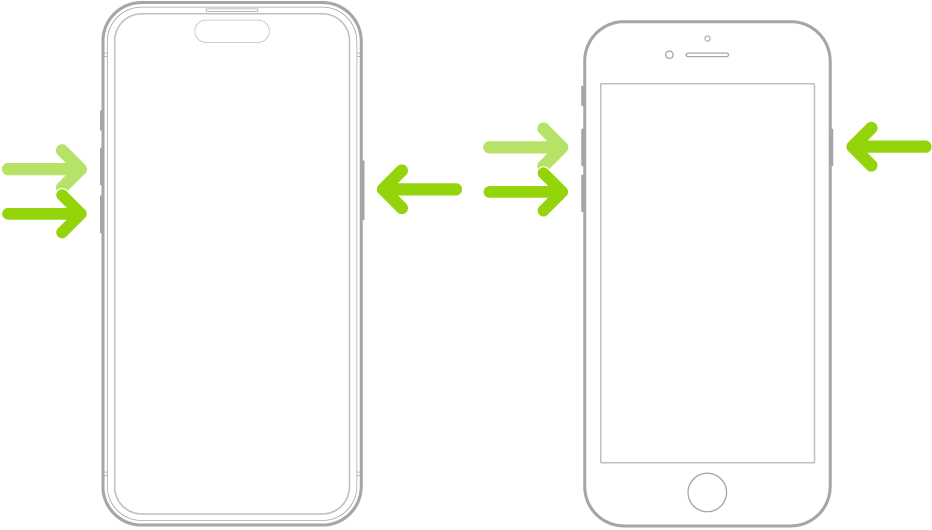
To fix the Apps crashing try Force restarting iPhone

  1. Press and quickly release the volume up button.
  2. Press and quickly release the volume down button.
  3. Press and hold the side button.
  4. When the Apple logo appears, you can release the side button.

Similar questions

3 replies
Question marked as Top-ranking reply

Sep 3, 2025 12:45 AM in response to Nickibadders227

To fix the typing in messages: To turn it off, go to Settings > Accessibility and disable Voice Control. The blue icon should disappear.


To fix the Apps crashing try Force restarting iPhone

  1. Press and quickly release the volume up button.
  2. Press and quickly release the volume down button.
  3. Press and hold the side button.
  4. When the Apple logo appears, you can release the side button.

Sep 3, 2025 11:34 PM in response to Vancouver22

lTjank you for the help and especially explaining everything step by step for me because it will save me so much time not having to open all the options in settings to find what I needed!


If I can ask one more question and see if you might have any ideas or an answer for me… Is there any reason or explanation as to how or why that “Voice control” feature would be on and off by itself? What I mean is, yes I am fully aware that there is a toggle to turn it on and off manually, BUT it had just happened mere hours before I posted my plea for advice and help here. I had not even opened settings all day so I know I didn’t accidentally click it trying to turn on something else. Voice Control literally turned itself on and less than an hour after it started it completely stopped and hasn’t made a peep since.

This thread has been closed by the system or the community team. You may vote for any posts you find helpful, or search the Community for additional answers.

iPhone 16e randomly types conversations in text messages

Welcome to Apple Support Community
A forum where Apple customers help each other with their products. Get started with your Apple Account.