How do I reduce “Other System Data” storage on iPhone 12 mini?

Hello!


My 64 GB iPhone 12 mini is suffering - mostly because of the 33,000 photos and 2,500 videos I have on the device/iCloud. I'm constantly trying to find more room (the end result is that I need a new phone with more storage) and for the time being I'm trying to offload things I don't need.


For example I noticed that "Other System Data" is taking up 15GB in my storage. I've seen suggestions on other posts about restarting the phone to rejig this, but that hasb't worked for me. It remains the same...


Any other hot tips?


Thanks,


Storagehoarder


[Re-Titled by Moderator]

Original Title: Storage - Other System data

iPhone 12 mini, iOS 16

Posted on Sep 11, 2025 9:39 PM

Reply
Question marked as Top-ranking reply

Posted on Sep 12, 2025 12:32 AM

"For example I noticed that "Other System Data" is taking up 15GB in my storage. I've seen suggestions on other posts about restarting the phone to rejig this, but that hasb't worked for me. It remains the same..."


You need to Back up the phone

Erase all content & settings

Set up the phone again, restoring the backup.

There is some risk so ensure you learn how to perform this.


Back up iPhone - Apple Support


Erase iPhone - Apple Support


Set up your iPhone or iPad – Apple Support (UK)

Similar questions

3 replies
Question marked as Top-ranking reply

Sep 12, 2025 12:32 AM in response to wow_eee

"For example I noticed that "Other System Data" is taking up 15GB in my storage. I've seen suggestions on other posts about restarting the phone to rejig this, but that hasb't worked for me. It remains the same..."


You need to Back up the phone

Erase all content & settings

Set up the phone again, restoring the backup.

There is some risk so ensure you learn how to perform this.


Back up iPhone - Apple Support


Erase iPhone - Apple Support


Set up your iPhone or iPad – Apple Support (UK)

Sep 12, 2025 12:17 AM in response to wow_eee

  • Other: Non-removable mobile assets, like Siri voices, fonts, dictionaries, non-removable logs and caches, Spotlight index, and system data, such as Keychain and CloudKit Database. Cached files can't be deleted by the system.
  • System: Space taken by the operating system. This can vary based on your device and model.


About cached files in "Other"

Finder and iTunes categorize cached music, videos, and photos as Other instead of actual songs, videos, or photos. Cached files are created when you stream or view content like music, videos, and photos. When you stream music or video, that content is stored as cached files on your device so you can quickly access it again.


Your device automatically removes cached files and temporary files when your device needs more space.


If storage on your device differs from what you see in Finder or iTunes

Since Finder and iTunes categorize cached files as Other, reported usage for Music or Videos might differ. To view usage on your device, go to Settings > General > [Device] Storage.


If you want to delete the cached files from your device

Your device automatically deletes cached files and temporary files when it needs more space. You don't need to delete them yourself.


In short --> IGNORE, if you are not convinced, Restart the device. You will see that Others Storage will reduce but total storage will remain more or less the same.


Watch the demo in the GIF below made on my iPhone 6 iOS 12.4.7
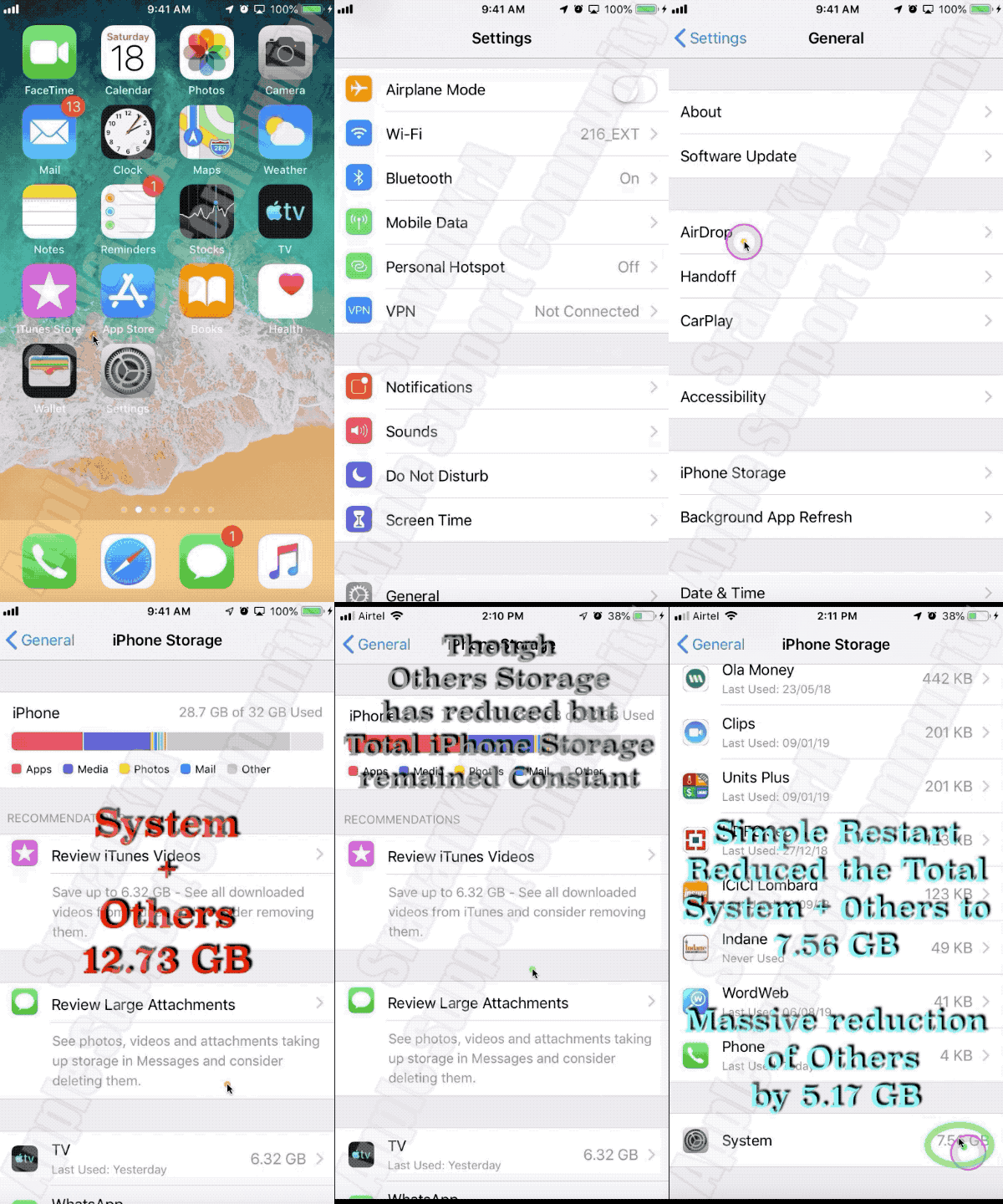

In short --> IGNORE, if you are not convinced, Restart the device. You will see that Others Storage will reduce but total storage will remain more or less the same


You may watch the same GIF in the form of Video on YouTube --> Others Storage consuming lot of space on an iPhone



Sep 12, 2025 12:41 AM in response to wow_eee

"My 64 GB iPhone 12 mini is suffering - mostly because of the 33,000 photos and 2,500 videos I have on the device/iCloud. "


If you have sufficient iCloud paid for and Photos is set up to Optimise storage it should not be a problem.

IF you are sure all your media is in iCloud then restoring the phone as described above will restore only thumbnails to Photos

This thread has been closed by the system or the community team. You may vote for any posts you find helpful, or search the Community for additional answers.

How do I reduce “Other System Data” storage on iPhone 12 mini?

Welcome to Apple Support Community
A forum where Apple customers help each other with their products. Get started with your Apple Account.