How to fix grainy and blurry selfie quality on iPhone 16 Pro Max?

the sefies look grainy and blurry sometimes. Not in good quality at all. I have no idea what to do


[Re-Titled by Moderator]

Original Title: why my iphone 16promax selfies not jn good quality?

Posted on Sep 13, 2025 12:41 AM

Reply
Question marked as Top-ranking reply

Posted on Sep 13, 2025 5:12 AM

Adjust the camera’s focus and exposure

Before you take a photo, the iPhone camera automatically sets the focus and exposure, and face detection balances the exposure across many faces. If you want to manually adjust the focus and exposure, do the following:

  1. Tap the screen to show the automatic focus area and exposure setting.
  2. Tap where you want to move the focus area.
  3. Next to the focus area, drag  up or down to adjust the exposure.
  4. To lock your manual focus and exposure settings for upcoming shots, touch and hold the focus area until you see AE/AF Lock; tap the screen to unlock settings.



If your Photos and Videos are stored in iCloud and you share it before downloading the original then it may appear blurry but it is not.


Your photos and videos are stored on your device in their original, high-resolution version. This means that they use a lot of space on your iPhone, iPad, and iPod touch. With iCloud Photos, you can make more space available on your device and have your entire collection, everywhere you go.

Get started with iCloud Photos:

  1. Tap Settings > [your name] > iCloud > Photos.
  2. Turn on iCloud Photos.
  3. Select Optimize iPhone Storage to save space on your device.
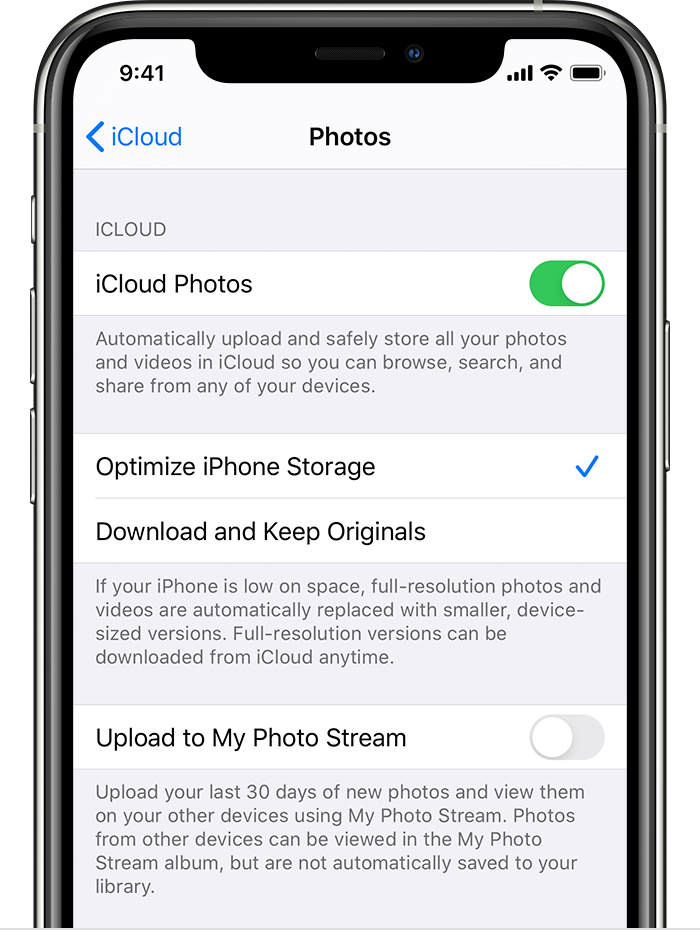
With Optimize Storage, smaller, space-saving photos and videos are kept on your device while all of your original, full-resolution versions are stored in iCloud. And as long as you have enough space in iCloud, you can store as many photos and videos as you want.


You may try some of these steps. Please check after each step...


  1. Ensure adequate lighting. Poor lighting can significantly impact eye-tracking performance.  
  2. Sometimes, assistive touch settings can interfere. Check your AssistiveTouch settings within the Accessibility menu.
  3. Ensure your screen protector or case isn't obstructing the front-facing camera. See the pic below



1 reply
Question marked as Top-ranking reply

Sep 13, 2025 5:12 AM in response to Travisnatashi

Adjust the camera’s focus and exposure

Before you take a photo, the iPhone camera automatically sets the focus and exposure, and face detection balances the exposure across many faces. If you want to manually adjust the focus and exposure, do the following:

  1. Tap the screen to show the automatic focus area and exposure setting.
  2. Tap where you want to move the focus area.
  3. Next to the focus area, drag  up or down to adjust the exposure.
  4. To lock your manual focus and exposure settings for upcoming shots, touch and hold the focus area until you see AE/AF Lock; tap the screen to unlock settings.


If your Photos and Videos are stored in iCloud and you share it before downloading the original then it may appear blurry but it is not.


Your photos and videos are stored on your device in their original, high-resolution version. This means that they use a lot of space on your iPhone, iPad, and iPod touch. With iCloud Photos, you can make more space available on your device and have your entire collection, everywhere you go.

Get started with iCloud Photos:

  1. Tap Settings > [your name] > iCloud > Photos.
  2. Turn on iCloud Photos.
  3. Select Optimize iPhone Storage to save space on your device.

With Optimize Storage, smaller, space-saving photos and videos are kept on your device while all of your original, full-resolution versions are stored in iCloud. And as long as you have enough space in iCloud, you can store as many photos and videos as you want.


You may try some of these steps. Please check after each step...


  1. Ensure adequate lighting. Poor lighting can significantly impact eye-tracking performance.  
  2. Sometimes, assistive touch settings can interfere. Check your AssistiveTouch settings within the Accessibility menu.
  3. Ensure your screen protector or case isn't obstructing the front-facing camera. See the pic below


This thread has been closed by the system or the community team. You may vote for any posts you find helpful, or search the Community for additional answers.

How to fix grainy and blurry selfie quality on iPhone 16 Pro Max?

Welcome to Apple Support Community
A forum where Apple customers help each other with their products. Get started with your Apple Account.