Workaround option:
I agree the removal of launchpad is a terrible idea. It makes my MacBook feel like a Windows computer now when I try and find an app. I have written to Apple feedback to request launchpad be brought back as a user selectable option, which would be great. When using the Tahoe equivalent function, the Apple 'suggested apps' have yet to show what I actually intend to use, and the categories are mostly wrong with no option to modify them by the user. I don't want to pin every single app I use to the taskbar as there are too many for the space.
I have set up a workaround which is possibly nicer to use than other options suggested and costs nothing:
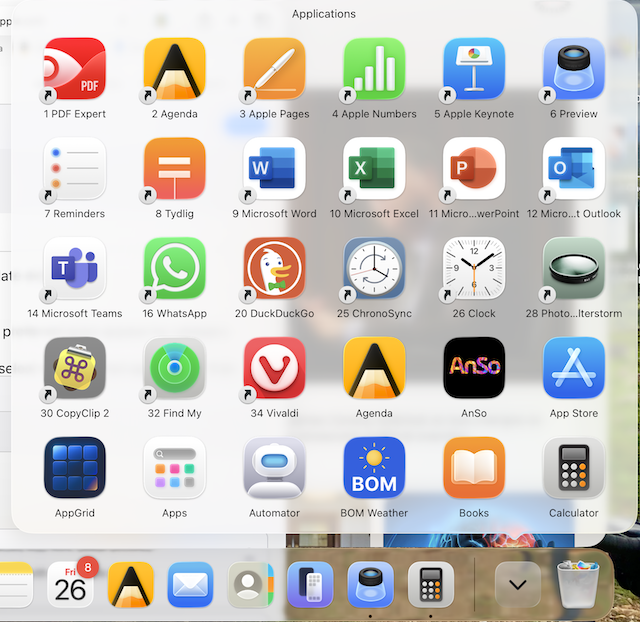
1) I went into the Apps folder and made an alias of every app that I wanted to have quick access to (that wasn't already in my taskbar). This basically included what was on the first page of my old launchpad.
2) I then made them appear in order by renaming each app with a number at the start of the name, eg: '1' and a space before the name of the app, then increase the number for each app (you don't need leading '0's to accommodate numbers >9)
3) set the folder to show icons in order of name (rather than size/date etc)
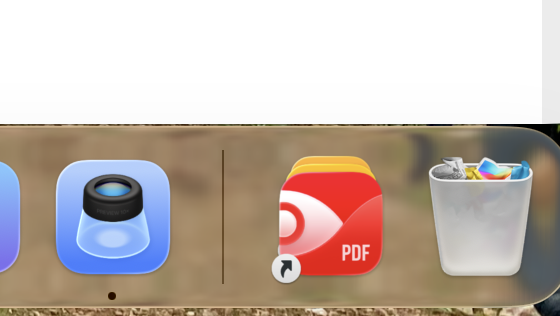
4) pin the app folder to the taskbar - the first app in the folder will display as the folder icon (see attached image)
Once you have done these steps: when you click the apps folder on the taskbar all of your preferred apps appear in your preferred order.
You can add another step:
5) add a category to each alias ('productivity' and 'utilities' etc) to subdivide the aliases - this only affects how the apps are arranged if you open the folder directly - it doesn't work on the pinned taskbar folder display option.
You can see I have tried the 'Appgrid' app - it seems usable, but needs an awkward 3 key sequence to open it instead of the pinch gesture. The subscription cost is not ideal either as we previously had better functionality from apple at no cost with the original launchpad. I doubt I will subscribe.
[Edited by Moderator]







