how do i restore the i pad where there are no data settings
how do i put back the settings right in this case
[Edited by Moderator]
Windows, Windows 11 (26200)
how do i put back the settings right in this case
[Edited by Moderator]
Windows, Windows 11 (26200)
Start here >>> If you can't activate your iPhone or iPad (Wi-Fi + Cellular) - Apple Support
If you are experiencing difficulties with (re)activation of your iPad, you may have more success if you connect your iPad to a Windows PC (with iTunes for Windows installed) or a Mac (with iTunes or Finder - as appropriate for the installed version of macOS). Once connected to your computer, your iPad will be detected - and you should be able to activate using iTunes.
A restart of your WiFi Router and/or a change of DNS settings may also be helpful.
To restart you home router, disconnect power - then wait at least 30 seconds before restarting. When you router has rebooted (which may take several minutes), force-restart your iPad:
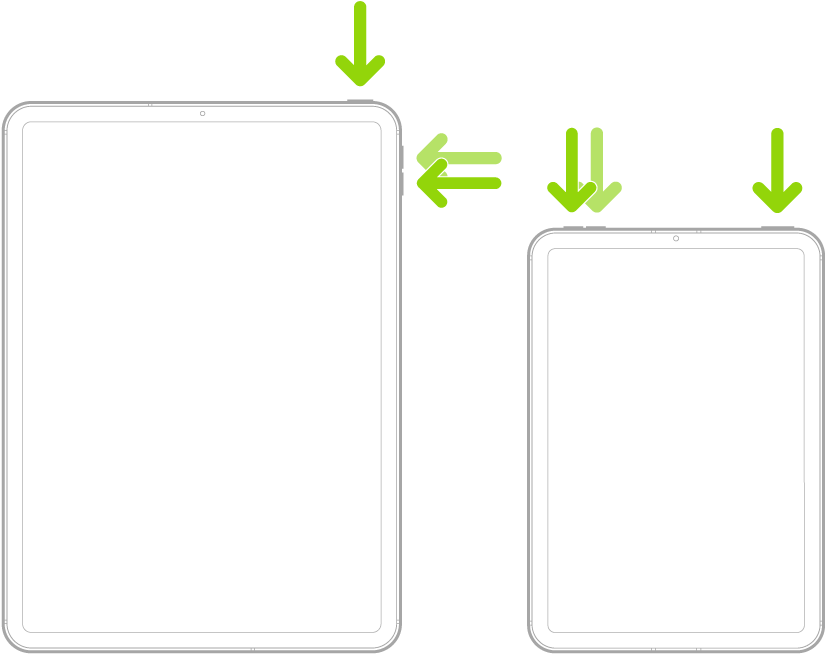
Force restart iPad (models with Face ID or with Touch ID in the top button)
If your iPad doesn’t have the Home button, do the following:
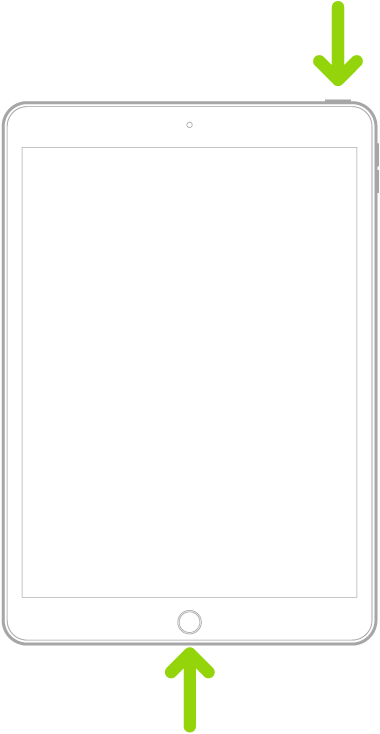
Force restart iPad (models with the Home button)
Press and hold the top button and the Home button at the same time. When the Apple logo appears, release both buttons.
For recommended DNS servers (configured at your home router and/or your iPad), you might choose one of the following Recursive DNS Providers (IPv4 and IPv6 addresses included below):
Quad9
9.9.9.9
149.112.112.112
2620:fe::fe
2620:fe::9
OpenDNS
208.67.222.222
208.67.220.220
2620:0:ccc::2
2620:0:ccd::2
Cloudflare
1.1.1.1
1.0.0.1
2606:4700:4700::1111
2606:4700:4700::1001
Should it be necessary to escalate your issue to Apple Support, the quickest route to engaging with Apple Support will be via the Support link at top-right or bottom-left of this page.
Start here >>> If you can't activate your iPhone or iPad (Wi-Fi + Cellular) - Apple Support
If you are experiencing difficulties with (re)activation of your iPad, you may have more success if you connect your iPad to a Windows PC (with iTunes for Windows installed) or a Mac (with iTunes or Finder - as appropriate for the installed version of macOS). Once connected to your computer, your iPad will be detected - and you should be able to activate using iTunes.
A restart of your WiFi Router and/or a change of DNS settings may also be helpful.
To restart you home router, disconnect power - then wait at least 30 seconds before restarting. When you router has rebooted (which may take several minutes), force-restart your iPad:
Force restart iPad (models with Face ID or with Touch ID in the top button)
If your iPad doesn’t have the Home button, do the following:
Force restart iPad (models with the Home button)
Press and hold the top button and the Home button at the same time. When the Apple logo appears, release both buttons.
For recommended DNS servers (configured at your home router and/or your iPad), you might choose one of the following Recursive DNS Providers (IPv4 and IPv6 addresses included below):
Quad9
9.9.9.9
149.112.112.112
2620:fe::fe
2620:fe::9
OpenDNS
208.67.222.222
208.67.220.220
2620:0:ccc::2
2620:0:ccd::2
Cloudflare
1.1.1.1
1.0.0.1
2606:4700:4700::1111
2606:4700:4700::1001
Should it be necessary to escalate your issue to Apple Support, the quickest route to engaging with Apple Support will be via the Support link at top-right or bottom-left of this page.
thank you for your respons, i have tried all that using both the itunes and the apple divices apps, flashing and updating all show succeful but when it comes to activation it say no network connected and yet both the wifi and the mobile networks are on, the apple divices says no user data after update, it asks to synchronis put it don't achive
THIS IS WHAT IS MY SCREEN NOW AND SOME TIME EJECT DIVICE NO ACTIVATION INFORMATION
[Edited by Moderator]
how do i restore the i pad where there are no data settings