Up Next is the (temporary) queue of songs that you have asked iTunes to play:

and if you click on the icon, the default (Up Next) list is shown, as seen below (but note the options to show the recent History, or the Lyrics of the song that is playing):
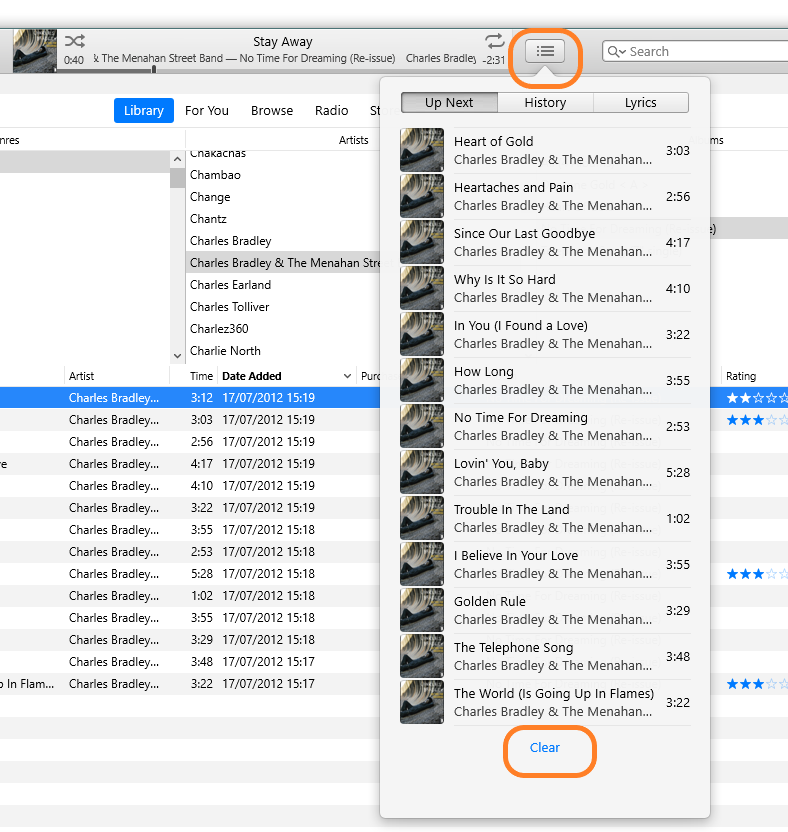
In your case, I think what has happened is either:
- with iTunes in Stop mode (i.e. you have just opened it up and there are no songs in the Up Next list) you have created an Up Next list (perhaps by dragging songs into the Up Next) and then clicked the Play icon at the top of the iTunes window
- or - you have previously used the menu option Controls/Stop, which will put the player into full stop mode as opposed to the pause mode. Note that when iTunes is playing a song that the large control icons at the top of the iTunes window show a Pause button, not a Stop button:

In either event, you need to go into the Up Next list (by clicking on the Up Next icon) and double-clicking the first song. Then the Up Next list will play in full. I have not found any other way to start the Up Next from stop mode (although I haven't spent much time looking, I simply double-click the first song in the list).
- If you tap the Clear Songs button it simply empties the Up Next list and plays the song that you have just double-clicked on. It does not delete existing Playlists or songs from your library
- if you click on Play Song, iTunes will play the song you've just double-clicked on and then continue with the Up Next list. Again, it does not delete any songs or Playlists from your library
The Up Next feature seems to have become much more sophisticated recently and can do additional things that I've not yet checked and confirmed. However, the principal still applies; the Up Next is simply an on-the-fly list of songs that you want to play at that time. Removing songs from the Up Next, or clearing the Up Next list does only that; it does not delete songs from Playlists or from your library.
If you simply want to add an additional song top the Up Next list, either drag it to the Up Next icn or right-click the song and select Play Later from the pop-up menu.
Finally, notice the Controls menu option shown below and the separate options for Pause and Stop:


