mrpatrick01 wrote:
…
Do you have a Mac or a PC available to check the local Wi-Fi environment?
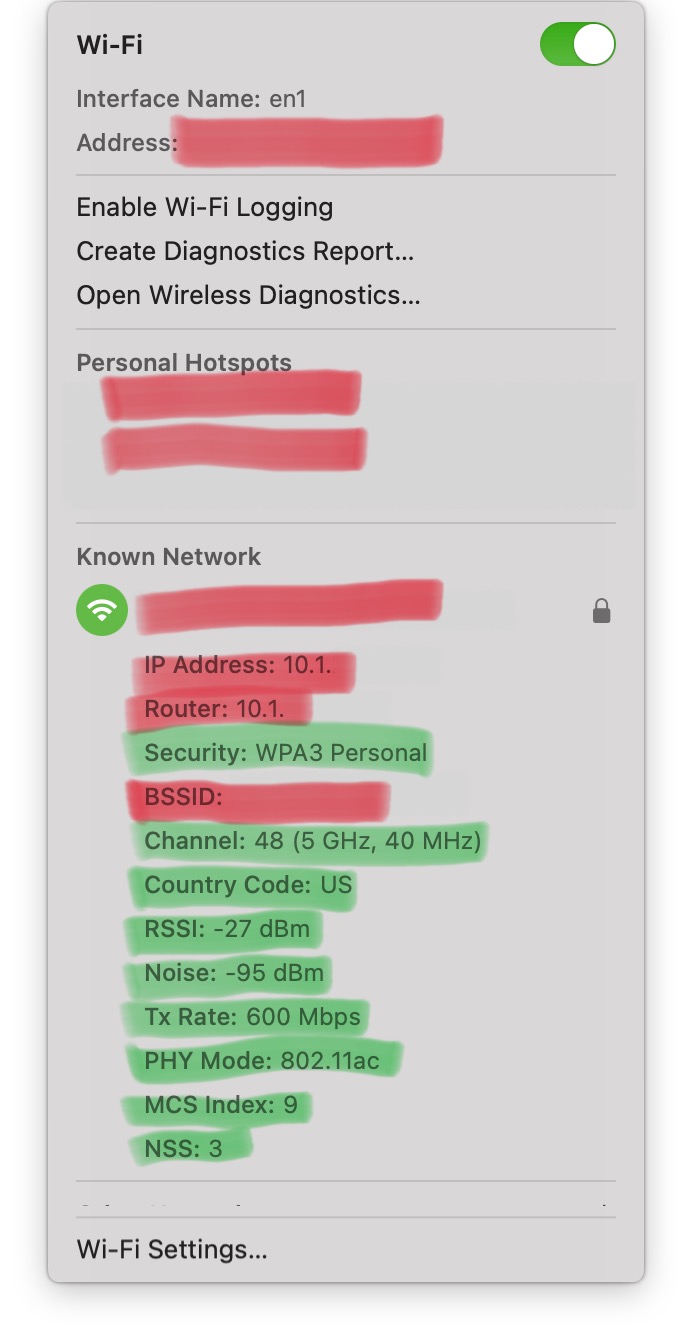
On a Mac, the basic Wi-Fi environment characteristics are visible when using Option-Click on the Wi-Fi logo 🛜 in the menu bar to capture some Wi-Fi network data.
For us to look at the Wi-Fi network data here, please post the items shown in the following image including the Security mode and from Channel to NSS inclusive (Security, Channel, Country, RSSI, Noise, Tx Rate, PHY mode, MCS, NSS, green highlight) (without posting the Wi-Fi address, any local HotSpots that might be present, the network name, or the BSSID, all of which are expurgated from the image shown below, red highlight), and we can take a look at the basic network environment.
An add-on app, such as the (inexpensive) WiFi Explorer app can be very useful for visualizing local Wi-Fi activity, as well. The vendor has a three-day free trial here: https://www.intuitibits.com/products/wifiexplorer/


