Resetting Password for iCloud but now have New Phone Number.

We are caught in a loop on reseting my dad's password. He has had an apple iCloud account for his iPhone for decades. He recently made the decision to get a new phone number via Spectrum Mobile because of too many spam calls. Now that he has a different phone number and came to point where we needed to reset a forgotten password, apple needs to send a text message to his iPhone to confirm it's him, but because the phone number is changed we cannot do that. Now if you create a new iCloud account you have the ability to set up several alternative ways to reset your password, and this is become a good standard across other companies, but back then you had one choice, your cell number. How do I fix this? When re tried to reset apple said "you'll get an email in 8 days....." That email was simply a Code, the one you would put in at the time you have the app window open to put in the new password, but there is no link to get you to where you need to put in that code. If you start over, that code is no longer valid and you end up in a circle. Help me.....

Posted on Jan 8, 2026 3:31 AM

Reply
Question marked as Top-ranking reply

Posted on Jan 8, 2026 6:54 AM

If you are prone to forgetting passwords then I would not set up a 28 digit recovery key (Set up a recovery key for your Apple Account - Apple Support ) on that new account. Should you forget the password again (and it sounds like these people are not really up on this kind of thing) and also lose the recovery code, you will be permanently locked out of the account. Apple can do nothing to help you.


A verification code can be sent to a landline. Look for other options and it should let you get one by voice.

Based on: Get a verification code and sign in with two-factor authentication - Apple Support


A code is sent first to your trusted devices (some other Apple computer or Apple mobile device signed in with your account) automatically. If you have a trusted device running iOS 9 and later, OS X El Capitan and later, iPadOS 13 and later, or watchOS 6 and later, the verification code is displayed automatically on your trusted devices.


If you don’t have a trusted device handy, you can choose to have a verification code sent to your trusted phone number as a text message or phone call.

1. Select “Didn’t Get a Code?” or “Can’t get to your devices?” on the verification code screen.

2. Choose a telephone number for where to receive a code.

3. You'll get a text message or phone call from Apple with your verification code. This text message might include an additional domain validation line. This line includes the @ symbol, the website name, and your code (for example: @icloud.com #123456 %apple.com).

4. Enter the code on your other device to complete sign in.

It is a good idea to have more than one trusted number.


If you had set up a recovery contact, read Help a friend or family member as their account recovery contact - Apple Support


You do not mention security questions so I won't complicate this issue by posting stuff about issues you do not even mention. If you cannot get code by phone call, you may need to do as instructed here --> How to use account recovery when you can’t reset your Apple Account password - Apple Support


Age is not an issue in understanding things unless somebody is truly having dementia. Many of the top helpers on this forum are well into retirement age. Similarly, I was talking to a car guy yesterday in his thirties and he was clearly not familiar with many aspects of cars from the 1980s.


3 replies
Question marked as Top-ranking reply

Jan 8, 2026 6:54 AM in response to Aronis

If you are prone to forgetting passwords then I would not set up a 28 digit recovery key (Set up a recovery key for your Apple Account - Apple Support ) on that new account. Should you forget the password again (and it sounds like these people are not really up on this kind of thing) and also lose the recovery code, you will be permanently locked out of the account. Apple can do nothing to help you.


A verification code can be sent to a landline. Look for other options and it should let you get one by voice.

Based on: Get a verification code and sign in with two-factor authentication - Apple Support


A code is sent first to your trusted devices (some other Apple computer or Apple mobile device signed in with your account) automatically. If you have a trusted device running iOS 9 and later, OS X El Capitan and later, iPadOS 13 and later, or watchOS 6 and later, the verification code is displayed automatically on your trusted devices.


If you don’t have a trusted device handy, you can choose to have a verification code sent to your trusted phone number as a text message or phone call.

1. Select “Didn’t Get a Code?” or “Can’t get to your devices?” on the verification code screen.

2. Choose a telephone number for where to receive a code.

3. You'll get a text message or phone call from Apple with your verification code. This text message might include an additional domain validation line. This line includes the @ symbol, the website name, and your code (for example: @icloud.com #123456 %apple.com).

4. Enter the code on your other device to complete sign in.

It is a good idea to have more than one trusted number.


If you had set up a recovery contact, read Help a friend or family member as their account recovery contact - Apple Support


You do not mention security questions so I won't complicate this issue by posting stuff about issues you do not even mention. If you cannot get code by phone call, you may need to do as instructed here --> How to use account recovery when you can’t reset your Apple Account password - Apple Support


Age is not an issue in understanding things unless somebody is truly having dementia. Many of the top helpers on this forum are well into retirement age. Similarly, I was talking to a car guy yesterday in his thirties and he was clearly not familiar with many aspects of cars from the 1980s.


Jan 8, 2026 3:56 AM in response to Aronis

If you can't unlock your Apple ID

If you use security questions with your Apple ID, or if you don't have access to a trusted device or phone number, go to iforgot.apple.com. Then you can unlock your account with your existing password or reset your password.


Watch this GIF
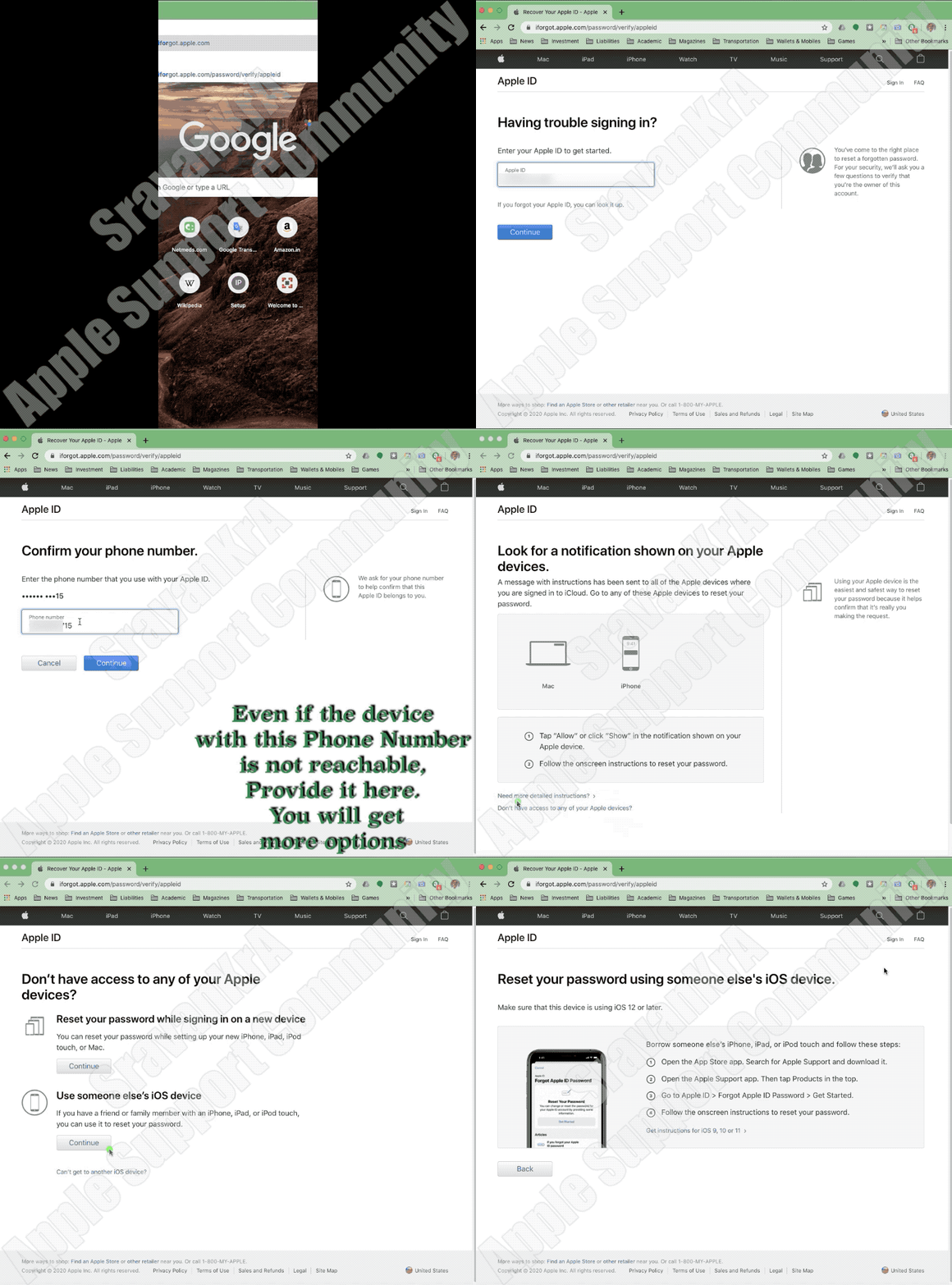


What if I can't access a trusted device or do not receive a verification code?

If you're signing in and don’t have a trusted device handy that can display verification codes, you can have a code sent to your trusted phone number via text message or an automated phone call instead. Click Didn't Get a Code on the sign-in screen and choose to send a code to your trusted phone number. You can also get a code directly from Settings on a trusted device. Learn how to get a verification code.

If you use iOS 11.3 or later on your iPhone, you might not need to enter a verification code. In some cases, your trusted phone number can be automatically verified in the background on your iPhone. It’s one less thing to do, and your account is still protected with two-factor authentication.


If you lost / can't reach the trusted device or phone number associated with your Apple ID

As long as you still have your Recovery Key and remember your Apple ID password, you can sign in and add a new trusted device or phone number to your account. You can also remove any devices you may have lost, sold, or given away.

  1. Go to your Apple ID account page and enter your Apple ID and password.
  2. On the Verify Your Identity screen, select "Can’t access your trusted devices?"
  3. In the pop-up window, enter your Recovery Key.
  4. Go to the Security section and click Edit.

Remove the device you no longer wish to use to verify your identity. If you have additional devices with Find My iPhone enabled, you can verify them as trusted devices. You can also add additional trusted phone numbers.


If you lost your Recovery Key

As long as you remember your Apple ID password and still have access to one of your trusted devices, you can sign in and create a new Recovery Key.

  1. Go to your Apple ID account page.
  2. Sign in with your password and trusted device.
  3. In the Security section, click Edit > Replace Lost Key.

Keep your new Recovery Key in a safe place. Your old Recovery Key won't work anymore and you can't use it to reset your password or access your account.


If I can't sign in, how do I regain access to my account?

If you can’t sign in, access a trusted device, reset your password, or receive verification codes, you can request account recovery to regain access to your account. Account recovery is an automatic process designed to get you back into your account as quickly as possible while denying access to anyone who might be pretending to be you. It might take a few days—or longer—depending on what specific account information you can provide to verify your identity. If you can't sign in with two-step verification using your Apple ID ...


Do I still need to remember any security questions?

No. With two-factor authentication, you don't need to remember any security questions. We verify your identity exclusively using your password and verification codes sent to your trusted devices and phone numbers. When you enroll in two-factor authentication, we keep your old security questions on file for two weeks in case you need to return your account to its previous security settings. After that, they're deleted.


Can Apple Support help me regain access to my account?

Apple Support can answer your questions about the account recovery process, but can't verify your identity or expedite the process in any way.



Jan 8, 2026 5:01 AM in response to SravanKrA

Thank you for your reply.


I have been working this issue for a week.


Here is where I am.


We do not know the existing password as he has several 'written down' and after three tries of various passwords the account is locked out.


Today the plan is to get on the phone with Apple and work through this process. I did make him a new iCloud account and migrated his data to the new id, set up a 28 digit verification code for that account and added a trusted friend to that account. Those are all great new features, but we never set that up for his original iCloud account because at that time it was email and phone number only. So he has his calendar and documents and new email on the phone again and it's all synced via the cloud. He just needs access to his old email address because he uses that for many things. Thankfully most are with his original charter.net account which he can still access.


We are in a similar issue with my mom's charter.net email. They moved, spectrum still supports that email address, but the server name has changed, and in order to correct it I need to log into her email on the web form, then it wants to send a text message to her phone. LOL. when they set up their email with Charter.net she did not have a cell phone and entered the home number into that form. Now it wants to send a text message to the home phone number which is not a cell and is no longer their number. It's kinda funny. I was on the phone with Spectrum and we got to the point where they wanted to hear my mom say 'ok' but she was out getting a hair cut. LOL. We plan on calling Spectrum for that one again today.


The newer setups are certainly better with the option to add several recovery methods so we are getting there, but these such things are very difficult for 88 year old people to navigate.


Mike


Resetting Password for iCloud but now have New Phone Number.

Welcome to Apple Support Community
A forum where Apple customers help each other with their products. Get started with your Apple Account.
