Unwanted update, no connectivity now

I 'updated' this iPhone 12 to iOS 26.2. The interface was horrendous. So I reset it. Everything is so screwed up now - I can't tell what has changed and what has not. Some changes from iOS 18 whatever to 26.2 that I did not want, remain. Now I can't even call from this phone. I have no internet connection. Cellular is turned on, WiiFi is turned on.

iPhone 12, iOS 26

Posted on Jan 13, 2026 4:55 PM

Reply
Question marked as Top-ranking reply

Posted on Jan 13, 2026 5:53 PM

1CM2 wrote:

I 'updated' this iPhone 12 to iOS 26.2. The interface was horrendous. So I reset it. Everything is so screwed up now - I can't tell what has changed and what has not. Some changes from iOS 18 whatever to 26.2 that I did not want, remain. Now I can't even call from this phone. I have no internet connection. Cellular is turned on, WiiFi is turned on.


Not sure how you down graded since that is not possible.


Have you shutdown & restarted the iPhone ie power off/on...?

Restart your iPhone - Apple Support


No cellular?— Settings>General>Transfer or Reset iPhone>Reset>Reset Network Settings <—————————RESET

If you see SOS, No Service, or Searching on your iPhone or iPad - Apple Support


if necessary contact your cell provider to re-provison you device if you have no cell connection.


Still have issues from your Mac if you have backups or archived backups see if that is allowed to restore


Restore your iPhone, iPad, or iPod touch from a backup

Restore your iPhone, iPad, or iPod touch from a backup - Apple Support


Restore iPhone from an iCloud backup

Restore all content to iPhone from a backup - Apple Support


see if there is anything here—

Restore your iPhone, iPad, or iPod to factory settings using a computer - Apple Support


6 replies
Question marked as Top-ranking reply

Jan 13, 2026 5:53 PM in response to 1CM2

1CM2 wrote:

I 'updated' this iPhone 12 to iOS 26.2. The interface was horrendous. So I reset it. Everything is so screwed up now - I can't tell what has changed and what has not. Some changes from iOS 18 whatever to 26.2 that I did not want, remain. Now I can't even call from this phone. I have no internet connection. Cellular is turned on, WiiFi is turned on.


Not sure how you down graded since that is not possible.


Have you shutdown & restarted the iPhone ie power off/on...?

Restart your iPhone - Apple Support


No cellular?— Settings>General>Transfer or Reset iPhone>Reset>Reset Network Settings <—————————RESET

If you see SOS, No Service, or Searching on your iPhone or iPad - Apple Support


if necessary contact your cell provider to re-provison you device if you have no cell connection.


Still have issues from your Mac if you have backups or archived backups see if that is allowed to restore


Restore your iPhone, iPad, or iPod touch from a backup

Restore your iPhone, iPad, or iPod touch from a backup - Apple Support


Restore iPhone from an iCloud backup

Restore all content to iPhone from a backup - Apple Support


see if there is anything here—

Restore your iPhone, iPad, or iPod to factory settings using a computer - Apple Support


Jan 14, 2026 12:05 AM in response to 1CM2

Check your iPhone settings

Go to Settings and turn on Airplane Mode, wait five seconds, then turn it off. Check Do Not Disturb. Go to Settings > Focus > Do Not Disturb and make sure it's turned off. Check for any blocked phone numbers.


If you can't make or receive calls on your iPhone - Apple Support



Can't send or receive message then try these steps first

  1. Restart your device: ... 
  2. Check your network connection. ... 
  3. Check with your carrier to see if the type of message you're trying to send, like MMS or SMS, is supported.
  4. If you're trying to send group MMS messages on an iPhone, go to Settings > Messages and turn on MMS Messaging.

More items...


If you can't send or receive messages on your iPhone, iPad, or ...


Can't send or receive message then try these steps first

  1. Restart your device: ... 
  2. Check your network connection. ... 
  3. Check with your carrier to see if the type of message you're trying to send, like MMS or SMS, is supported.
  4. If you're trying to send group MMS messages on an iPhone, go to Settings > Messages and turn on MMS Messaging.

More items...


If you can't send or receive messages on your iPhone, iPad, or ...


If you are unable make a call or receive; If you can't make or receive calls on your iPhone - Apple Support


Cellular Update Failed —> If you see an Update Failed or Apple Pay Not Available alert after iOS update or restart


Settings > Mobile Data > APN [under Mobile Data APN] enter the APN pin


View and edit your APN settings

If your carrier allows it, you can view your APN settings in one of the following locations: Settings > Cellular > Cellular Data Options > Cellular Network. Settings> Mobile Data > Mobile Data Options > Mobile Data Network.


View and edit your Access Point Name (APN) on your iPhone ...


Carrier Update (Required): Released by your Cellular Service provider (Carrier Update), affects your Outgoing / Incoming calls, SMS, Data etc..
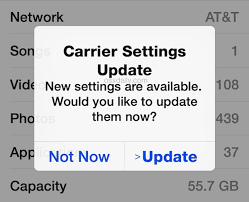


How to Update Carrier Settings

You can manually check for and install a carrier settings, update with these steps: Make sure your device is connected to a Wi-Fi or cellular network. Tap Settings > General > About. If an update is available, you'll see an option to update your carrier settings.

Update your carrier settings on your iPhone or iPad - Apple Support


If nothing helps then --> If you see a Cellular, Ultra Wideband, or Apple Pay Issue message after an iOS update or restart


Reset Network Settings: Only network settings are removed.

  • When you reset network settings, previously used networks and VPN settings that weren’t installed by a configuration profile or mobile device management (MDM) are removed. Wi-Fi is turned off and then back on, disconnecting you from any network you’re on. The Wi-Fi and Ask to Join Networks settings remain turned on.
  • To remove VPN settings installed by a configuration profile, go to Settings > General > Profiles & Device Management, select the configuration profile, then tap Remove Profile. This also removes other settings and accounts provided by the profile. See Install or remove configuration profiles on iPhone in this guide.
  • To remove network settings installed by MDM, go to Settings > General > Profiles & Device Management, select the management, then tap Remove Management. This also removes other settings and certificates provided by MDM. See “Mobile device management (MDM)” in the iOS Deployment Reference.
  • Reset your Network Settings. Tap Settings > General > Reset > Reset Network Settings. This also resets Wi-Fi networks and passwords, cellular settings, and VPN and APN settings that you've used before.


If the above fails...


Reset All Settings: All settings—including network settings, the keyboard dictionary, the Home screen layout, location settings, privacy settings, and Apple Pay cards—are removed or reset to their defaults. No data or media are deleted.

  1. Reset All Settings: Return iPhone settings to their defaults - Apple Support:- Return iPhone settings to their defaults
  2. You can return settings to their defaults without erasing your content.
  3. If you want to save your settings, back up your iPhone before returning them to their defaults. For example, if you’re trying to solve a problem but returning settings to their defaults doesn’t help, you might want to restore your previous settings from a backup.


If nothing above works probably it could be your iPhone may have a radio or antenna problem. In that case, take your device to an Apple Retail Store or Apple Authorized Service Provider, or contact Apple Support and get the hardware tested and if needed repaired/replaced.


Find Locations - Location Selector - Apple

Contact Apple for support and service - Apple Support 

Get a Genius Bar Reservation and Apple Support Options - Apple

Contact Genius Bar. Manage Reservations - My Reservations - Apple



Jan 14, 2026 6:13 AM in response to 1CM2

1CM2 wrote:

I 'updated' this iPhone 12 to iOS 26.2. The interface was horrendous. So I reset it. Everything is so screwed up now - I can't tell what has changed and what has not. Some changes from iOS 18 whatever to 26.2 that I did not want, remain. Now I can't even call from this phone. I have no internet connection. Cellular is turned on, WiiFi is turned on.

What do you mean you "reset it"?


Downgrading is not supported. If you downgraded from iOS 26 to iOS 18, your phone is no longer supported.


Put it into DFU mode and restore the current version of iOS.

Jan 14, 2026 12:02 AM in response to 1CM2

It's not always the iOS update's fault!  Many things can cause phone problems.  If you tell people you think it's an iOS update, it might make it harder to fix or find a solution for the real issue.


Remember, the right question often leads to the solution!


Was/Is your device Jailbroken? If that's the situation, please be informed that attributing the issues to iOS updates may not be accurate.


iOS updates aim to enhance user experience, boost security, and fix bugs rather than disrupt core features. The majority of the issues after updates might stem from underlying, unmentioned factors. Updates won't typically alter personal data but may refine settings or features. Backup before major updates for safety. Review Apple's update details and backup advice for a smooth process.


Kindly consider checking your settings and addressing any device issues before attributing the issue to external factors. This could be a pure coincidence that the iOS update affected the iPhone functions.


Before initiating a standard iOS update, it's advisable to create a backup. Have you completed this step? If yes, proceed with the restoration from the backup.


See what each update does: OS — iOS 26, About iOS 18 Updates, About iOS 17 Updates, About iOS 16 Updates, About iOS 15 Updates, About iOS 14 Updates, About iOS 13 Updates, About iOS 12 Updates, and so on...


Jan 14, 2026 2:32 AM in response to 1CM2

1CM2 wrote:

I 'updated' this iPhone 12 to iOS 26.2. The interface was horrendous. So I reset it. Everything is so screwed up now - I can't tell what has changed and what has not. Some changes from iOS 18 whatever to 26.2 that I did not want, remain. ...

Whatever you think you reset, you are still on ios 26.2.

This thread has been closed by the system or the community team. You may vote for any posts you find helpful, or search the Community for additional answers.

Unwanted update, no connectivity now

Welcome to Apple Support Community
A forum where Apple customers help each other with their products. Get started with your Apple Account.


