Find My not showing family's location on iPhone

My family shares their location with me (daughters and grandchildren) and I share mine with them. It has all worked fine for over a year until a couple days ago. I um unable to see either of my daughters location. Yes, their phones (everyone has an iphone) are on WiFi and their shared location is still on. .. nothing else has changed. What do I need to do to fix this? I've tried turning my phone off and back on. And a few other things listed in this community help. What's left to try?

iPhone 12 Pro, iOS 26

Posted on Jan 14, 2026 12:13 PM

Reply
4 replies

Jan 14, 2026 10:39 PM in response to MoMo_25

Share my Location is for the Device.

The family organizer sets up location sharing in Family Sharing settings. After location sharing is turned on, the organizer's location is automatically shared with everyone in the family group. Then each family member can choose whether or not to share their location. When you agree to share, your family members see your location in Find My Friends and Messages. And you can see where they're located too.

Plus, with location sharing enabled, if your device is lost or stolen, you can ask a family member to use Find My iPhone to help you locate it and get it back.


Share your location with your family - Apple Support


Share your location with your Family Sharing group - Apple Support (IN)


Locational Services is for the Apps

  1. Go to Settings > Privacy > Location Services.
  2. Make sure that Location Services is on.
  3. Scroll down to find the app.
  4. Tap the app and select an option:
    • Never: Prevents access to Location Services information.
    • While using the App: Allows access to Location Services only when the app or one of its features is visible on screen. If an app is set to While Using the App, you might see your status bar turn blue with a message that an app is actively using your location.
    • Always: Allows access to your location even when the app is in the background.

Turn Location Services and GPS on or off on your iPhone, iPad, or ...


Jan 14, 2026 10:35 PM in response to MoMo_25

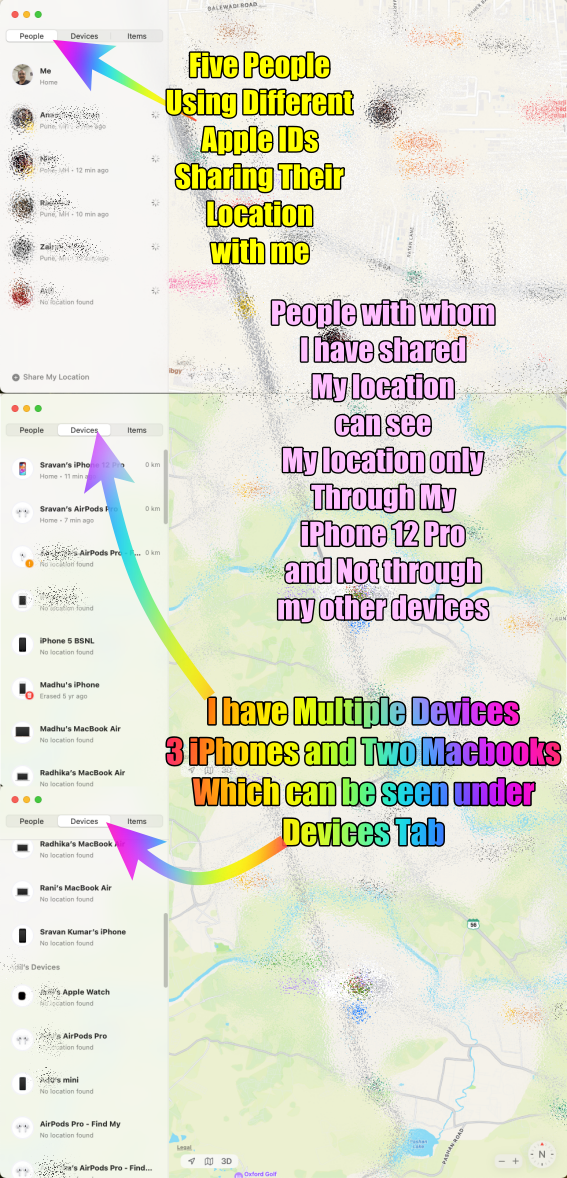
There are two scenarios: People and Devices under Find My


In the Find My app, there are distinct functionalities for tracking People and Devices. Under the People tab, the sharing of location is limited to a single device. If multiple individuals are using the same Apple ID, only one person's device location can be viewed at a time. This means that if you've shared your location with someone using the Find My app and they are also using the same Apple ID, you'll only be able to see the location of one of their devices under the People section.


Conversely, the Devices tab offers broader visibility. Irrespective of whether multiple devices are linked to the same Apple ID, all these devices' locations can be shared and viewed. This tab allows for comprehensive tracking and visibility of all devices associated with the Apple ID, enabling users to locate and monitor the whereabouts of various devices simultaneously.


Essentially, the distinction lies in the limitation of sharing a single person's device location under the People tab versus the broader accessibility to view all device locations under the Devices tab, regardless of the number of devices linked to the Apple ID.


Summary

  1. Multiple Devices with the same Apple ID...
    1. The People Tab will show only one device
    2. The Device Tab will show all the devices
  2. Multiple Devices with multiple Apple IDs...
    1. The People tab will show all the devices except your own which is shown under the Me Tab
    2. The Device Tab will show all the devices (If they are part of your family)


The pic below is self-explanatory

Jan 14, 2026 10:36 PM in response to MoMo_25

To use Find My and Location Services on an iPhone effectively, both your iPhone and the device you're trying to locate must have an active internet connection. These services rely on internet access to share your location with friends and family and to track the locations of devices, people, and items. Without internet connectivity on either end, the sharing and locating features of Find My and Location Services will not function properly. --> Internet not available WiFi and Cellular … - Apple Community


Find My not showing family's location on iPhone

Welcome to Apple Support Community
A forum where Apple customers help each other with their products. Get started with your Apple Account.
