I am familiar with the steps to Archive Medication but unable to find a way to DELETE it completely.

I want to start over with my medication tracking; I want to DELETE or REMOVE all prior info I entered becuase I was doing it so wrong. I have iPhone 17 Pro Max running IOS 26.2 and I am familiar with the steps to Archive Medication but unable to find a way to DELETE it completely. I want to start fresh or I won't use the app at all.

iPhone 17 Pro Max

Posted on Jan 17, 2026 10:30 PM

Reply
6 replies

Jan 17, 2026 10:42 PM in response to FreedomsHope

I am familiar with the steps to Archive Medication but unable to find a way to DELETE it completely.: I want to start over with my medication tracking; I want to DELETE or REMOVE all prior info I entered becuase I was doing it so wrong. I have iPhone 17 Pro Max running IOS 26.2 and I am familiar with the steps to Archive Medication but unable to find a way to DELETE it completely. I want to start fresh or I won't use the app at all.

———-


Riding Medication History:

If you want to, then you could start fresh.


Undying Medications in iCloud Settings:

  1. Go to: Settings
  2. Tap: on [your Name] (very-top item)
  3. Tap: iCloud
  4. Toggle Off: Medication


New iCloud Sessions:

Log out of your Apple Account in all on your devices, and log back in, one-device-at-a-time.


Point Being: It might be backing it up, and turning of Medication in iCloud, it would stop all of the syncing, permitting you to ring it off, yourself.

Jan 17, 2026 11:38 PM in response to TheAvacado11

I appreciate what you're saying, but I'm not getting the option to DELETE them from Medications (only option is to archive) or Archived Medications - only option is to add it back - DELETE does not appear anywhere, can't be swiped away. When I go to Options - I get to choose things related to notificatons (Dose reminders, follow up reminders, time zone change options - but no delete.)

Jan 18, 2026 12:24 AM in response to FreedomsHope

You probably have exported Apple Health data to a computer. There is no separate option for archiving this data on an iOS device without using the export option.


  • Exported Data (ZIP/XML):
    • When you use Export All Health Data in the Health app, you get a ZIP file containing XML records.
    • This file is intended for viewing, analysis, sharing, or archiving purposes only — Apple does not provide a method to re-import it into the Health app.
    • In other words, you can’t “restore” Health data from this export onto a new iPhone.


  • Export = archive only (good for safekeeping, sharing, or analysis).
  • Backup = restore (the only official way to get Health data back into a new iPhone).



Go to the Settings app on your iPhone · Tap your name, then tap iCloud. · Tap Show All, tap Health, then turn Sync with iPhone on or off.

Back up your Health data in iCloud on iPhone


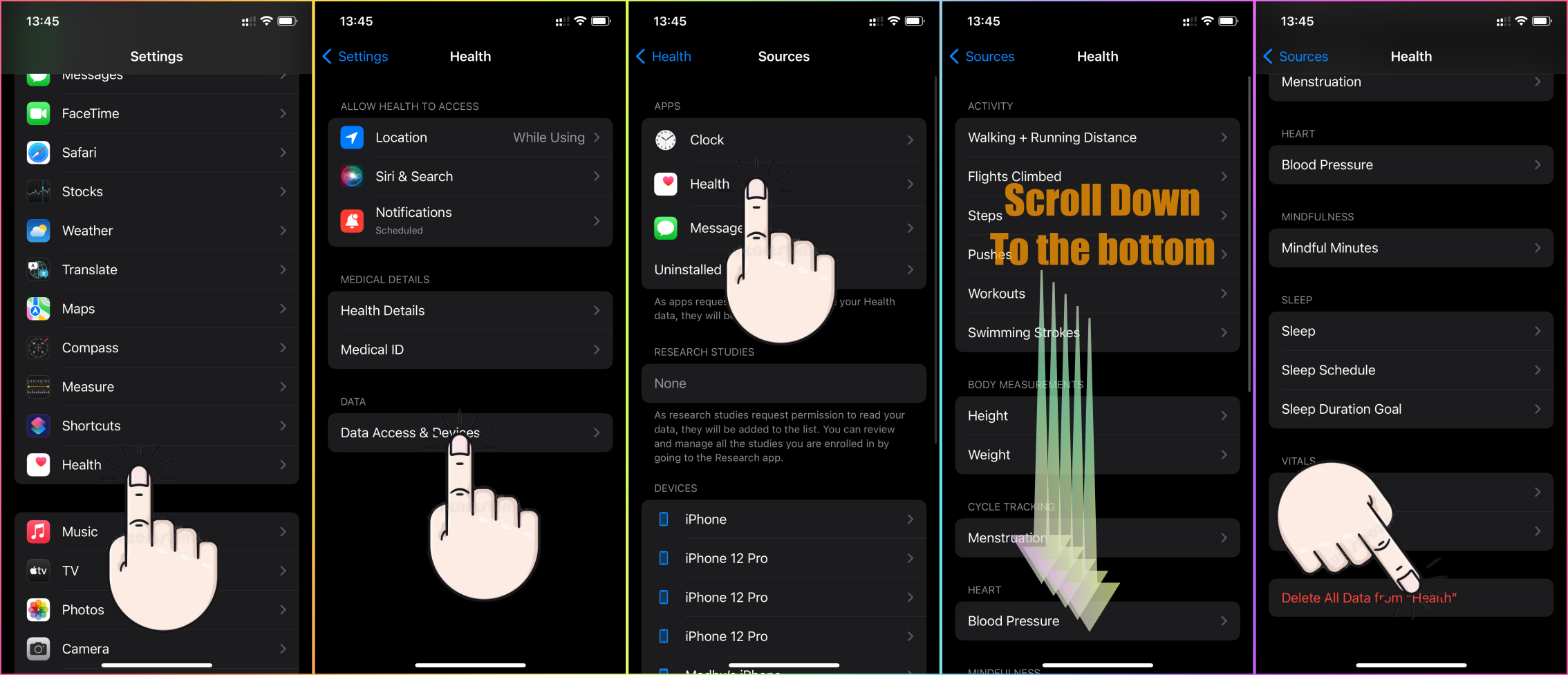
See the pic below to delete this data.


Go to the Health app on your iPhone. · Tap Sharing at the bottom of the screen. · Tap the name of a person or a healthcare provider. · Scroll down, then tap View 

Share your data in Health on iPhone


Open the Health app on your iPhone or iPad. · If you're on your iPhone, tap Search · Tap a category, such as Activity. · Tap a subcategory, such as Steps. 

Manage Health data on your iPhone, iPad or Apple Watch


Select the files that you want to copy. From the Edit menu, click Copy [items]. Paste the files in the new location. Copy files from the Files app on your ...

Archive or make copies of the information you store in iCloud


Please see the pic below, which is self-explanatory

I am familiar with the steps to Archive Medication but unable to find a way to DELETE it completely.

Welcome to Apple Support Community
A forum where Apple customers help each other with their products. Get started with your Apple Account.

