
How to connect M7649 with Mac Mini M4?
I have an old (2003) 17" Apple Studio Display (M7649) that I would like to connect to a new (2024) Mac Mini M4. Is this possible and what kind of adapter would I need?
Thanks!
I have an old (2003) 17" Apple Studio Display (M7649) that I would like to connect to a new (2024) Mac Mini M4. Is this possible and what kind of adapter would I need?
Thanks!
Ok, this should be doable, but it is important to get the correct cables/adapters for success.
To start you specifically want the Apple DVI to ADC Adapter, model A1006 (sometimes listed as Apple M8661LL/B). This is the active converter brick that provides ADC power + USB + video to the display. Without this piece, the M7649 won’t power up.
What it must have:
Then, your Studio Display is 1280×1024 native and expects a proper digital DVI signal. You want DVI-D (digital) output only. Avoid anything described as DVI-A or “analog”. Here, you're looking for a HDMI > DVI-D cable.
So, the overall connection configuration is: Mac mini HDMI > HDMI - DVI-D > Apple A1006 > ADC monitor
Ok, this should be doable, but it is important to get the correct cables/adapters for success.
To start you specifically want the Apple DVI to ADC Adapter, model A1006 (sometimes listed as Apple M8661LL/B). This is the active converter brick that provides ADC power + USB + video to the display. Without this piece, the M7649 won’t power up.
What it must have:
Then, your Studio Display is 1280×1024 native and expects a proper digital DVI signal. You want DVI-D (digital) output only. Avoid anything described as DVI-A or “analog”. Here, you're looking for a HDMI > DVI-D cable.
So, the overall connection configuration is: Mac mini HDMI > HDMI - DVI-D > Apple A1006 > ADC monitor
That is a 17-in display with a lucite sorround. The display by itself is a 1280 by 1024 display with a long lead-in cord with an Apple ADC plug on the end. It has no power cord because it gets it power from the ADC interface..
It can be run by an Apple DVI to ADC adapter (and power supply) such as A1006, about 6-in square by 1.5 inches thick with a long two-connector input cord with DVI INPUT and a USB-A input connectors. Output is a jack for ADC, which includes power provided by the Box. The long lead-in cord from the display plugs onto this jack.
When connected, it makes the Apple display cord look like a DVI snake that just had lunch, and has a fat box in the middle of it, with a power cord leading into the box.
you may be able to buy a replacement display for less than readily available adapters, but you might get lucky with a used one, OR you may already have that adapter sitting around and not recognize it as such.
You can generate a DVI output from HDMI output with a simple adapter, as long as the horizontal resolution does not exceed 1920 wide. This is known as single-link DVI.
Then that feeds the DVI to ADC adapter described above.
Thank you for the replies.
I do have the A1006 adapter brick and have used this with a 2015 MacBook Pro.
The Mini does not have any USB A ports, so will I need a USB C > USB A adapter for that? Was thinking of getting a small hub for that to connect a couple of older peripherals as well.
I'm a bit uncertain about the HDMI > DVI-D connection. The DVI side needs to be female and those I'm finding have a slightly different shape to the connection that isn't going to fit with the male side from the A1006 adapter. See picture.
There is an adapter for female DVI to USB-C that looks the same shape. Do you think this would work? One AI response suggested the Mini has USB-C capable of video on the back of the unit. See picture.
For reference, the image that you provided is for a DVI-D Single Link type connector. The image of the one from Amazon appears to be a DVI-I Dual Link.
In theory, this DVI-I Dual Link should work with the DVI-D Single Link coming from the monitor ... at least, when it comes to a physical connection.
The key point is that DVI-I (“Integrated”) carries both digital and analog signals, while DVI-D (“Digital”) carries digital only. Since the digital pins are shared, a DVI-D connector will physically fit and work in a DVI-I port as long as you’re using the digital signal path. Just be aware that you will still be limited to a Single Link resolution/refresh rate support. That is, it can't magically provide Dual Link performance ... which you don't want in this case anyway.
Because the signals are similar, conversion from HDMI to single-link DVI-D is easy, and the adapter is cheap. If you are in the US, try this adapter:
Monoprice HDMI Male to DVI-D Single Link Female Adapter Product # 2080 US$3.19
note that this adapter is female, and accepts the plug on the input cable of the Apple adapter.
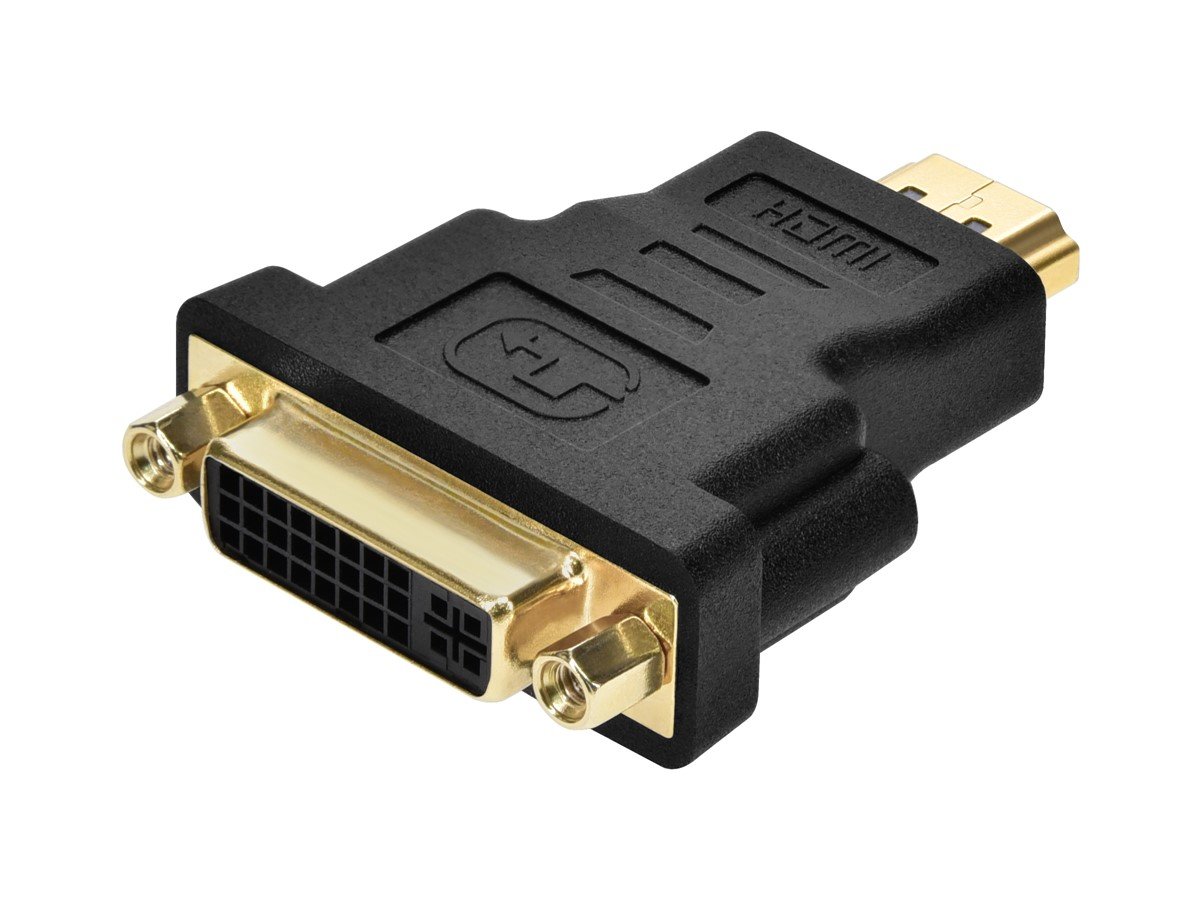
My senior colleague Tesserax and I are in violent agreement about how to power and use this display.
We have just come to essentially the same conclusions from slightly different directions.
How to connect M7649 with Mac Mini M4?

