How to disable Stolen Device Protection without Face ID on iPhone XS Max?

How to disable stolen device protection without faceid ? My faceid stopped working (seems like after some update) and I can't reset it without switching off "Stolen Device Protection". Iphone Xs Max


[Re-Titled by Moderator]

Original Title: FaceId issue

Posted on Feb 9, 2026 3:20 AM

Reply
13 replies

Feb 9, 2026 3:29 AM in response to transact

See the pic below which is self-explanatory
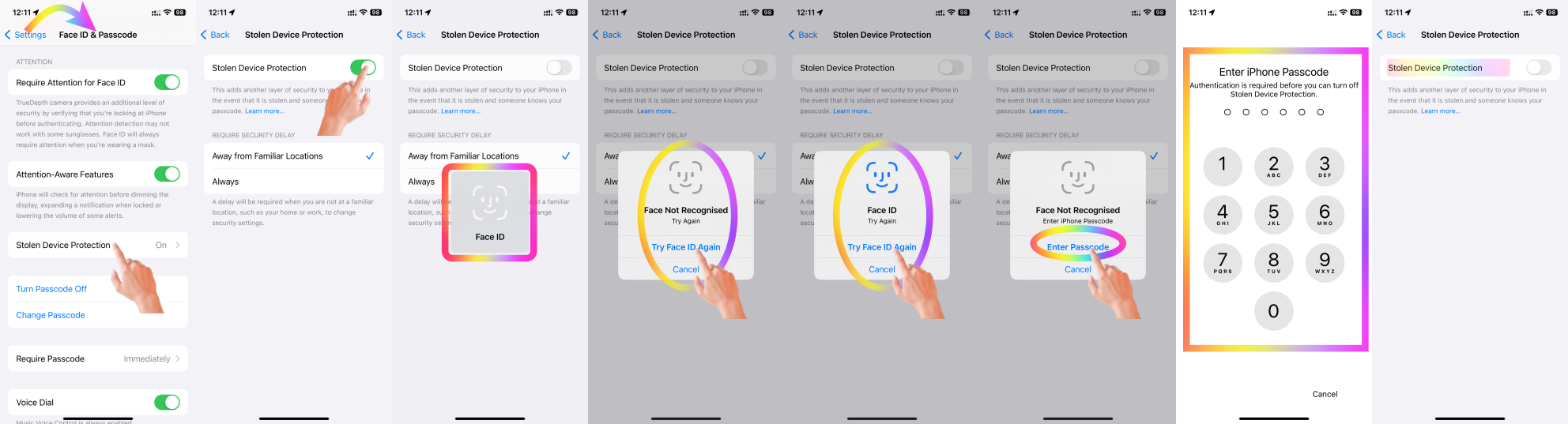


Probably you have "Always" Ticked in place of "Away from Familiar Location"


For enhanced security, there's a one-hour delay when changing your location settings from "Always" to "Away from Familiar Location." This applies even if you use Face ID for authentication.


A delay will be required when you are not at a familiar location, such as your home or work, to change security settings.


Know more --> About Stolen Device Protection for iPhone



Simply adding a location to your contact card (e.g., marking it as "Home") does not automatically make it a "Familiar Location" in the context of iPhone's location-based learning and features.


Why Adding "Home" to the Contact Card Isn't Enough:

  1. Trust and Validation: Adding an address to your contact card can be done manually or by anyone with access to your phone, but the iPhone uses activity-based learning to validate locations it deems "familiar."
  2. Behavior-Based Learning: iPhones utilize machine learning and location tracking (if enabled) to recognize patterns of frequent visits. It identifies "Familiar Locations" based on where the phone spends significant time during specific periods, like overnight stays or long durations.


What You Can Do:

  1. Spend Time at the Location: Use your iPhone at your new address consistently, especially during the hours you'd normally be home (e.g., evening and night). Over time, the iPhone will learn this as a familiar location.
  2. Enable Location Services:
    1. Go to Settings > Privacy & Security > Location Services and ensure it's turned on.
    2. Make sure "Significant Locations" (under System Services) is enabled. This helps the iPhone learn frequently visited locations.
  3. Ensure GPS Accuracy: Poor GPS accuracy can delay location recognition. Make sure your iPhone is connected to Wi-Fi, as this improves location precision indoors.


By doing this, the iPhone will naturally associate the address with your routines, and over time, it will classify it as a "Familiar Location."



Feb 9, 2026 1:21 PM in response to transact

transact wrote:

Thank you so much for detailed response. But the problem that once I get to screen to enter passcode and input my pin it again trying to apply faceId (saying that faceid is required to continue).
So I can't change this setting as it's in a loop even after providing passcode it asks for faceid again. I repeated it many times always the same.


So you have used a Mac or PC and recovery mode and have reset, and now continue to get the message?


Were you setting up as new, or restoring a backup?


If the sequence is not working, contact Apple Support.

Feb 9, 2026 1:04 PM in response to SravanKrA

Thank you so much for detailed response. But the problem that once I get to screen to enter passcode and input my pin it again trying to apply faceId (saying that faceid is required to continue).

So I can't change this setting as it's in a loop even after providing passcode it asks for faceid again. I repeated it many times always the same.

Feb 9, 2026 1:26 PM in response to transact

transact wrote:

Thank you so much for detailed response. But the problem that once I get to screen to enter passcode and input my pin it again trying to apply faceId (saying that faceid is required to continue).
So I can't change this setting as it's in a loop even after providing passcode it asks for faceid again. I repeated it many times always the same.

I gave you the answer!!

https://discussions.apple.com/docs/DOC-250009915


How to disable Stolen Device Protection without Face ID on iPhone XS Max?

Welcome to Apple Support Community
A forum where Apple customers help each other with their products. Get started with your Apple Account.