iPad 11: Settings frozen, unresponsive touch, double screen

iPad 11, 3 months old, frozen on settings with a double screen. Sign out overlaying Apple account. Touch screen unresponsive. Games and apps working properly. Force restart is unsuccessful. Battery 100%, charged for 1 hour. Updates current, I think OS 26. Can anyone help?

iPad, iPadOS 26

Posted on Feb 12, 2026 3:32 PM

Reply
Question marked as Top-ranking reply

Posted on Feb 13, 2026 6:12 AM

Connect your iPad to its Power Adapter and allow the iPad to charge. While connected to external power, retry a forced-restart of the iPad:


Force restart iPad (models with Face ID or with Touch ID in the top button)


  1. Press and quickly release the volume button nearest to the top button.
  2. Press and quickly release the volume button farthest from the top button.
  3. Press and hold the top button; do not release either button until...
  4. When the Apple logo appears, release the top button.
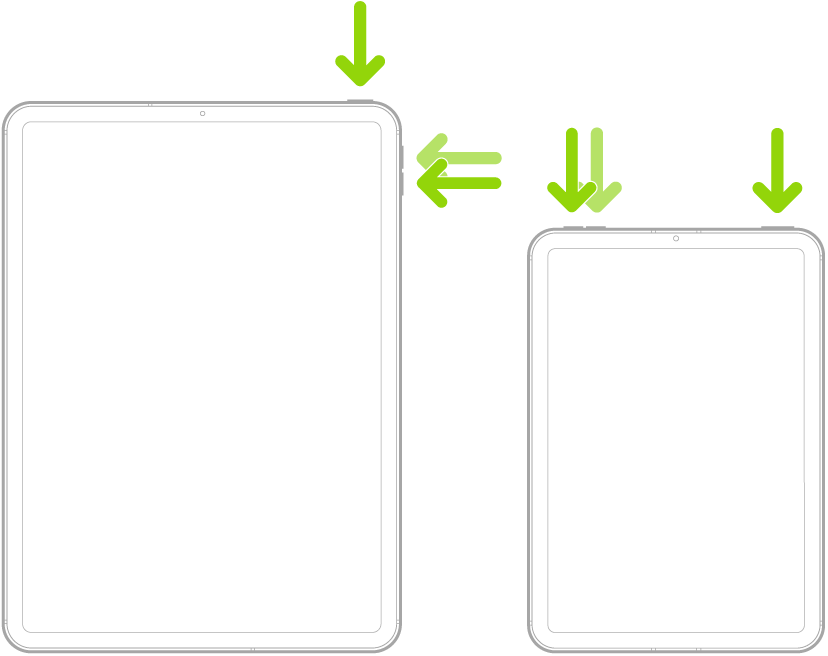


When performed correctly, the iPad will restart.


If you continue to experience difficulties, you would be best advised to seek assistance directly from Apple Support. You can contact the Support Team using the Support link at top-right or bottom-left of this page.


Alternatively you can initiate and manage your support cases from Apple devices using the excellent Apple Support App. If not already installed, the App can be downloaded from the App Store:

https://apps.apple.com/app/apple-support/id1130498044


You might also visit the Genius Bar at your local Apple Store or Apple Authorised Service Provider (AASP) - where the technicians will be able to assist with troubleshooting:

Genius Bar Reservation and Apple Support Options - Apple

1 reply
Question marked as Top-ranking reply

Feb 13, 2026 6:12 AM in response to Bear20bb26

Connect your iPad to its Power Adapter and allow the iPad to charge. While connected to external power, retry a forced-restart of the iPad:


Force restart iPad (models with Face ID or with Touch ID in the top button)


  1. Press and quickly release the volume button nearest to the top button.
  2. Press and quickly release the volume button farthest from the top button.
  3. Press and hold the top button; do not release either button until...
  4. When the Apple logo appears, release the top button.


When performed correctly, the iPad will restart.


If you continue to experience difficulties, you would be best advised to seek assistance directly from Apple Support. You can contact the Support Team using the Support link at top-right or bottom-left of this page.


Alternatively you can initiate and manage your support cases from Apple devices using the excellent Apple Support App. If not already installed, the App can be downloaded from the App Store:

https://apps.apple.com/app/apple-support/id1130498044


You might also visit the Genius Bar at your local Apple Store or Apple Authorised Service Provider (AASP) - where the technicians will be able to assist with troubleshooting:

Genius Bar Reservation and Apple Support Options - Apple

iPad 11: Settings frozen, unresponsive touch, double screen

Welcome to Apple Support Community
A forum where Apple customers help each other with their products. Get started with your Apple Account.