iPad: Black box with text, passcode/apps not working

ipad has black box with white letters at top of screan that tells me the key i touch for my passcode but the numbers are not entered for the passcode. Not sure why pic is sideways. It started while I was using iPad and every app I touch it would say the app name in the box but not open the app.

iPad, iPadOS 26

Posted on Feb 14, 2026 7:33 PM

Reply
Question marked as Top-ranking reply

Posted on Feb 15, 2026 5:20 AM

Expanding upon Katana-San’s suggested actions, if your iPad is unresponsive, begin with a forced-restart of your iPad:


Force restart iPad (models with Face ID or with Touch ID in the top button)


If your iPad doesn’t have the Home button, do the following:

  1. Press and quickly release the volume button nearest to the top button.
  2. Press and quickly release the volume button farthest from the top button.
  3. Press and hold the top button.
  4. When the Apple logo appears, release the top button.
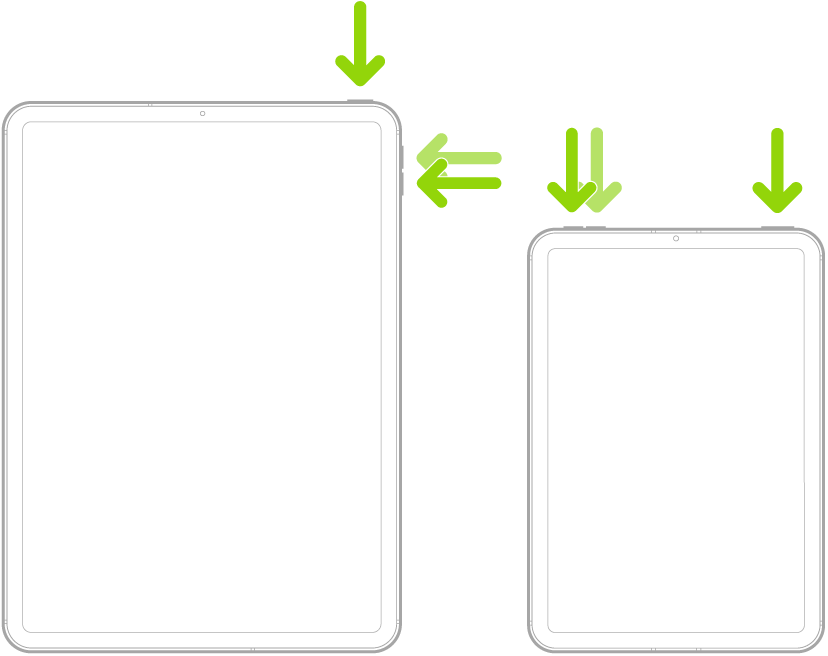


Force restart iPad (models with the Home button)


Press and hold the top button and the Home button at the same time. When the Apple logo appears, release both buttons.


After the restart, you'll hopefully be able to enter your Passcode and access the iPad. Next check your iPad Accessibility settings - and if enabled, turn-off hover typing:

Settings > Accessibility > [Vision] Hover Text > Hover Typing > Hover Typing - set to OFF

2 replies
Question marked as Top-ranking reply

Feb 15, 2026 5:20 AM in response to Goutdoors

Expanding upon Katana-San’s suggested actions, if your iPad is unresponsive, begin with a forced-restart of your iPad:


Force restart iPad (models with Face ID or with Touch ID in the top button)


If your iPad doesn’t have the Home button, do the following:

  1. Press and quickly release the volume button nearest to the top button.
  2. Press and quickly release the volume button farthest from the top button.
  3. Press and hold the top button.
  4. When the Apple logo appears, release the top button.


Force restart iPad (models with the Home button)


Press and hold the top button and the Home button at the same time. When the Apple logo appears, release both buttons.


After the restart, you'll hopefully be able to enter your Passcode and access the iPad. Next check your iPad Accessibility settings - and if enabled, turn-off hover typing:

Settings > Accessibility > [Vision] Hover Text > Hover Typing > Hover Typing - set to OFF

This thread has been closed by the system or the community team. You may vote for any posts you find helpful, or search the Community for additional answers.

iPad: Black box with text, passcode/apps not working

Welcome to Apple Support Community
A forum where Apple customers help each other with their products. Get started with your Apple Account.