
Unable to remove or rearrange Dock icons on Mac Studio
I can no longer remove icons from the Dock or rearrange them. macOS 26.3, Mac Studio M1 Max Pro
I can no longer remove icons from the Dock or rearrange them. macOS 26.3, Mac Studio M1 Max Pro
Throwergb wrote:
Thanks for responding so quickly. You've listed the way it worked for me prior to macOS Tahoe 26.3. It stopped working for me that way when I installed 26.3. I can no longer remove icons from the Dock or rearrange them since installing 26.3.
Also, prior to 26.3 clicking and holding down on an icon, a small window would open providing a number action and also an "Option" selector which opened to some additional actions, including removing the icon from the Dock. That's no longer there in 26.3.
Sorry but the methods listed from above links and illustrations
They still working for me on 1 M4 Mac Mini , 1 M4 15 " MBA and 1 M2 Mac Mini all with Tahoe 26.3
How many times has the computer been Restarted since the installation of Tahoe 26.3 ?
Simple illustration for Mail
To Remove the Mail application from the dock
If nothing in above working
Part 1 of 2
Restart the computer in Safe Mode
Do the issues persist ?
Sometimes a Safe Boot followed by a Normal Boot will just put things right.
If not - there could be something in the main User Account playing up.
To further isolate this - Set up users, guests, and groups on Mac.
Then log out of the Main User account and log into the dummy account and test again if the issue persists.
If the issue is present in the dummy account - then, this appears to be a System Wide issue on the computer.
Part 2 of 2
To Drill Down further and to avoid a session of 20 Questions
Download the Application Etrecheck ( External Link ) directly from the Developer.
The Application is Not a " Silver Bullet " and is only a tool to examine the Hardware / Software used on this computer
This is a Diagnostic Tool that makes no changes to the computer Hardware / Software used on this computer
The application is free or paid from added features.
The Report will Not Reveal Any Personal Information.
Post back the Full Report - Share Report >> Copy , then paste >>>> using the Additional Text Icon <<<<
Throwergb wrote:
Thanks for responding so quickly. You've listed the way it worked for me prior to macOS Tahoe 26.3. It stopped working for me that way when I installed 26.3. I can no longer remove icons from the Dock or rearrange them since installing 26.3.
Also, prior to 26.3 clicking and holding down on an icon, a small window would open providing a number action and also an "Option" selector which opened to some additional actions, including removing the icon from the Dock. That's no longer there in 26.3.
Sorry but the methods listed from above links and illustrations
They still working for me on 1 M4 Mac Mini , 1 M4 15 " MBA and 1 M2 Mac Mini all with Tahoe 26.3
How many times has the computer been Restarted since the installation of Tahoe 26.3 ?
Simple illustration for Mail
To Remove the Mail application from the dock
If nothing in above working
Part 1 of 2
Restart the computer in Safe Mode
Do the issues persist ?
Sometimes a Safe Boot followed by a Normal Boot will just put things right.
If not - there could be something in the main User Account playing up.
To further isolate this - Set up users, guests, and groups on Mac.
Then log out of the Main User account and log into the dummy account and test again if the issue persists.
If the issue is present in the dummy account - then, this appears to be a System Wide issue on the computer.
Part 2 of 2
To Drill Down further and to avoid a session of 20 Questions
Download the Application Etrecheck ( External Link ) directly from the Developer.
The Application is Not a " Silver Bullet " and is only a tool to examine the Hardware / Software used on this computer
This is a Diagnostic Tool that makes no changes to the computer Hardware / Software used on this computer
The application is free or paid from added features.
The Report will Not Reveal Any Personal Information.
Post back the Full Report - Share Report >> Copy , then paste >>>> using the Additional Text Icon <<<<
Just wanted to jump in here to say that I experienced the same problem. I just kept playing around with it until I figured it out (that wasn't the plan; I was just bored).
What helped was tapping the trackpad on the icon in the dock first (yes, it will open the application if you have touch-click enabled like I do). The next attempt you take to click and drag, it will respond and the icon will move where you drag it. It's almost like you have to "prime" the icon being dragged before it will be drag-compliant. I chalk this up to trackpad settings creating a bit of confusion.
Honestly, I think the system of holding down the Command key to drag and reposition the Menu Bar icons works really well and should be adopted for the Dock, as well.
Anyway, let me know how it goes and if I need to explain something further.
How so ?
Remove an item from the Dock. Drag it out of the Dock. The item isn’t removed from your Mac—just from the Dock.
Add, remove, or rearrange Dock items
On your Mac, do any of the following:
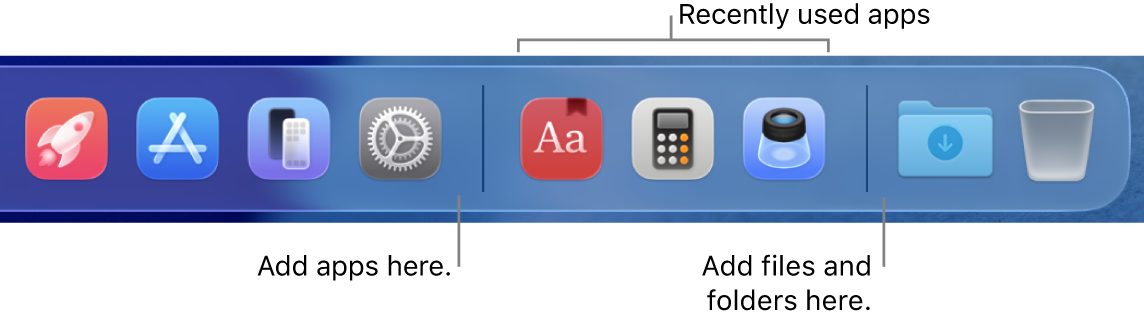
Tip: If you use Handoff, the Handoff icon of the app you’re using on your iPhone, iPad, iPod touch, or Apple Watch appears near the right end of the Dock.
Thanks for responding so quickly. You've listed the way it worked for me prior to macOS Tahoe 26.3. It stopped working for me that way when I installed 26.3. I can no longer remove icons from the Dock or rearrange them since installing 26.3.
Also, prior to 26.3 clicking and holding down on an icon, a small window would open providing a number action and also an "Option" selector which opened to some additional actions, including removing the icon from the Dock. That's no longer there in 26.3.
(pls delete)
Unable to remove or rearrange Dock icons on Mac Studio

