I think I understand that you can see the Photos Library in the Mac, it takes up enough space that you're sure there's stuff there, but the Photos app won't show it-- is that right? I'm not sure what you mean about "file pathway."
If that's right, then the first thing you must do is make a copy of that Photos Library-- dragging it to another disk drive is best, but you can also option-drag the Library to another folder-- if you have the room on your internal drive to them both.
If you're convinced that this Library has a corrupted database and Photos has lost the connections to the picture files, then the best thing to do is to open the Library "Package" and get the contents. This about guarantees that the Library will not work with Photos again, but you can get the original pictures, although they won't have the edits and comments.
The Library is a "package," a folder that is slightly protected-- it takes an extra step to open it and look inside. You can open a Library package by right-clicking the Library and choosing Show Library Contents. The insides might look like this:

The folders might be different depending on the Operating System, and there may be extra folders and files--this is from Tahoe, but it should look similar in Catalina. The Originals and Resources folders have had different names in different OSs, but they should be the two largest folders.
The "Originals" folder has the original picture files in a bunch of awkwardly named folders, but the pictures' names have all been changed. Since in a Library import there might be several pictures named IMG_0123, for instance, all the file names have been changed to a 128 bit name like 39B2CD17-CDCF-4412-823F-6D48938D3D0E.jpg This is a GUID, a 128 bit global unique identifier. With 128 bits, there are 10³⁸ different possible names, so a random number generator is very very very (38 verys) unlikely to produce a duplicate name. Pretty cool.
So, you can retrieve all your Original Unmodified picture files, but you may have a time trying to get them into order. The metadata should be intact, though, so the dates will help a lot. But the dates in Finder are file dates, so they may mix up capture dates.
Putting all the originals into another Photos Library is a pretty good way to work with them. I just tried this, and I imported the pictures from an Originals folder into a new Photos Library, and Photos correctly interpreted the capture date from the pictures' metadata. So pictures of similar events occurred together. So there may be no problem in not having original file dates.
To make a new Library for the Mac, close Photos, option click the Photos icon, and choose Create New from the Library Chooser dialog. You can then specify an external drive as the location, if that's what you need.
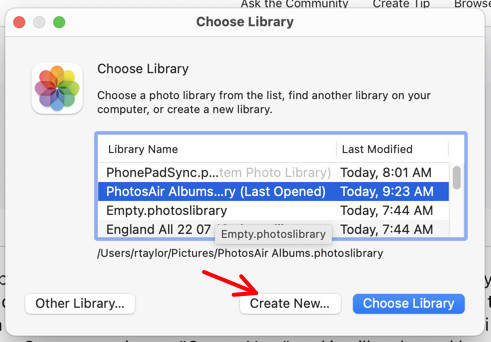
You can use this dialog to switch between Libraries, or you can just double click on a Library to open it in Photos.
The Recources folder has Thumbnails and preview copies, all lower resolution than the originals. But if you did have some edits, these might show a bit of what was done. These do not have the comments, keywords, captions or titles that may have been added.
Well, that's a lot. Tell us how it goes, and let us know if you have more questions…


