Rolling-back to an earlier version of iOS/iPadOS is not possible.
All System Updates are digitally signed by Apple - and can only be installed whilst the digital signatures remain valid. After release of a new iOS/iPadOS version, the immediately preceding version continues to be digitally signed by Apple - however, usually within a few days, Apple will revoke the digital certificate with which the earlier version is signed.
Perhaps consider that iOS/iPadOS updates include both functional and essential security updates. Restoring an earlier version of the OS would undermine the security of your device and your personal data.
iPadOS multitasking has received a significant makeover from that to which you may be accustomed in iPadOS 18.x and earlier - and may take a little time to learn and adjust your workflows. This short video may help you to understand how to use the multitasking system:
https://cdsassets.apple.com/vid/live/hls/7WUAS350/videos/93ad67d2_1759269510.m3u8
You would also likely benefit from reviewing the official iPadOS User Guide and the many available online tutorials (such as YouTube) to become better acquainted with the new multitasking interface and associated gestures and controls:
Multitask on iPad with iPadOS 26 - Apple Support
Work with multiple windows at once on iPad - Apple Support
OS - iPadOS 26 - Apple
The three-dot multitasking button with which you are no doubt familiar from earlier versions of iPadOS has been replaced with the traffic-light button to access and control the revised window-based User Interface.
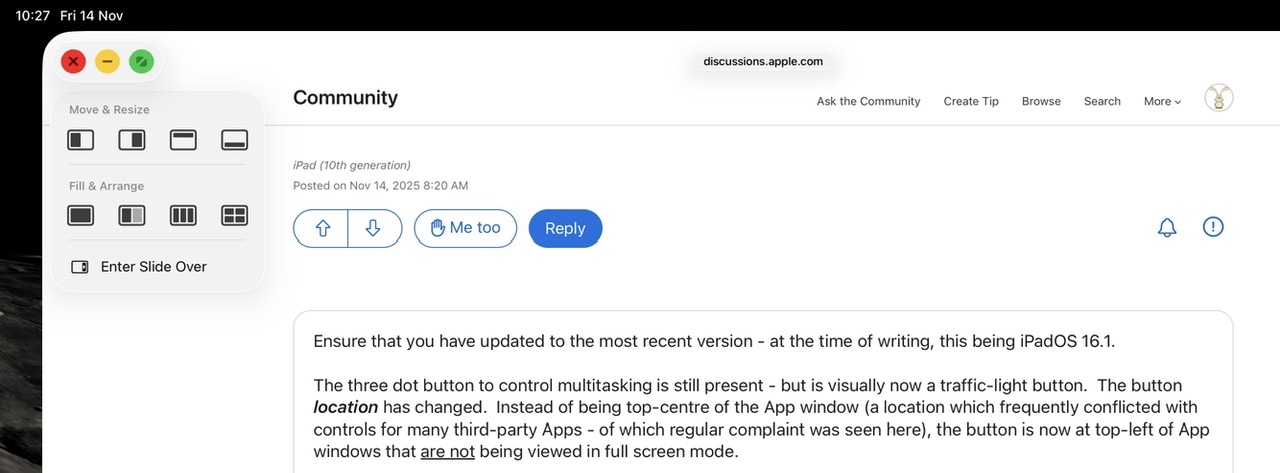
Tapping the traffic-light multitasking button expands the control - whereas touch-and-hold of the button offers the option of arranging open windows side-by-side, as a tripple, or arranged into a quad.
The iPadOS 26 side-by-side view also works with a slide-over window.
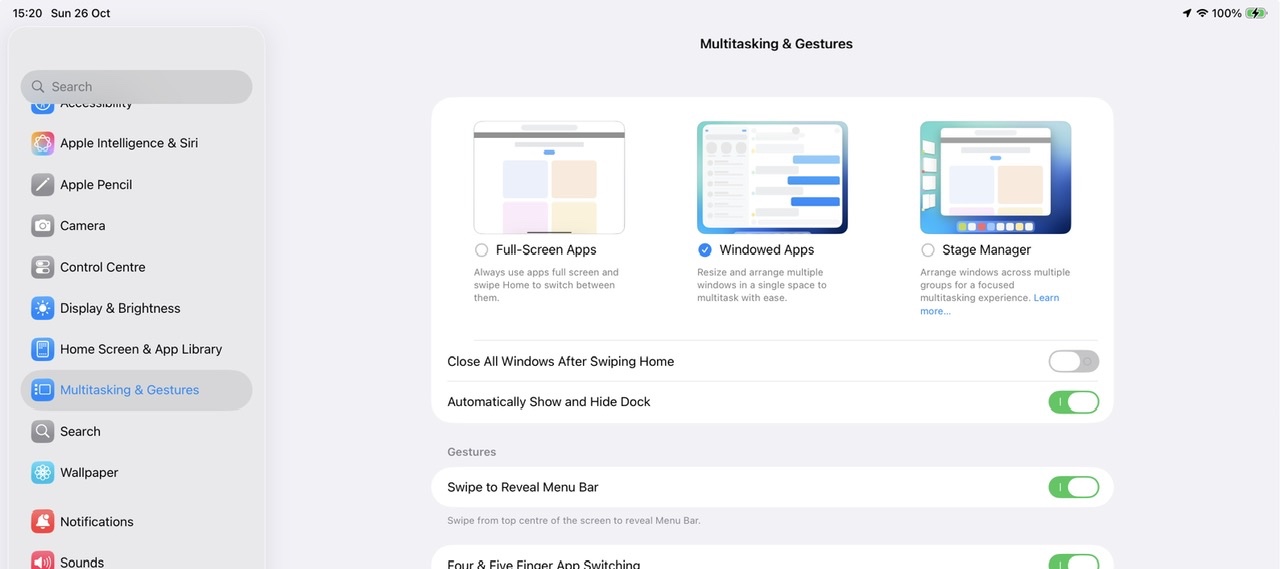
If you dislike the windowed environment, you can switch to using the basic Full-Screen App mode - but this disables all multitasking capabilities and hide the traffic-light controls; you will not be able to use split screen or slide-over modes with which you are likely familiar:
Settings > Multitasking & Gestures - select Full Screen Apps
Apple invite submission of constructive comments and feature requests via its Product Feedback portal. If you would like Apple to reconsider recent changes, or alter the appearance or function of the multitasking controls, this would be the most appropriate and effective path to having your voice heard:
Feedback - iPad - Apple


