Legacy Extension Warning Popup Procedure Question

Tahoe 26.3.1

Mac Studio 1 MAX

March 6/2026


When following the popup prompt to allow extension for a Legacy warning, I turn on the

kextload>restart>turn off kextload. Is this the proper procedure?


I ask because it seems the advice is, terse as it is, advises to visit the company which needs a manual ext allowed, but that manufacturer, in this case Seagate, only shows the following:


Some software for your Seagate or LaCie drive may require a specific driver to enable certain features. Your Mac may display the following message about Legacy System Extensions related to these drivers:
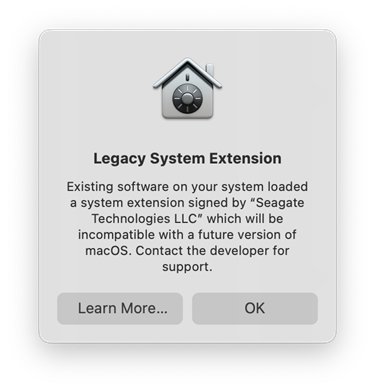
Apple is transitioning from device drivers to Mac system extensions in upcoming macOS versions. Both Toolkit and LaCie RAID Manager have been updated to support the latest extensions required by Apple. Click OK to dismiss the message. The software will prompt you to update the system extension when needed.


But the OS's shown (12 & 13) are outdated, meaning I followed their latest instructions as I stated above. Is this a proper procedure?

Posted on Mar 6, 2026 6:32 AM

Reply
Question marked as Top-ranking reply

Posted on Mar 6, 2026 7:04 AM

No, that’s not the current procedure. I’d start looking for a modern replacement for that software (and perhaps hardware).


The procedure to run legacy kexts is to boot into Recovery, put your Mac in Reduced Security mode, snd there is a tick box to allow legacy kernel extensions. Personally, I would not run my Macs with Reduced Security.

13 replies
Question marked as Top-ranking reply

Mar 6, 2026 7:04 AM in response to OutsideShooter

No, that’s not the current procedure. I’d start looking for a modern replacement for that software (and perhaps hardware).


The procedure to run legacy kexts is to boot into Recovery, put your Mac in Reduced Security mode, snd there is a tick box to allow legacy kernel extensions. Personally, I would not run my Macs with Reduced Security.

Mar 6, 2026 6:55 AM in response to OutsideShooter

I’d interpret that vendor message as indicating the vendor has an update available which deals with this automatically, so dismiss the message, update the app, and subsequent restarts will not get this message.


If that LaCie update doesn’t work, I’d next try a Safe Mode start, and then restart normally. This to clear the caches.


Then failing that, see if the vendor has a documented app removal procedure for your particular LaCie RAID storage gear, follow it, and then re-install the current version of the app.


It is possible to go spelunking too, but I’d rather not start there.

Mar 6, 2026 6:47 AM in response to OutsideShooter

I just found out how to check to see if the procedure above is correct, or at least if it worked. It did and here is where you can check to verify that the above steps (procedure) worked;


Apple>System>Privacy & Security>Security (scroll way down) and you should see the following (in my case) "System software from developer (Seagate Technologies LLC) has been updated."


Hope this helps the community who have tons of questions about this

Mar 6, 2026 2:24 PM in response to OutsideShooter

I would double check what they're for before canning them, just in case other 3rd party software put something there it relies on. Other than what was installed from the apps that came with the external drives, that is.


For instance, if you use Toast Titanium, it always installs the Soundflower kext. An open-source extension known to be poorly written.


If you know for certain a kext file can be removed, put it in the trash. You'll be required to enter your admin password to complete the move. Been a while since I deleted Soundflower, so I can't remember if you have to restart the Mac before you can empty the trash. A restart will also take longer when you remove a kext file as the OS does whatever to unregister the kext during the startup sequence.

Mar 6, 2026 8:37 AM in response to Kurt Lang

Thanks to all, and I'm wondering if all of you missed my procedure SECOND STEP


"When following the popup prompt to allow extension for a Legacy warning, I turn on the

kextload>restart>turn off kextload."


So after allowing for the kernel extension to update my LaCie Seragate hardrives, I within 30 minutes it advises, go back and turn back off the kextload option


I believe that gives me the safety you guys are warning me about, correct?


Legacy Extension Warning Popup Procedure Question

Welcome to Apple Support Community
A forum where Apple customers help each other with their products. Get started with your Apple Account.
