Mac laptop: Dock for 4K 60Hz DisplayPort and charging

I don't think this is necessarily the place to ask but I'm thinking about making the switch to Mac (at least for laptop) with the release of the Neo.


My only question is regarding dock/external display support for it. Currently I supply my own laptop for work and hook into a USB-A dock w/ 1 HDMI for 1080p and directly plug into my laptop for a 4k display that requires Displayport.


I understand I will need to replace the dock (which is fine) but what is needed to be able to use a display port based monitor is not particularly clear to me while maintaining charging capabilities. I don't notice any kind of Thunderbolt compatibility that would clarify it to me. It would also be nice to keep the 1080p monitor but is not necessary as I typically use my laptop closed and could simply leave the Neo open to compensate.


TLDR what dock/set up do I need to at least run a 4k 60hz monitor as a 2nd display while still charging.

Posted on Mar 25, 2026 12:37 AM

Reply
4 replies

Mar 25, 2026 6:52 AM in response to Ashercrasher

Ashercrasher wrote:

I understand I will need to replace the dock (which is fine) but what is needed to be able to use a display port based monitor is not particularly clear to me while maintaining charging capabilities.


Another possibility:

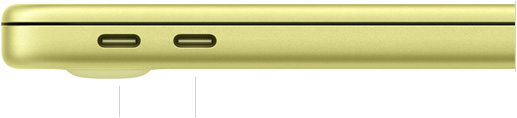
  • Connect a 4K display to the MacBook Neo's rear USB-C port using a USB-C to DisplayPort adapter [cable].
  • Connect a power adapter to the MacBook Neo's front USB-C port.

This would leave no place to plug in drives, but it would let you use a 4K DisplayPort display while charging.

Mar 25, 2026 6:32 AM in response to Ashercrasher

The MacBook Neo does not support Thunderbolt in any way, shape, or form.


It does support DisplayPort Alt Mode on its rear USB-C port – the one shown to the left in the "side view" picture on Apple's Technical Specifications page. (The front USB-C port only supports USB 2 and charging, and is useless for connecting a first-class, hardware-supported display.)


The MacBook Neo "Supports one external display with up to a native resolution of 4K at 60Hz", and the description goes on to say that the "USB 3 (USB-C) port supports native DisplayPort 1.4 speeds (up to HBR3)."


Bottom line:

  • You cannot use a display that requires Thunderbolt input, such as the current 27" Apple 5K Studio Display. Most displays do not require Thunderbolt input – they want USB-C (DisplayPort), DisplayPort, or HDMI; all of which the MacBook Neo can support (in some cases with an appropriate hub, dock, or adapter).
  • You cannot use a hub or dock that requires Thunderbolt input, and has no way to fall back to "just" DisplayPort Alt Mode and USB 3.
  • You can use a plain USB-C dock which depends upon DisplayPort Alt Mode, USB 3, and USB-C Power Delivery. I have a 12" Retina MacBook that is similar to your MacBook Neo in supporting USB 3 and DIsplayPort Alt Mode – but not Thunderbolt. I bought a Other World Computing USB-C Travel Dock E to keep around in case I needed it, but there are also many "dime a dozen" USB-C hubs/docks that will do a similar job. Your main challenge may be finding one that brings video out on a dedicated DisplayPort, rather than on a dedicated HDMI one.
  • You can use a USB-C to DisplayPort adapter or adapter cable. Those are a dime a dozen. The issue you will run into there is that, since the MacBook Neo only has one port that supports anything better than USB 2, taking that port for a USB-C to DisplayPort adapter would keep you from plugging in high-speed drives at the same time.


Mar 25, 2026 6:41 AM in response to Ashercrasher

P.S. – Given the MacBook Neo's limited port selection, and the fact that just about all "plain" USB-C hubs & docks have HDMI ports, the best docking station setup for a MacBook Neo would be either:


  1. A monitor with a USB-C (DisplayPort) connection that also serves to charge a laptop, and to connect built-in hub ports on the monitor, or
  2. A monitor with a HDMI input, plus a "plain" USB-C hub/dock that has, among other things, HDMI output


In scenario #1, you would want the monitor to support DisplayPort v1.4 or later. That would allow you to run your 4K monitor at 60 Hz without having to limit the connection to your monitor's USB hub ports to USB 2 speeds.

Mac laptop: Dock for 4K 60Hz DisplayPort and charging

Welcome to Apple Support Community
A forum where Apple customers help each other with their products. Get started with your Apple Account.