iPad 3rd generation activation error after restoring

Hello,


I’m having an issue activating my iPad (3rd generation).


After restoring the device, I get an “Activation Error” message saying that activation could not be completed and suggesting to restore and try again. I have already done multiple restores (including DFU mode), but the problem persists.


Important details:

- Device: iPad 3 (32gb Cellular a1430)

- iOS version: latest available for this device (iOS 9.3.5 / 9.3.6)

- Apple ID: working fine, I can log in on other devices and on the web

- SIM card: removed / also tried with SIM — no difference

- Network: tried different Wi-Fi networks


From what I understand, older devices sometimes have activation issues due to server or certificate changes. Could this be the case here?


The device is not lost or stolen. It was previously used by me / my family and worked normally before reset.


Could you please advise:

- Is activation still supported for iPad 3?

- Is there any known issue with activation servers for older devices?

- Is there any workaround or fix?


Thank you in advance.

iPad, iOS 9

Posted on Apr 9, 2026 12:31 PM

Reply
Question marked as Top-ranking reply

Posted on Apr 9, 2026 5:22 PM

Start here >>> If you can't activate your iPhone or iPad (Wi-Fi + Cellular) - Apple Support


If you are experiencing difficulties with (re)activation of your iPad, you may have more success if you connect your iPad to a Windows PC (with iTunes for Windows installed, or more recent Apple Devices App) or a Mac computer (with iTunes or Finder - as appropriate for the installed version of macOS). Once connected to your computer, your iPad will be detected - and you should be able to activate using iTunes.


  1. Make sure that you have the latest version of macOS or the latest version of iTunes.
  2. Check that your computer has an Internet connection.
  3. With the cable that came with your iPad, connect your iPad to your computer. Locate your device on your computer.
  4. Wait while your computer detects and activates your iPad:
  • If you see an alert that shows "Set up as New" or "Restore from Backup", it means your iPad is activated.
  • If you get an error message that says the "activation information was invalid" or "activation information could not be obtained from the device", use recovery mode to restore your iPhone.


A restart of your WiFi Router and/or a change of DNS settings may also be helpful.


To restart you home router, disconnect power - then wait at least 30 seconds before restarting. When you router has rebooted (which may take several minutes), force-restart your iPad:


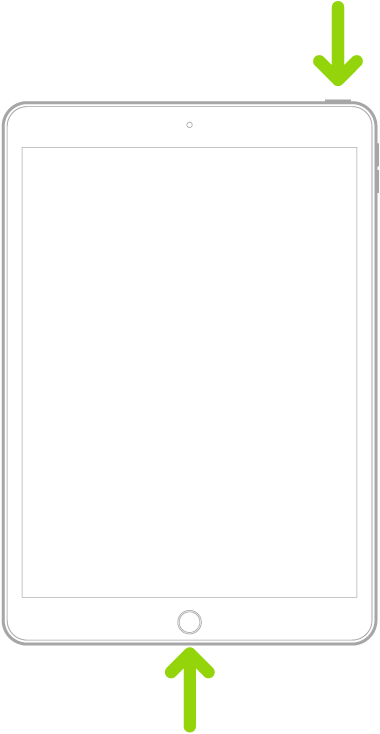
Force restart iPad (models with the Home button)

Press and hold the top button and the Home button at the same time. When the Apple logo appears, release both buttons.


For recommended DNS servers (configured at your home router and/or your iPad), you might choose one of the following Recursive DNS Providers (IPv4 and IPv6 addresses included below):


Quad9

9.9.9.9

149.112.112.112

2620:fe::fe

2620:fe::9


OpenDNS

208.67.222.222

208.67.220.220

2620:0:ccc::2

2620:0:ccd::2


Cloudflare

1.1.1.1

1.0.0.1

2606:4700:4700::1111

2606:4700:4700::1001


Should it be necessary to escalate your issue to Apple Support, the quickest route to engaging with Apple Support will be via the Support link at top-right or bottom-left of this page.

4 replies
Question marked as Top-ranking reply

Apr 9, 2026 5:22 PM in response to t_zu

Start here >>> If you can't activate your iPhone or iPad (Wi-Fi + Cellular) - Apple Support


If you are experiencing difficulties with (re)activation of your iPad, you may have more success if you connect your iPad to a Windows PC (with iTunes for Windows installed, or more recent Apple Devices App) or a Mac computer (with iTunes or Finder - as appropriate for the installed version of macOS). Once connected to your computer, your iPad will be detected - and you should be able to activate using iTunes.


  1. Make sure that you have the latest version of macOS or the latest version of iTunes.
  2. Check that your computer has an Internet connection.
  3. With the cable that came with your iPad, connect your iPad to your computer. Locate your device on your computer.
  4. Wait while your computer detects and activates your iPad:
  • If you see an alert that shows "Set up as New" or "Restore from Backup", it means your iPad is activated.
  • If you get an error message that says the "activation information was invalid" or "activation information could not be obtained from the device", use recovery mode to restore your iPhone.


A restart of your WiFi Router and/or a change of DNS settings may also be helpful.


To restart you home router, disconnect power - then wait at least 30 seconds before restarting. When you router has rebooted (which may take several minutes), force-restart your iPad:


Force restart iPad (models with the Home button)

Press and hold the top button and the Home button at the same time. When the Apple logo appears, release both buttons.


For recommended DNS servers (configured at your home router and/or your iPad), you might choose one of the following Recursive DNS Providers (IPv4 and IPv6 addresses included below):


Quad9

9.9.9.9

149.112.112.112

2620:fe::fe

2620:fe::9


OpenDNS

208.67.222.222

208.67.220.220

2620:0:ccc::2

2620:0:ccd::2


Cloudflare

1.1.1.1

1.0.0.1

2606:4700:4700::1111

2606:4700:4700::1001


Should it be necessary to escalate your issue to Apple Support, the quickest route to engaging with Apple Support will be via the Support link at top-right or bottom-left of this page.

Apr 13, 2026 2:50 PM in response to t_zu

Multiple recent posts, concerning unresolvable issues with re-activation, suggest that Apple has finally removed all server-support for obsolete 32-bit devices.


As all 32-bit Apps have already been retired and removed from the Apple App Store, it is perhaps unsurprising that the long-ago obsolete devices are now potentially unusable.

Apr 10, 2026 7:03 AM in response to t_zu

Could you please advise:

- Is activation still supported for iPad 3?


For that information, you need so contact Apple but they do not respond in these user-to-user forums.


I am seeing other similar posts here about very old iPads not activating. All are modles incable of runnig iPadOS 11 or higher, and current iCloud documents say a minimum of OS 11 is required for iPads and iPhones to use iCloud.


That may be part of the activation issue, but only Apple knows for sure.


Official Apple Support


iPad 3rd generation activation error after restoring

Welcome to Apple Support Community
A forum where Apple customers help each other with their products. Get started with your Apple Account.