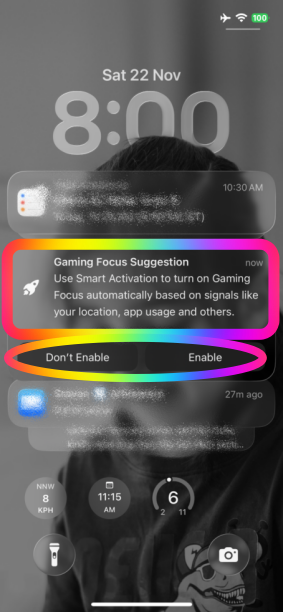
Do Not Disturb randomly turning on on iPhone 16 Pro

Why is ‘Do Not Disturb’ turning on when nothing is set up.


I had DND set to come on in the evening, but noticed it was randomly turning itself on during the day.


To try and fix this I’ve deleted all my schedules, turned off the focus status, turned off share across devices, made sure I have the latest update and restarted my phone and yet it is still randomly putting itself in DND.


Any ideas on how to resolve this?


Im using an iPhone 16 Pro on software update 26.4.2.

iPhone 16 Pro, iOS 26

Posted on Apr 26, 2026 7:30 AM

Reply
Question marked as Top-ranking reply

Posted on Jul 24, 2026 12:19 AM

You say you Reset the phone but presumably restored the backup?

Rogue software like VPN can cause it and must be uninstalled.


If you have access to a Mac then back up to the Mac and Archive the backup.

Erase all content & settings again and set up the phone manually with no additional apps other than absolutely necessary eg email and bank.

Observe behaviour.

Decide whether it fixed it and if so whether to continue with the newly set up regime.

13 replies
Question marked as Top-ranking reply

Jul 24, 2026 12:19 AM in response to QuietTeaDrinker

You say you Reset the phone but presumably restored the backup?

Rogue software like VPN can cause it and must be uninstalled.


If you have access to a Mac then back up to the Mac and Archive the backup.

Erase all content & settings again and set up the phone manually with no additional apps other than absolutely necessary eg email and bank.

Observe behaviour.

Decide whether it fixed it and if so whether to continue with the newly set up regime.

Jul 24, 2026 12:03 AM in response to QuietTeaDrinker

There are three primary factors that trigger the automatic activation of the Focus modes. Users have the flexibility to deactivate each of these factors based on their individual preferences.


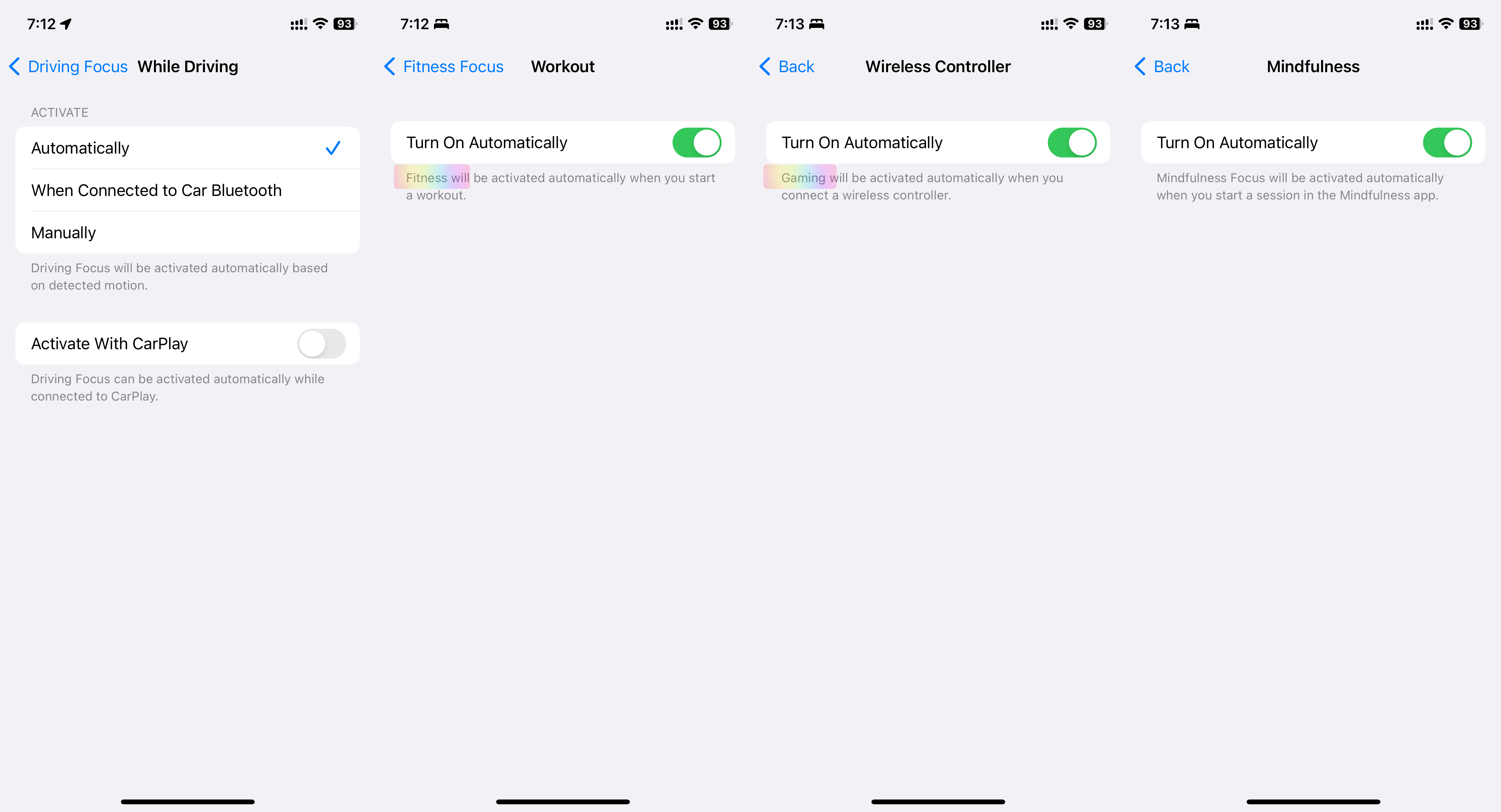
  1. Automatic Activation: Driving, Fitness, Gaming, Mindfulness
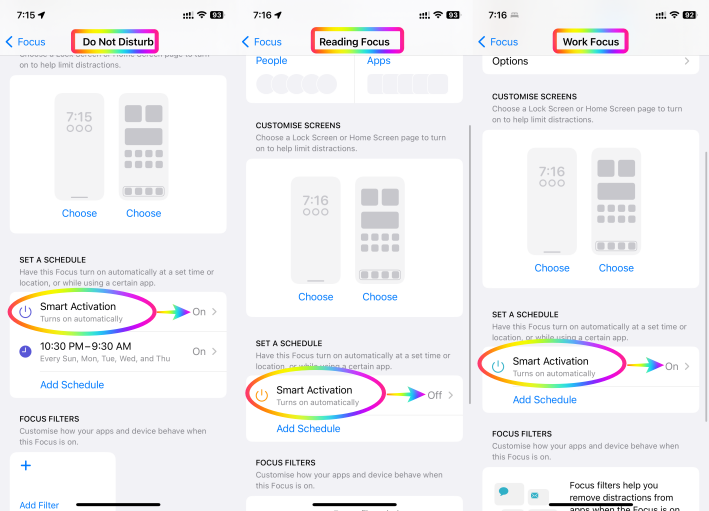
  2. Smart Activation: Work, Reading, DND
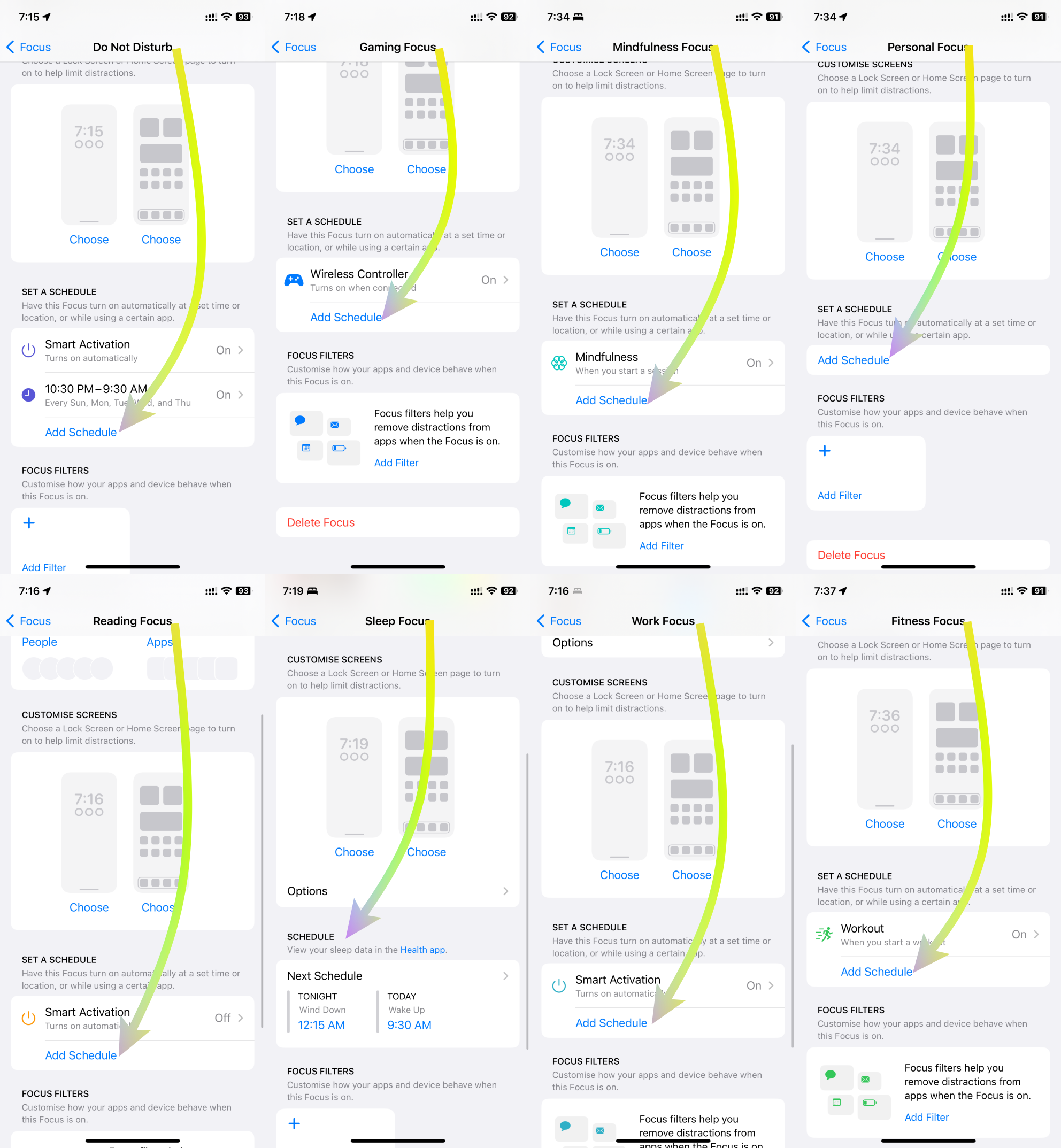
  3. Scheduled Activation: DND, Gaming, Mindfulness, Personal, Reading, Sleep, Work, Fitness


Elaborated below are comprehensive explanations for each of these three triggers.



1. Automatic Activation:

DND's Automatic Activation innovatively responds to specific contexts, improving user engagement and well-being. In driving scenarios, it identifies motion through GPS, accelerometers, and Bluetooth to ensure safer driving by silencing distractions. During fitness activities, it synchronizes with fitness trackers, ensuring uninterrupted workouts for optimal results. For gaming, it intuitively activates DND, heightening immersive experiences. In mindfulness practices, it triggers DND for focused meditation. Users can customize these triggers to suit their preferences, harmonizing technology with life.

See the pic below

2. Smart Activation:

Smart Activation introduces intelligent functionality by activating DND during tasks that require focus. When sharing screens, it suppresses notifications to aid presentations. During screen recording, it enables uninterrupted capturing. While streaming to TV, it elevates content consumption without disturbances. When mirroring screens, it ensures seamless interactions. This feature adeptly aligns technology with multitasking, streamlining interactions and fostering efficient engagements.


See the pic below


3. Scheduled Activation:

DND's Scheduled Activation empowers users with versatile control over privacy and focus. It accommodates contexts like work, exercise, reading, mindfulness, gaming, personal time, and sleep. By scheduling DND during work hours, users can enhance productivity. During fitness routines, DND preserves concentration. For leisure activities like reading and mindfulness, it creates tranquil settings. In gaming sessions, DND blocks distractions. This scheduling flexibility harmonizes technology usage with diverse lifestyle needs.


See the pic below

In essence, the integration of these activation triggers redefines DND's role beyond simple interruption management. It transforms the user experience across domains, from driving safety and focused fitness to immersive gaming and mindful introspection. With each trigger customizable to individual preferences, this innovation reflects technology's adaptability to enhance well-being and productivity in a digital age

Apr 26, 2026 9:48 AM in response to QuietTeaDrinker

QuietTeaDrinker wrote:

Thank you for your response. I have Apple Intelligence turned off so I assume it’s not that and I’m updated to the latest version.

Interestingly, earlier it went into DND and for the first time it was linking to some time blocking I had in my Google calendar, so I do believe it’s turning on because it’s using some sort of ‘intelligence’ to decide I’m just not sure where from.

A really good possibility. You might check with the Google support forum. And let us know if you have further insight.

Apr 26, 2026 9:31 AM in response to Lawrence Finch

Thank you for your response. I have Apple Intelligence turned off so I assume it’s not that and I’m updated to the latest version.


Interestingly, earlier it went into DND and for the first time it was linking to some time blocking I had in my Google calendar, so I do believe it’s turning on because it’s using some sort of ‘intelligence’ to decide I’m just not sure where from.

Jul 24, 2026 12:54 AM in response to QuietTeaDrinker

QuietTeaDrinker wrote:
I turned options 2 & 3 off when first trying to fix this issue and it didn’t work. How do you get to the screens in option 1, I’ve tried searching for these options on my phone but it doesn’t match with anything.

If it is definitely DND with the moon symbol then all automatic options are in the DND focus setting.


Auto applies more to things like Driving focus or individual app settings eg gaming

Do Not Disturb randomly turning on on iPhone 16 Pro

Welcome to Apple Support Community
A forum where Apple customers help each other with their products. Get started with your Apple Account.