
iPhone 11 back camera repeatedly fails to focus
my iphone 11 back camera stopped focusing, now ive tried resetting the settings and it worked for a while but after that its doing the same thing again. how do i fix this?
iPhone 11
my iphone 11 back camera stopped focusing, now ive tried resetting the settings and it worked for a while but after that its doing the same thing again. how do i fix this?
iPhone 11
Hi,
iPhone 11 back camera focus issues are frequently linked to software glitches following iOS updates or hardware defects in the 1x lens module, particularly if the 0.5x lens focuses correctly.
Troubleshooting Steps:
If the camera fails to focus in all modes, makes clicking noises, or remains blurry after these steps, the issue is likely a hardware failure requiring professional repair or replacement of the rear camera module.
Hi,
iPhone 11 back camera focus issues are frequently linked to software glitches following iOS updates or hardware defects in the 1x lens module, particularly if the 0.5x lens focuses correctly.
Troubleshooting Steps:
If the camera fails to focus in all modes, makes clicking noises, or remains blurry after these steps, the issue is likely a hardware failure requiring professional repair or replacement of the rear camera module.
Adjust the camera’s focus and exposure
Before you take a photo, the iPhone camera automatically sets the focus and exposure, and face detection balances the exposure across many faces. If you want to manually adjust the focus and exposure, do the following:
 up or down to adjust the exposure.
If your Photos and Videos are stored in iCloud and you share it before downloading the original then it may appear blurry but it is not.
Your photos and videos are stored on your device in their original, high-resolution version. This means that they use a lot of space on your iPhone, iPad, and iPod touch. With iCloud Photos, you can make more space available on your device and have your entire collection, everywhere you go.
Get started with iCloud Photos:
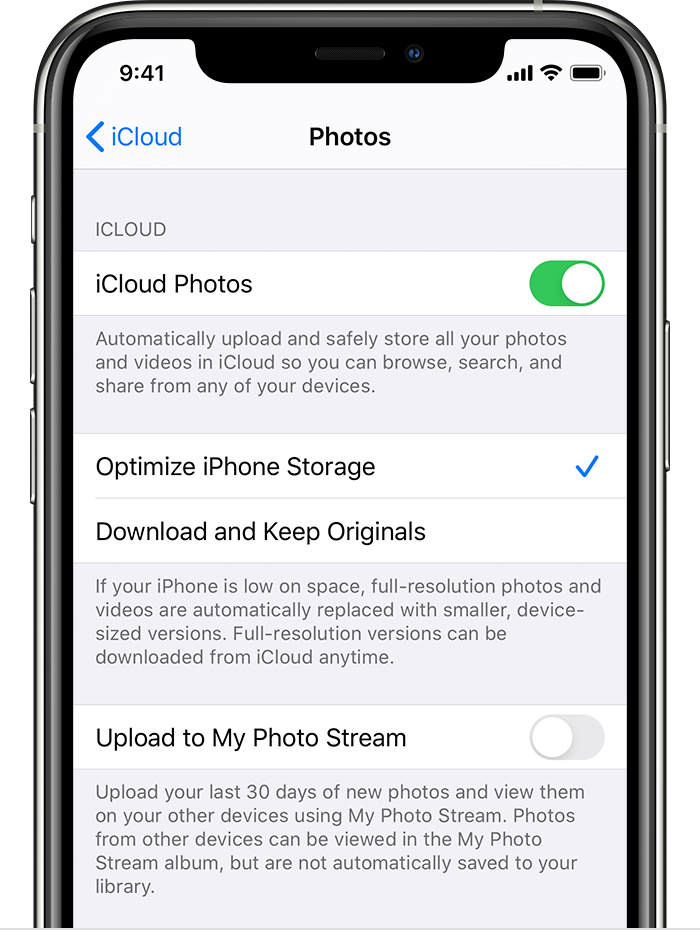
With Optimize Storage, smaller, space-saving photos and videos are kept on your device while all of your original, full-resolution versions are stored in iCloud. And as long as you have enough space in iCloud, you can store as many photos and videos as you want.
You may try some of these steps, please check after each step...
iPhone 11 back camera repeatedly fails to focus

