How do I fix an unresponsive iPad 8th Generation that won't charge or turn on?

My ipad 8th generation has stopped charging, and will not turn on, i have tried trickle charging it with a brick and an outlet, for over an hour, and then tried to force restart it, but it still wont charge or turn on, please if you have anything to help and ive tried putting it in recovery and dfuu mode to no avail, wont show up on apple configurator either.


[Re-Titled by Moderator]

Original Title: Ipad wont turn on

iPad (8th generation)

Posted on Jul 13, 2026 2:22 PM

Reply
Question marked as Top-ranking reply

Posted on Jul 14, 2026 2:39 AM

If your iPad appears to be unresponsive, connect your iPad to its Power Adapter and allow the iPad to charge undisturbed for at least and hour - or preferably overnight. Then, while still connected to external power, try a forced-restart:


Force restart iPad (models with Face ID or with Touch ID in the top button)

If your iPad doesn’t have the Home button, do the following:

  1. Press and quickly release the volume button nearest to the top button.
  2. Press and quickly release the volume button farthest from the top button.
  3. Press and hold the top button.
  4. When the Apple logo appears, release the top button.



Force restart iPad (models with the Home button)

Press and hold the top button and the Home button at the same time. When the Apple logo appears, release both buttons.
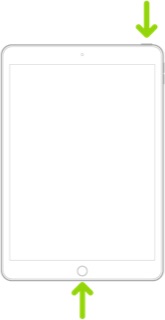


If iPad still doesn’t turn on, or if it gets stuck during start up, see the Apple Support article If your iPhone, iPad, or iPod touch won’t turn on or is frozen. Or if your iPad isn’t working correctly after you restart it, see the iPad Support website.


These support pages should help with troubleshooting general battery and charging issues:

Charge and monitor the iPad battery - Apple Support

If your iPad won't charge – Apple Support


Troubleshooting generally requires substitution of the Power Adapter and cable for another known-good item. Most models of iPad require a Power Adapter rated at 12W (i.e. 2.4A @5V) or greater to reliably charge. 5W Power Adapters (1.0A @5V) intended for older models of iPhone are inadequate to charge an iPad; if the iPad charges at all, charging will be very slow. Many recent models of iPad are supplied with an Apple 20W USB-C Power Adapter.


Some third-party USB-C power adapters (and portable PowerBanks) may not support USB PD (Power Delivery). Power Delivery mutually negotiates the charging voltage; the source, load and cable are all elements involved in the negotiation protocol. Unless the Power Adapter explicitly supports USB PD, it will almost certainly fail to charge the iPad; proprietary charging standards, such as QC (Quick Charge), are not supported.


Many computer USB ports also cannot source sufficient power to charge an iPad. Unless explicitly designed for charging connected devices, computer USB ports are typically limited to 0.5-1A @5V (i.e., 2.5-5.0W).


If you continue to experience difficulties when using an appropriate Power Adapter of 12W or greater, you would be best advised to seek assistance directly from Apple Support. You can contact the Support Team using the Support link at top-right or bottom-left of this page. Alternatively you can initiate and manage your support cases from Apple devices using the excellent Apple Support App. If not already installed, the App can be downloaded from the App Store:

https://apps.apple.com/app/apple-support/id1130498044


You might also visit the Genius Bar at your local Apple Store or Apple Authorised Service Provider (AASP) - where the technicians will be able to test and assess your iPad:

Genius Bar Reservation and Apple Support Options - Apple

3 replies
Question marked as Top-ranking reply

Jul 14, 2026 2:39 AM in response to HendoIT

If your iPad appears to be unresponsive, connect your iPad to its Power Adapter and allow the iPad to charge undisturbed for at least and hour - or preferably overnight. Then, while still connected to external power, try a forced-restart:


Force restart iPad (models with Face ID or with Touch ID in the top button)

If your iPad doesn’t have the Home button, do the following:

  1. Press and quickly release the volume button nearest to the top button.
  2. Press and quickly release the volume button farthest from the top button.
  3. Press and hold the top button.
  4. When the Apple logo appears, release the top button.


Force restart iPad (models with the Home button)

Press and hold the top button and the Home button at the same time. When the Apple logo appears, release both buttons.


If iPad still doesn’t turn on, or if it gets stuck during start up, see the Apple Support article If your iPhone, iPad, or iPod touch won’t turn on or is frozen. Or if your iPad isn’t working correctly after you restart it, see the iPad Support website.


These support pages should help with troubleshooting general battery and charging issues:

Charge and monitor the iPad battery - Apple Support

If your iPad won't charge – Apple Support


Troubleshooting generally requires substitution of the Power Adapter and cable for another known-good item. Most models of iPad require a Power Adapter rated at 12W (i.e. 2.4A @5V) or greater to reliably charge. 5W Power Adapters (1.0A @5V) intended for older models of iPhone are inadequate to charge an iPad; if the iPad charges at all, charging will be very slow. Many recent models of iPad are supplied with an Apple 20W USB-C Power Adapter.


Some third-party USB-C power adapters (and portable PowerBanks) may not support USB PD (Power Delivery). Power Delivery mutually negotiates the charging voltage; the source, load and cable are all elements involved in the negotiation protocol. Unless the Power Adapter explicitly supports USB PD, it will almost certainly fail to charge the iPad; proprietary charging standards, such as QC (Quick Charge), are not supported.


Many computer USB ports also cannot source sufficient power to charge an iPad. Unless explicitly designed for charging connected devices, computer USB ports are typically limited to 0.5-1A @5V (i.e., 2.5-5.0W).


If you continue to experience difficulties when using an appropriate Power Adapter of 12W or greater, you would be best advised to seek assistance directly from Apple Support. You can contact the Support Team using the Support link at top-right or bottom-left of this page. Alternatively you can initiate and manage your support cases from Apple devices using the excellent Apple Support App. If not already installed, the App can be downloaded from the App Store:

https://apps.apple.com/app/apple-support/id1130498044


You might also visit the Genius Bar at your local Apple Store or Apple Authorised Service Provider (AASP) - where the technicians will be able to test and assess your iPad:

Genius Bar Reservation and Apple Support Options - Apple

Jul 13, 2026 2:37 PM in response to HendoIT

Welcome and thank you for reaching out. 🤗


If your iPad doesn't charge, follow these steps to check your hardware and charge your device. You might need to charge for up to an hour.


If your iPad still isn't charging, there appears to be a problem with the charging system or the internal battery. Only a certified Apple technician can determine the cause and offer a complete solution.


Therefore, I recommend service.


Service Checklist:


Service Appointment:


Contact Information:


Additional Support:


Good luck! 👋🏼😉

Smiliñ 😎 Brian | Community Volunteer

How do I fix an unresponsive iPad 8th Generation that won't charge or turn on?

Welcome to Apple Support Community
A forum where Apple customers help each other with their products. Get started with your Apple Account.