my ios 26 stage manager is missing features

ever since i updated to ios 26 the split screen/stage manager has completely change how i can use my iPad. i used to type papers dual screen, but the keyboard has completely changed.


i am wondering if there is a way to add this feature within stage manager, or even if there is a way to go back to the pre-ios 26 split screen mechanics.


below is an example of what i am talking about. besides just how blatantly worse the split screen has gotten for user experience and visuals, it nerfed so many useful features.


Posted on Jul 17, 2026 5:07 PM

Reply
Question marked as Top-ranking reply

Posted on Jul 18, 2026 1:53 AM

Rolling-back to an earlier version of iOS/iPadOS is not possible.


All System Updates are digitally signed by Apple - and can only be installed whilst the digital signatures remain valid. After release of a new iOS/iPadOS version, the immediately preceding version continues to be digitally signed by Apple - however, usually within a few days, Apple will revoke the digital certificate with which the earlier version is signed.


Perhaps consider that iOS/iPadOS updates include both functional and essential security updates. Restoring an earlier version of the OS would undermine the security of your device and your personal data. 


iPadOS multitasking has received a significant makeover from that to which you may be accustomed in iPadOS 18.x and earlier - and may take a little time to learn and adjust your workflows. This short video may help you to understand how to use the multitasking system:

https://cdsassets.apple.com/vid/live/hls/7WUAS350/videos/93ad67d2_1759269510.m3u8


You would also likely benefit from reviewing the official iPadOS User Guide and the many available online tutorials (such as YouTube) to become better acquainted with the new multitasking interface and associated gestures and controls:

Multitask on iPad with iPadOS 26 - Apple Support

Work with multiple windows at once on iPad - Apple Support

OS - iPadOS 26 - Apple


The three-dot multitasking button with which you are no doubt familiar from earlier versions of iPadOS has been replaced with the traffic-light button to access and control the revised window-based User Interface.
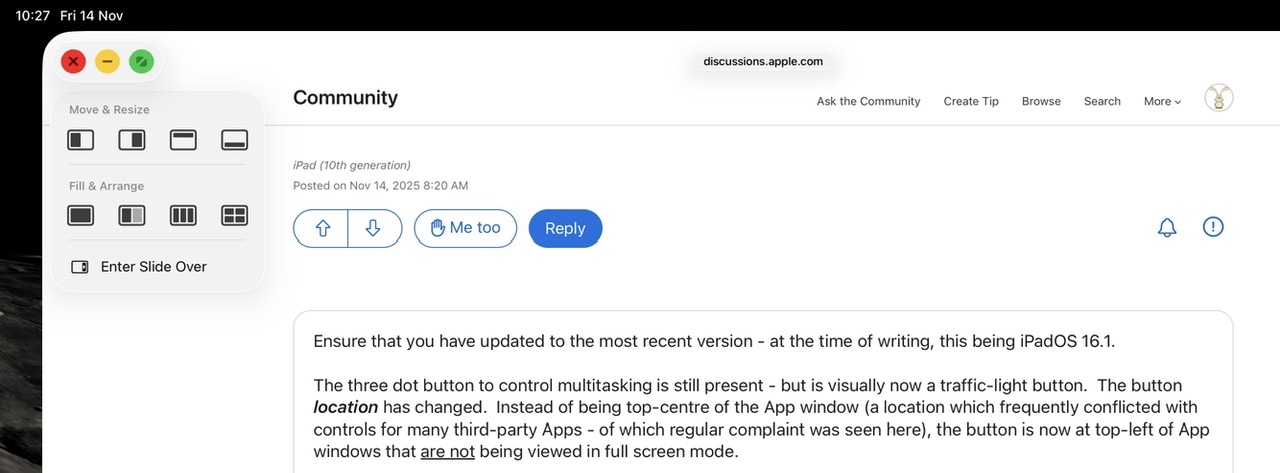


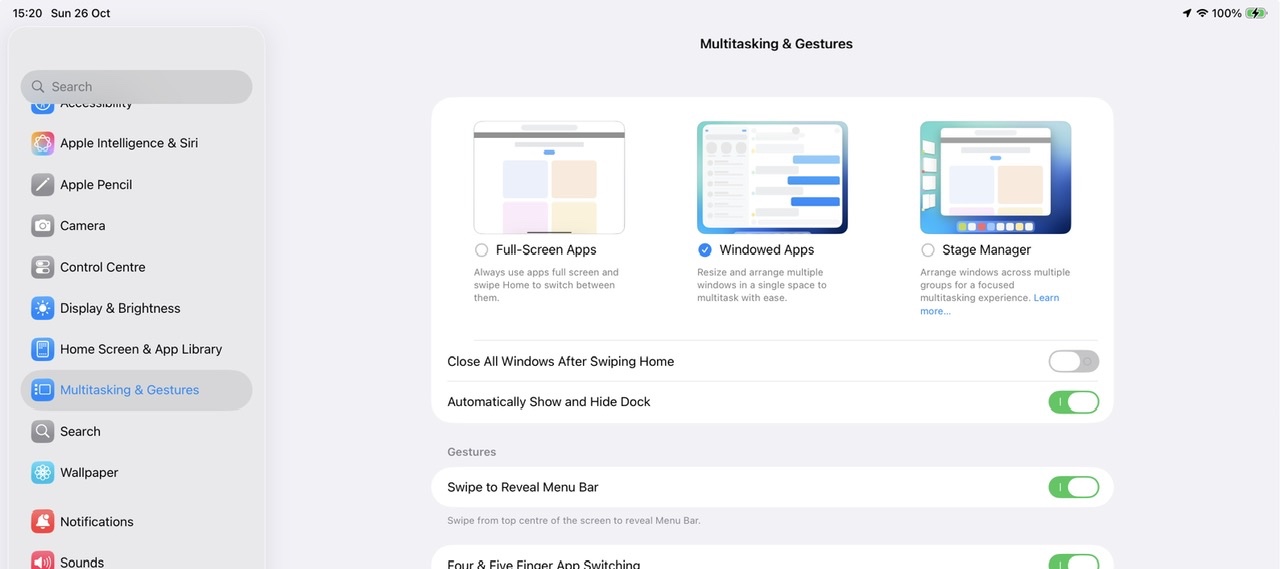
If you dislike the new Windowed Apps or Stage Manager modes, you can switch to using the basic Full-Screen App mode - but this disables all multitasking capabilities and hide the associated traffic-light controls; you will also not be able to use split screen or slide-over modes with which you are likely familiar:

Settings > Multitasking & Gestures - select Full Screen Apps


For information, Apple does invite submission of comments via its Product Feedback portal. For iPad and iPadOS:

Feedback - iPad - Apple


If you would like to see specific changes or additional functionality in a future release of iPadOS, this would be the most appropriate channel through which to communicate any requests to Apple. While you are unlikely to receive an individual reply, it is our understanding that all submissions are logged, analysed and forwarded to the relevant team(s) for consideration.


2 replies
Question marked as Top-ranking reply

Jul 18, 2026 1:53 AM in response to cam_rie

Rolling-back to an earlier version of iOS/iPadOS is not possible.


All System Updates are digitally signed by Apple - and can only be installed whilst the digital signatures remain valid. After release of a new iOS/iPadOS version, the immediately preceding version continues to be digitally signed by Apple - however, usually within a few days, Apple will revoke the digital certificate with which the earlier version is signed.


Perhaps consider that iOS/iPadOS updates include both functional and essential security updates. Restoring an earlier version of the OS would undermine the security of your device and your personal data. 


iPadOS multitasking has received a significant makeover from that to which you may be accustomed in iPadOS 18.x and earlier - and may take a little time to learn and adjust your workflows. This short video may help you to understand how to use the multitasking system:

https://cdsassets.apple.com/vid/live/hls/7WUAS350/videos/93ad67d2_1759269510.m3u8


You would also likely benefit from reviewing the official iPadOS User Guide and the many available online tutorials (such as YouTube) to become better acquainted with the new multitasking interface and associated gestures and controls:

Multitask on iPad with iPadOS 26 - Apple Support

Work with multiple windows at once on iPad - Apple Support

OS - iPadOS 26 - Apple


The three-dot multitasking button with which you are no doubt familiar from earlier versions of iPadOS has been replaced with the traffic-light button to access and control the revised window-based User Interface.


If you dislike the new Windowed Apps or Stage Manager modes, you can switch to using the basic Full-Screen App mode - but this disables all multitasking capabilities and hide the associated traffic-light controls; you will also not be able to use split screen or slide-over modes with which you are likely familiar:

Settings > Multitasking & Gestures - select Full Screen Apps


For information, Apple does invite submission of comments via its Product Feedback portal. For iPad and iPadOS:

Feedback - iPad - Apple


If you would like to see specific changes or additional functionality in a future release of iPadOS, this would be the most appropriate channel through which to communicate any requests to Apple. While you are unlikely to receive an individual reply, it is our understanding that all submissions are logged, analysed and forwarded to the relevant team(s) for consideration.

my ios 26 stage manager is missing features

Welcome to Apple Support Community
A forum where Apple customers help each other with their products. Get started with your Apple Account.