My Apple Pencil 1st gen won't pair with my new iPad 11 A16

my new ipad 11 A16 doesn't recognize my apple pencil 1st gen when i try to pair it. i've followed the instructions but nothing happens when i connect it to the ipad with a cable. the pencil works fine with my 6th gen ipad and the battery is fully charged.


[Re-Titled by Moderator]

Original Title: my new ipad 11 A16 doesn't recognize my apple pencil 1st gen when i try to pair it

iPad, iPadOS 26

Posted on Aug 26, 2026 8:28 AM

Reply
Question marked as Top-ranking reply

Posted on Aug 26, 2026 3:42 PM

The first generation Apple Pencil uses the physical Lightning connector of the Pencil, via the correct charging Adapter, to pair with - and charge from the iPad A16's USB-C port:



New first generation Pencils now ship with this special adapter in the box along with the Pencil. However, some older stock purchased from retailers may lack the USB-C to Lightning adapter - and may instead have an older Lightning to Lightning Adapter.



For owners of older first generation Pencils, or for “old stock” new Pencils, the new special adapter can be purchased directly from Apple as an accessory.

https://store.apple.com/xc/product/MQLU3ZM/A
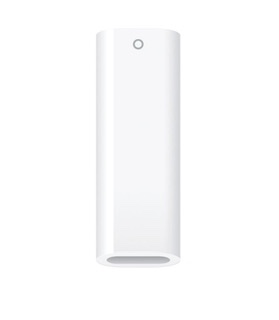


These support pages may be helpful with pairing and use of the Pencil with your iPad A16:

Pair and charge Apple Pencil (1st generation) with iPad - Apple Support

Connect Apple Pencil with your iPad - Apple Support

Charge your Apple Pencil and check the battery - Apple Support


If you continue to experience difficulties, here is one of the better troubleshooting guides:

https://appletoolbox.com/apple-pencil-not-working-heres-our-troubleshooting-guide/


Be aware that if your Pencil has been set-aside for an extended period, unused and uncharged, the Pencil battery may have been damaged through deep discharge. In common with all Li-ion batteries, they must always have some level of charge.


The tiny internal Li-ion battery is susceptible to permanent/irreversible damage through being left discharged for long periods. Even some “new” pencils can exhibit signs of failure out-of-the-box if they are “old stock”. 


It is essential that if you have an Apple Pencil that you charge it regularly - whether used or not - so as to protect the battery from deep-discharge. Do not allow a pencil to remain in low-charge state for any period of time - as the internal battery will fail, rendering the Pencil useless. Setting aside an unused Pencil, for extended periods, is a recipe for premature death of the Pencil battery.


If the Pencil Battery has failed, the only remedy is to replace the Pencil. If the battery has failed and your pencil is within its one-year warranty, you should look to having it replaced by your retailer or at an Apple Store.


Gentle warming of the Pencil (such as placing on a hot water radiator), prior to attempting charging of the Pencil, can sometimes resurrect a dead Pencil battery.


3 replies
Question marked as Top-ranking reply

Aug 26, 2026 3:42 PM in response to wildernessbob

The first generation Apple Pencil uses the physical Lightning connector of the Pencil, via the correct charging Adapter, to pair with - and charge from the iPad A16's USB-C port:


New first generation Pencils now ship with this special adapter in the box along with the Pencil. However, some older stock purchased from retailers may lack the USB-C to Lightning adapter - and may instead have an older Lightning to Lightning Adapter.


For owners of older first generation Pencils, or for “old stock” new Pencils, the new special adapter can be purchased directly from Apple as an accessory.

https://store.apple.com/xc/product/MQLU3ZM/A


These support pages may be helpful with pairing and use of the Pencil with your iPad A16:

Pair and charge Apple Pencil (1st generation) with iPad - Apple Support

Connect Apple Pencil with your iPad - Apple Support

Charge your Apple Pencil and check the battery - Apple Support


If you continue to experience difficulties, here is one of the better troubleshooting guides:

https://appletoolbox.com/apple-pencil-not-working-heres-our-troubleshooting-guide/


Be aware that if your Pencil has been set-aside for an extended period, unused and uncharged, the Pencil battery may have been damaged through deep discharge. In common with all Li-ion batteries, they must always have some level of charge.


The tiny internal Li-ion battery is susceptible to permanent/irreversible damage through being left discharged for long periods. Even some “new” pencils can exhibit signs of failure out-of-the-box if they are “old stock”. 


It is essential that if you have an Apple Pencil that you charge it regularly - whether used or not - so as to protect the battery from deep-discharge. Do not allow a pencil to remain in low-charge state for any period of time - as the internal battery will fail, rendering the Pencil useless. Setting aside an unused Pencil, for extended periods, is a recipe for premature death of the Pencil battery.


If the Pencil Battery has failed, the only remedy is to replace the Pencil. If the battery has failed and your pencil is within its one-year warranty, you should look to having it replaced by your retailer or at an Apple Store.


Gentle warming of the Pencil (such as placing on a hot water radiator), prior to attempting charging of the Pencil, can sometimes resurrect a dead Pencil battery.

Aug 27, 2026 1:20 AM in response to wildernessbob

Ensure that you have updated your iPad to the most recent version of iPadOS. At the time of writing, iPadOS 26.6.1 is current.


If your compatible iPad and Pencil are not operating as expected, try a forced-restart - as this will often clear an isolated or post-update software issue:


Force restart iPad (models with Face ID or with Touch ID in the top button)

If your iPad doesn’t have the Home button, do the following:

  1. Press and quickly release the volume button nearest to the top button.
  2. Press and quickly release the volume button farthest from the top button.
  3. Press and hold the top button.
  4. When the Apple logo appears, release the top button.


If the problem persists after performing the restart, it may be necessary to reset your iPad settings. While this reset will not cause any loss of data, as a precaution, it is always wise to ensure that you have a current iCloud or iTunes backup before performing the reset:

How to back up your iPhone, iPad, and iPod touch - Apple Support


When you are happy to proceed, you can perform the reset from iPad settings:

Settings > General > Transfer or Reset iPad > Reset > Reset All Settings


If the problem still doesn’t clear, the next step is to reset the iPad to factory settings:

Restore your iPhone, iPad, or iPod to factory settings - Apple Support


Otherwise, you would be well advised to seek assistance directly from Apple Support. You can contact the Support Team using the Support link at top-right or bottom-left of this page. Alternatively you can initiate and manage your support cases from Apple devices using the excellent Apple Support App. If not already installed, the App can be downloaded from the App Store:

https://apps.apple.com/app/apple-support/id1130498044


You might also visit the Genius Bar at your local Apple Store or Apple Authorised Service Provider (AASP) - where the technicians will be able to assist with troubleshooting:

Genius Bar Reservation and Apple Support Options - Apple

Aug 26, 2026 8:45 PM in response to LotusPilot

Thanks Lotuspilot, very thorough. unfortunately it's still not being discovered by my ipad. 100% charge, followed all the options in the links above. it's never been paired with this new ipad, so it's not in my list of bt devices to forget. it works perfectly fine with my old 6th gen ipad. i removed it (forget this device) on the 6th gen, and successfully repaired it. ironically the new ipad does see the old ipad in devices, but won't pair because they are not compatible. i am using a usbc to lighting cable, (brand new apple, tested and works fine on other devices) is that maybe an issue?

My Apple Pencil 1st gen won't pair with my new iPad 11 A16

Welcome to Apple Support Community
A forum where Apple customers help each other with their products. Get started with your Apple Account.