Shift+2 is the @ on my mac keyboard. the windows key is the apple command key. the alt key is the option key.
You could try one of these keyboard mapping programs.
Pick a key you want to change. Find out what the keyboard shortcut is. Map to what you need. Isn't page back something line command+[ in firefox? Use Full Key Codes to find out the numeric value for the key.
iKey is a front end program that simulates typing and mouse movements. I use iKey to remap the Function keys.
"iKey is an automation utility, a program that creates shortcuts to accomplish repetitive tasks. In essence, an iKey shortcut is a little program in its own right, but you don't need to know the first thing about programming to create an iKey shortcut. All you have to do is put together three necessary parts of a shortcut: One or more commands that give the shortcut its functionality, a context in which it runs, and a launcher that defines how the shortcut is activated."
http://www.scriptsoftware.com/ikey/
iKey has a little more function then the previous free version called youpi key. For many years, I used youpi key before switching to iKey. It works fairly well for me in MAC OS 10.4 although not officially supported. The youpi key download is hard to find & no longer here.
http://www.versiontracker.com/dyn/moreinfo/macosx/11485&vid=75326
Examples:
I have the common programs that I use assigned to function keys. I have F4 assigned to Firefox. When I want to start FireFox, I press F4. When I want to switch to firefox, I press F4! Starting & switching to an application in Mac OS are the same thing in Mac OS.
Here is an example of to assign volumn control to a function key.
http://discussions.apple.com/message.jspa?messageID=10361085#10361085
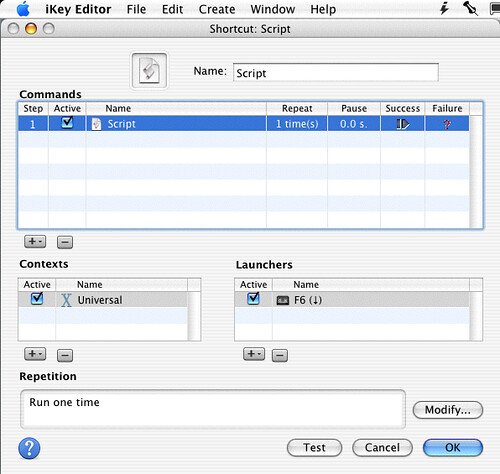
Here is my script for listing my application folder. I have it assigned to function-key 6.
!http://farm3.static.flickr.com/2689/4292832695_f3a8f1122e.jpg!
tell application "Finder"
open folder "Applications" of startup disk
select Finder window 1
set bounds of Finder window 1 to {-3, 44, 691, 545}
--set position of Finder window 1 to {33, 44}
set position of Finder window 1 to {60, 45}
activate
end tell
The second portion of this script was generated in the script editor record mode. After I recorded the script and did some editing, I copy the script to ikey/youpi key.
Full Key Codes
http://download.cnet.com/Full-Key-Codes/3000-2094_4-44175.html
-----------------
Spark
"Spark is a powerful, and easy Shortcuts manager. With Spark you can create Hot Keys to launch applications and documents, execute AppleScript, command iTunes, and more... You can also export and import your Hot Keys library, or save it in HTML format to print it. Spark is free, so use it without moderation!"
http://www.versiontracker.com/dyn/moreinfo/macosx/22675
---------------
Mac OS X remap or rename keyboard keys
by vivek
So how do you remap or rename keyboard keys under Mac OS X?
Simply use DoubleCommand software. It is a free program
http://theos.in/apple/download-doublecommand-to-remap-keyboard-keys/
----------------
Keyboard Maestro is a powerful macro program for Mac OS X (including Tiger and Leopard) which has received glowing reviews. Keyboard Maestro will take your Macintosh experience to a new level in “Ease of Use”. With Keyboard Maestro you can design a custom action sequence with your own shortcuts and use them at any time, you can navigate through running applications and open windows with Program Switcher, and you can work with an unlimited number of clipboards - all by pressing simple keystrokes.
http://www.keyboardmaestro.com/main/