IMac g3 blinking folder with Question Mark

Hi everyone,
I bought an IMac g3 at a tag sale and plugged it in and when it started up a screen with a folder with the picasso face and question mark was blinking. I cannot get past this screen even after resetting the pram.

I think my IMac g3 was made in the Summer of 2001 and is the grey/Graphite color and has a slot loading disk drive.

Does anyone know what I should do next?
Thank you for your help!

IMac G3

Posted on Dec 11, 2010 4:35 PM

Reply
21 replies

Dec 12, 2010 12:03 AM in response to BlueTropix00

If your iMac was manufactured in 2001, the specs for it can be found here. As for choice of OS, Neil suggested OS 9.x, in case the computer's firmware hasn't been updated to the latest version. To install OS X, the required firmware is version 4.1.9. The catch is that the firmware can only be updated when booted from OS 9.x on the internal hard drive. If the firmware has already been updated, then the purchase/installation of OS 9.x is unnecessary. To experience a modern Mac OS, you should consider installing OS 10.3.x (Panther) or 10.4.x (Tiger). I'd recommend at least 512 MBs of installed memory to run either. To ensure a trouble-free installation, it's preferable to purchase the retail/universal OS X installer disk, rather than another model Mac's Restore disk. Tiger comes on a DVD, so if your iMac has the CD-RW drive, you'll have a problem. To install the OS, power ON the iMac and immediately insert the disk, then press/hold down the C key to boot from the optical drive.

Dec 13, 2010 11:56 AM in response to BlueTropix00

You do not need 9.x to check your firmware. See below. I'd go with 10.4 if you have the correct firmware.

------------------

There are some CD versions of tiger.
http://store.fastmac.com/productinfo.php?productsid=111

Texas Mac Man tells how to find a Tiger disc:
http://discussions.apple.com/message.jspa?messageID=11117872#11117872

You could buy an external DVD drive. It needs to be firewire and bootable by Mac OS. If you have another PPC with firewire, you could try target Disk mode and installed tiger that way.

You need to figure out the level of your firmware before installing 10.2 or greater. ( The PC name for firmware is BIOS. ) Installing 10.2 with a down level firmware will most likely make your iMac unusable and difficult to fix.

What is firmware?
The firmware software receives control when you poweron your machine. It does some hardware testing and some hardware configuration then passes control to your version of Mac OS. It reside on a PROM ( program read only memory ) chip on the logic board.

Figuring out what level of firmware you have?

Open Firmware, boot into Open Firmware.
Power on your iMac while holding down command option+of
The first output line contains the firmware level. Mine reads:
Apple PowerMac4,1 4.1.9f1 BootRom built on 09/14/01 at 13.18.04
Copyright 1994-2001 Apple Computer Inc.

On my machine, I have 4.1.9f1.

What firmware do you need?
http://docs.info.apple.com/article.html?artnum=86117

For a slot loading iMac, this article indicates that you need to be running 9.1 or later version of Mac OS Classic.
http://docs.info.apple.com/article.html?artnum=75130
"The iMac Firmware Update 4.1.9 will only run on iMac computers with lot-loading CD or DVD drives running Mac OS 9.1 or later from a local drive. If you are using Mac OS X you must boot from a local Mac OS 9.1 or later writeable partition (not a CD, or network disk) prior to following the update instructions."

You can download the Mac OS 9 updates from the Apple site.
http://support.apple.com/kb/HT1387?viewlocale=en_US

For tiger, you need 256meg of memory.

Mac OS X 10.4: System requirements
http://support.apple.com/kb/HT1514


There is no need to partition. You can save hard drive space by doing a custom install. Leave out the print drivers you do not need and the languages you do not need. Doing so you will need about three gigabytes of space.


outoforderorder explains how...
By the way, here it is how you find the terminal application.
Macintosh-HD -> Applications -> Utilities -> Terminal

From: san francisco,ca
Registered: Apr 27, 2007

Re: Do the widgets drain system resources and power?
Posted: Apr 28, 2007 2:51 PM

I tend to think dashboard is neat, but not neccesary for my everyday workflow.

it is possible to enable and disable it as needed,
by entering the following commands into the terminal:

#To turn Dashboard off:
defaults write com.apple.dashboard mcx-disabled -boolean YES

#To turn Dashboard on:
defaults write com.apple.dashboard mcx-disabled -boolean NO

#*You have to restart the Dock after making either change for it to take effect:
killall Dock

Bye Bye Dashbaord
http://www.kainjow.com/kermitsoft/downloads.html

Disable Spotlight, Bonjour and Dashboard:
http://discussions.apple.com/message.jspa?messageID=8749558#8749558

Dec 17, 2010 3:24 PM in response to Jeff

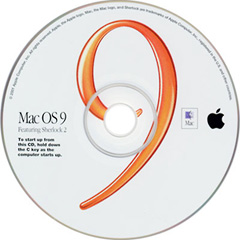
Jeff, I see what you are saying and I did ask the seller and they said it was the full install CD and now I am trying to install it, and nothing happens when I press 'c' or 'cmd-option-shift-delete', etc. The CD has the orange 9 on it and is version 9.1 and I do believe it is the legitimate full install CD

What should I do next?

Thank you for any and all your help!

Dec 17, 2010 4:26 PM in response to BlueTropix00

Hey Blue,
As rc has already posted you can check your open firmware without an operating system in there.
I repeat his post:
"Figuring out what level of firmware you have?

Open Firmware, boot into Open Firmware.
Power on your iMac while holding down command option+of
The first output line contains the firmware level. Mine reads:
Apple PowerMac4,1 4.1.9f1 BootRom built on 09/14/01 at 13.18.04
Copyright 1994-2001 Apple Computer Inc.
"
If your firmware is already up to date you don't need OS 9 installed at all.
nothing happens when I press 'c'

So you put the CD in the drive and push "c" while the machine is powering up?
It's also possible the CD/optical drive is bad and also that the hard drive is also bad but you can't tell that until you can get it to boot w/ a CD and use disk utility.
Richard

Dec 17, 2010 8:18 PM in response to BlueTropix00

Check out the chart on this page and scroll down to the iMac listings. The "3" indicates that "These computers are supported by the version of Mac OS included with the computer when it was purchased; retail copies of Mac OS with the same (or earlier) version number may not include the system software components necessary to start up these models." Richard ("spudnuty") has refurbed many of these iMacs, so he may have the definitive answer as to whether or not the OS 9.1 retail/universal installer disk will boot a 600 MHz Graphite iMac that shipped with OS 9.1.

Dec 18, 2010 7:05 AM in response to spudnuty

Thank you everyone for these suggestions. I have checked the suggested website and see that 9.1 OS came with my model and I also did a firmware check spudnuty and my firmware matches your computer's.

I cannot see if the hard drive or CD disc loader is broken because I cannot boot anything up from the install CD, it has no resonse to any key commands to start up the installation. Just the same blinking folder with a question mark.
Right now I feel like I have reached a purgatory or a pickle and don't know what the next step is. Thanks everyone for trying, let me know if you have any suggestions for me!

Dec 18, 2010 11:31 AM in response to BlueTropix00

Right now I feel like I have reached a purgatory or a pickle and don't know what the next step is. Thanks everyone for trying, let me know if you have any suggestions for me!


Start with the cd in the cd-rom drive.

Power off machine. Hold down the option key. Power on the machine.

This will bring up the startup manager. You will see icon of bootable volumes. Do you see a cd?

---------

You can boot these machines from an external firewire device. I hacked an external firewire hd and placed in a Sony DVD drive. Worked.

There may be an Apple User Group in your area.

http://www.apple.com/usergroups/

Dec 18, 2010 2:29 PM in response to rccharles

thanks Rccharles and everyone else, I did this but no luck - I will explain exactly what happened:

I began with the OS CD inside the machine, turned it off, held down the option key before turning back on the iMac and then a blue screen with a curvy arrow (that kind of resembles a circle) comes up on the left side of the blue screen and an arrow pointing right ( ---> ) comes up on the right side. There are no bootable volumes/CD's to choose from. I have clicked both of these arrows and the arrow pointing right ---> does nothing at all and the circular arrow on the left causes the mouse icon to have a picture of ticking watch and prompts the physical computer to sound like it is spinning a CD, though nothing changes on the monitor. I wait and nothing happens, the spinning sound stops and I am still at this blue screen. Any ideas?

I am beginning to think that my iMac is an unfortunate lost cause and that perhaps I have a broken hard drive which may not be worth the money to repair.

Please let me know any and all of your ideas regarding the blue screen with two arrows/installing Mac os 9 and the possibility of calling it quits with my iMac g3.

I am no computer wiz and have never owned an iMac and this computer brought back so many fond memories of using friends' iMacs, I thought I'd give it a try but not sure where this is heading... 😟 Thanks so much

Dec 19, 2010 8:23 AM in response to BlueTropix00

The fact that the Startup Manager found no bootable volumes likely indicates that the hard drive isn't formatted, that it has no OS installed on it, or is defective. If it's bad, the standard 3.5" IDE/EIDE drive used in PCs can be installed, but anything larger than 128 GBs won't be recognized. A bootable disk in the optical drive should be found by the Startup Manager, provided that the OS 9.1 installer disk that you purchased can boot your iMac. I'm hoping that "spudnuty" will reply and can confirm whether that's the case. If that specific disk isn't supported or if the optical drive is defective - either scenario would cause the optical drive to be a no-show when using the Startup Manager. I'm reluctant to suggest spending more $$ to get the iMac running. If you bought a (used) Panther (OS 10.3.x) retail installer CD, you'll still be out of luck, if the optical drive is bad. Your Graphite iMac may have a CD-RW drive, and not the DVD-ROM drive found in certain iMacs of that vintage. Since the Tiger (OS 10.4.x) retail installer is typically on a DVD disk, you'd have to work around that. Before sinking a lot of $$ in a newly-acquired, 10 year-old iMac, you should be aware that many of them develop problems with the PAV board. This is the main component providing power to the unit and because of the electrical shock hazard involved in replacing it, it should be done by a trained tech. The cost for this far exceeds the value of a G3 iMac, so that's something to keep in mind. You could be lucky and have no problems with the PAV board, but when they go bad, many iMac owners retire the computer.

Dec 19, 2010 11:54 AM in response to BlueTropix00

and prompts the physical computer to sound like it is spinning a CD, though nothing changes on the monitor. I wait and nothing happens, the spinning sound stops and I am still at this blue screen. Any ideas?


I put a Mac OS 9.0.4 cd in my machine ( down level software for my machine) and held down the option key when powering on, I heard the spinning cd sound just like you. I know that I have a good cd drive. I knew that macs do not boot down level OS versions. So, open firmware checks for a valid software version before displaying an icon.

It could be you have a down level cd in the machine.

Even though your machine shipped with 9.1, it could be a slightly different version than the official version of 9.1 & will not boot the 9.1 official version. This has happened regularly in the past. You would need 9.2 if this is the case.

What to do? You could try a Linux cd to see if your cd drive where good. Your machine is a PPC & you need a version of Linux for the PPC.

I have booted Ubuntu 6.10 and 6.06 LTS in my machine iMac g3 600. Ubuntu stopped supporting the PPC in 2007. It is important to go with either of the versions I mention.

The Ubuntu cd will cause lines to be writing on the screen. Once you see some output, you will know your cd drive is OK.

Ubuntu

The Ubuntu folks stopped supporting the power PC a while back. You will have to install an older over of Ubuntu.

You need to modify xorg.conf. See:
http://ubuntuforums.org/showthread.php?t=219532

Mac G3 modem install Howto
http://ubuntuforums.org/showthread.php?t=355205

You will have adjust adjust xorg.conf. See these instructions:
http://ubuntuforums.org/showthread.php?t=234437

I was able to get the last official versions of Ubuntu working on my G3 600.
6.10 Edgy Eft,
6.06 Dapper Drake

I used the alternate install and did the alterations noted above.
These versions are listed at the very bottom of the page.
https://wiki.ubuntu.com/PowerPCDownloads

Robert

I am beginning to think that my iMac is an unfortunate lost cause and that perhaps I have a broken hard drive which may not be worth the money to repair.

Please let me know any and all of your ideas regarding the blue screen with two arrows/installing Mac os 9 and the possibility of calling it quits with my iMac g3.

I am no computer wiz and have never owned an iMac and this computer brought back so many fond memories of using friends' iMacs, I thought I'd give it a try but not sure where this is heading... 😟 Thanks so much

Dec 19, 2010 8:11 PM in response to Jeff

I think that the reason there is no Startup Manager is because there is no OS. That's why I'm trying to install 9.1 because there is virtually nothing on this computer...because I bought it from a tag sale I'm guessing the previous owner absolutely wiped out everything on the system (which is why there is no OS) or knew it was broken and wanted to make a buck. Unfortunately, I don't think I'm in any position to start uninstalling/installing HD's and even then it could be a potential waste of $ if I'm not sure if either the HD or the CD drive is broken.

Too bad, It's upsetting that It just won't work!! 😟 I wish it would just be easy & let me get it workin'!

This thread has been closed by the system or the community team. You may vote for any posts you find helpful, or search the Community for additional answers.

IMac g3 blinking folder with Question Mark

Welcome to Apple Support Community
A forum where Apple customers help each other with their products. Get started with your Apple Account.