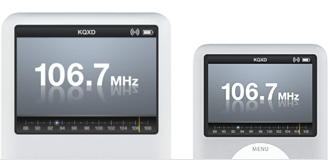
iPod Radio Remote is great!!

I got one of the new iPod Radio Remotes today and it is really good.

I use in on my Nano and the reception in the house is fantastic, so it the sound quality. It's a wonderful addition to the iPod !

Ian

20 iMac G5 1.8Ghz, Mac OS X (10.4.4)

Posted on Jan 13, 2006 10:47 AM

Reply
17 replies

Jan 13, 2006 1:50 PM in response to scrye

The cord length from the iPod to the remote is 35 inches (90cm).

The length of the headphones that come with the remote is 45 inches (114cm).

The headphones are not hardwired into the remote so can use any headphones you like.

You can listen to the radio if you connect the headphones to the iPod and have nothing connected in the remote. I have to say that the headphones seem to act as the antenna for the radio when they are connect to the remote.

Ian

Jan 14, 2006 8:23 AM in response to scrye

" Can you listen to the radio by connecting just to the regular jack instead of through the remote?"

Yes, you can do this, and given that you will get more volume this way, it's (for me) a better option.

The volume is far quieter if you connect the headphones to the remote than if you connect via the headphone jack.

This may be a problem for two listeners. You can listen through both outputs at the same time.

Jan 17, 2006 3:47 PM in response to Ian Parkinson

I agree the radio remote is great! A question: In the radio display I only see the frequency numbers not the radio dial graphic the Apple ads show. (http://store.apple.com/Catalog/US/Images/lmma070garr.jpg) This mockup of a radio dial is supposed to show in the bottom third of the iPod display. Instead I have a blank area until I adjust the volume. When adjusting the volume, the standard volume control slide shows. Is anyone else experiencing this?

This thread has been closed by the system or the community team. You may vote for any posts you find helpful, or search the Community for additional answers.

iPod Radio Remote is great!!

Welcome to Apple Support Community
A forum where Apple customers help each other with their products. Get started with your Apple Account.