A function like that might be possible in Excel with Excel's array functions but not so simple to do in Numbers. But, depending on what you are trying to accomplish, here is another idea:
Use the Categorize feature of Numbers to categorize the table by your Category column. Use the category formulas feature, choosing Maximum as the function, to get the maximum amount for each category.
You can't use those maximums in any downstream formulas or in charts, they are for looking at and that's it.
Note that turning on categories will sort the table. If you turn off categories and want it sorted back the way it started, you need a way to do that. Maybe you can sort your table by date, sometimes people add a column for an index number for each record (1,2,3 etc).
If you really need it done with a formula, it will require more than just a formula in a cell. It will require a new column full of formulas for each category you want to do. It is easy but cumbersome. Here is the start of it for three categories:
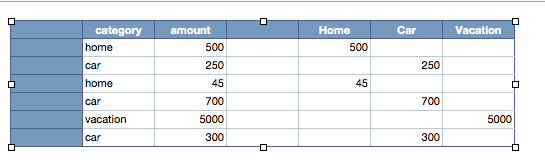
The formula in cell E2 (directly below the word "Home") is =IF($B2=E$1,$C2,"") . You fill right and down to the other columns & rows. With the categories separated into columns, you can find the max of each. You can hide these columns after you have everything set up.


