iOS5 Cannot Send Mail

I'm trying to set up my iPhone 4 with iOS 5 and iCloud. I signed up for an iCloud account and entered it in. I've been trying to send out an email and I keep getting:


Cannot Send Mail

The connection to the outgoing server "p08-smtp.mail.me.com" failed. Additional Outgoing Mail Servers can be configured in Settings > Mail, Contacts, Calendars.


I have no idea what to do.

iPhone 4

Posted on Oct 12, 2011 8:53 PM

Reply
14 replies

Oct 13, 2011 5:39 AM in response to elmac

I'm just posting this as I did for all these threads for the same issue:


Ok I think this problem here is Apple... It's a DNS problem. You get this problem depending on what smtp server you are registered on.

I always get the message that "p06-smtp.mail.me.com" failed...
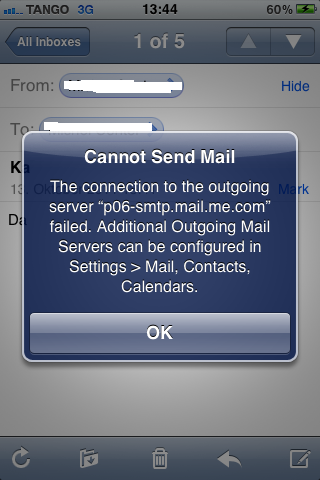

User uploaded file


But according to the nslookup command there are only the servers "p01, p02, p03, p04"... no p05 and p06 or p07 and p08 ...
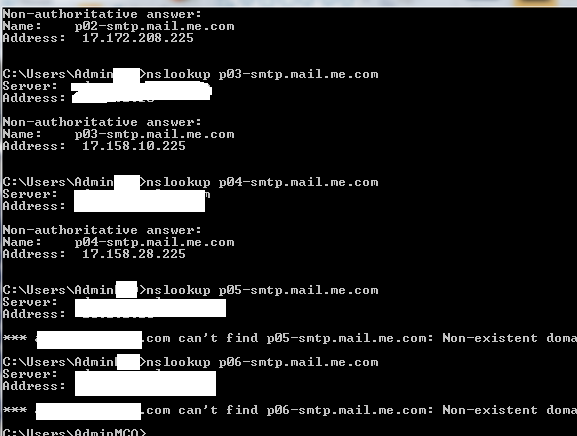

User uploaded file


What I did to get it to work (only considered as workaround):


first I tried to add a second SMTP server with the address "smtp.mail.me.com", it seemed that the mail went through... but never arrived... then I configured "p01-smtp.mail.me.com" as second server and it worked!!


User uploaded file


What is the problem with this workaround?


When you change the password! As it doesn't accept the Apple Token you must configure your Apple ID credentials manually... however when you change them, you have also to change the manually configured second SMTP server!

Oct 13, 2011 11:18 PM in response to zombiefreak

There is a new solution, working better:


User uploaded file

ahariri

User uploaded file Level 1 (0 points)

I did fix it on my iPhone, but with no additional SMTP servers, no delay, and instant recieve and send, I will tell you how:


Go to Settings > mail > contacts > calenders > icloud > account > mail > SMTP > Add Server... (Make sure to delete any other SMTP Servers first, or disable them)


Add the following details:

Host Name: smtp.me.com

User Name: your full email account, including domain (Ex: john@me.com)

Password: type your email password


After a moments, the dialog will disappear as if nothing changed, but it will be fixed.


Enjoy...

This thread has been closed by the system or the community team. You may vote for any posts you find helpful, or search the Community for additional answers.

iOS5 Cannot Send Mail

Welcome to Apple Support Community
A forum where Apple customers help each other with their products. Get started with your Apple Account.
