iPhone 4s Battery Life?

My iPhone 4s battery seems terrible! Almost equivalent to my 3GS and it's terrible battery life. When I got my iPhone yesterday and restored from backup I noticed nothing really changed with minimal usage and standby! Is this normal or should I consider setting it up as a new phone because maybe something is running in the background that's causing it to drop a percentage every few minutes under light usage? Input would be great!

Posted on Oct 15, 2011 7:14 AM

Reply
12,787 replies

Nov 14, 2011 12:26 PM in response to Scarface.

OK, This is my 4th post on this topic. I have a white 32 Gb Phone (In case anyone from Apple is actually monitoring this thread). I am getting pretty decent battery life since updating to iOS 5.0.1. Battery seems to be dropping off at about 1% per hour. It is a little higher when I use it a lot to look things up on the web, send multiple texts, multiple emails or make long calls.


I have the locations mostly turned off, because Facebook doesn't need to know any more about me than it already does. I have Siri and Find My iPhone location turned on. And in System Services I have Cell Network Search and Compass Calibration both on. In Notifications I have Messages and Reminders turned on. The calendar notifies me when I have a reminder set there anyway so I don't need it on the notification's page. I may change my mind on this over time as I get used to the notifications system, which is great but I am still getting used to it.


At work I turn off WiFi and Bluetooth while in the office because the company WiFi has the things I would need blocked anyway, gmail, facebook, itunes, aol mail, (Pretty much all of the web based email systems are locked out), YouTube, etc. So it's just a drain to have WiFi on anyway. I wish Apple would authorize someone to create an app that you can single touch the WiFi and BlueTooth off and on from the home page so I didn't have to dig into the settings when I wanted to do this. This really detracts from the user experience for me so that reason for not allowing it doesn't work.


And I don't use my BlueTooth headset at work anyway.


I have done a couple of full battery drains with full over night recharges which made a bit of a difference for me. I would not be surprised to find out that there is a glitch in the battery meter on new phones with new batteries that causes it to not set up properly, but that is just an idea of mine and I have no way to prove it.


I also did the Reset All Settings reset in the General settings section. This allows you to set the phone up as a new one and not lose all of your stuff. This did make a difference for me.


I will keep an eye on this and see what happens and will wait a few days to update my firmware when Apple finally released 5.0.2.

Nov 14, 2011 12:30 PM in response to Palex80

I agree. I upgraded my two year old 3GS with IOS5 before I recieved my 4S. The software worked fine on the 3 and if anything the battery life has improved a little. So my 4s is running all the same apps as the 3GS and the battery drains about 2% a minute if use it in any way at all. Everything is turned off, no Siri, push notifications, no data, no wireless, no 3G, etc. etc. it's just a basic phone and it doesn't last the day on standby. If I dare make a call it drains in front of my eyes.


It's got to be to do with the bigger processor. Either way Apple should never have released it without proper testing.

Nov 14, 2011 12:57 PM in response to Scarface.

ORIGINALLY was losing over 50% just overnight!! Been following this post off and on for over 2 weeks. NOW things are MUCH better. I've lost 40% in 48 hours - which I can live with. Here are the BIG things I believe contributed to the fix:


1. turned OFF the Auto Send for Diangnostics & Usage

2. Turned OFF the Sync via wifi in iTunes (works fine with iPad but seems to be sucking the life out of the iPhone battery)

3. downloaded IOS 5.0.1 update

4. did the reset on the iPhone (press & hold home and on/off buttons until Apple logo appears)


Hope this helps!


🙂

Nov 14, 2011 1:19 PM in response to kevincarver

Why should we turn off the sync with iTunes? It only does it if it is connected to power.


My iPhone 4S is less than a week old and I am having the same battery problems. I have very few apps and none that run in the background. It doesn't matter what is causing this problem, Apple needs to fix it and do so in a way that doesn't eliminate the features.

Nov 14, 2011 1:28 PM in response to simoninshropshire

simoninshropshire wrote:


We all have the same problem although I don't think it's IOS5. I downloaded it my 3GS and my battery life has improved if anything. I wonder if it's just the 16GB 4s that has the problem ?


It's difficult to say. I have the following comparison between my wife's 16GB 3GS and my 32GB 4S, both running the original iOS 5.0. It looks like I'm actually doing better on the 4S (although I can't complain about either one). Strange, and I hope a solution comes soon for the folks that are having the most serious problems.


User uploaded file

Nov 14, 2011 1:22 PM in response to Thom_D

Thom_D wrote:


OK, This is my 4th post on this topic. I have a white 32 Gb Phone (In case anyone from Apple is actually monitoring this thread). I am getting pretty decent battery life since updating to iOS 5.0.1. Battery seems to be dropping off at about 1% per hour. It is a little higher when I use it a lot to look things up on the web, send multiple texts, multiple emails or make long calls.


I have the locations mostly turned off, because Facebook doesn't need to know any more about me than it already does. [rest of post deleted]

I'd check that your facebook settings aren't set to push every little bit of social news remotely related to you. Settings > (scroll down to Facebook and select it) > change settings there as needed

Nov 14, 2011 1:28 PM in response to Scarface.

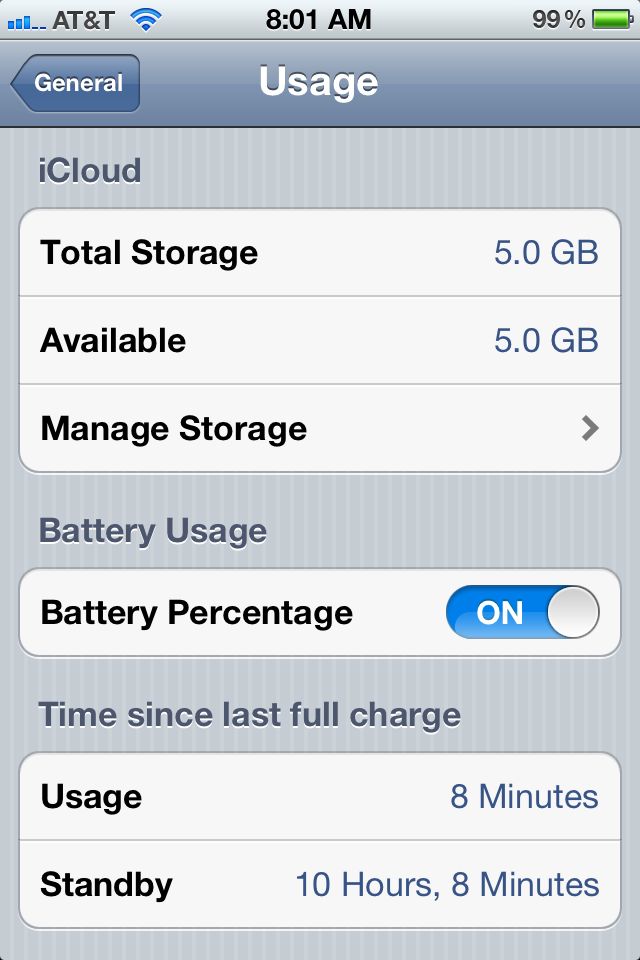
User uploaded file


Above is what you can expect from your 4s after software bugs are worked out. The phone does perform if all is well with software running correctly. This is with full charge last evening, and unplugged overnight w/WiFi on, all apps closed, and most other "features" turned off. So take heart....your phone is very capable, although I can just imagine the frustration out there, with an $$$ new phone not working, right out of the gate.


It's clearly not a hardware issue. Faulty electronic equipment cannot fix themselves, anymore that a shattered piece of glass can repair itself...batteries included. Many have had great success by altering settings or other forms of re-configuration (resets, re-downloading, etc.) which all support software problems/conflicts. I seriously doubt that Apple knowingly released IOS 5 w/known issues, so I suspect that problems are arising due to original IOS 5.0 downloads to consumers. You have to remember that testing of IOS 5 is done with engineers downloading new versions directly from their in-house computers, NOT using cell towers, or cable feeds. Same as antenna-gate. All testers were told to NEVER take iphone4 out of look-alike 3g case, in order to not even have their family members see it, probably under a signed penalty of death!!! So it never got tested much actually holding the phone directly. While testing probably looked great in-house for IOS 5, it most likely never got the chance to be tested with extensive OTA (over the air) downloads.


New version releases always have bugs. Why? Because there are millions of different factors affecting compatibility, with many millions of users. It's impossible to know what every single situation is with every single user. We all have different combinations of apps, carriers, settings, signal strength, etc. To evaluate all would result in a new version coming out once every 5 years, because would take that long to consider every single scenario. And that is just not the world we live in, with new phones and software coming to market every single week at breakneck speed.


I do suspect problem is in the data transmission of iOS 5 to your phone, be it carrier issues, cell tower glitches, or resident apps/configuations pre-existing on some phones. You have to remember that the slightest interuption in data flow when downloading software can result in less than stellar results. And IOS 5 and IOS 5.0.1 (877 mb. ???) are very large files, with millions trying to download same thing, in a short period of time. It's not a stretch to think some data, to some users, got corrupted along the way. Could even be Apple's originating servers that could not keep up. Just so many things that can go wrong.


I think Apple's main problem is replicating the problems out there. Probably will involve sending engineers with test equipment, in tow, to problem areas around the country, and running diognostics on both users actual phones, and carrier transmission data received by them. Then grouping back together to share info., and decide on a course of action, and a real meaningful fix.


That can't happen overnight. Has Apple handled this well?.... NO! They really do need to be more in touch with consumers, and issue a statement explaining that they understand the problem, and are putting ALL of their resources to address issues. That is the very least they can do. So start sending emails to Apple's customer feedback page saying "Your mad as ****, and you're not going to take it anymore" 😠


So hang in there....Your phone usage screen can, and will, look like the one above. Apple has always been pretty good about customer service, albeit often following un-nessesary confusing silence about addressing issues.


You can bet Tom Cook is not a happy camper right now. Look on the bright side....You are not the head of Apple's software release team. I'm sure he is busy trying to dislodge a few iPAD's from up his ***, as we speak! 😁


Nov 14, 2011 1:33 PM in response to Scarface.

I've looked through a number of posts on here and I'm have the same problems many others have complained about regarding battery life (or lack there of).


I have done the update.....spent close to 30 minutes on the phone with Apple Care who walked me through a few things I hadn't done and still crappy battery life. They also told me to take my phone to the nearest Apple Store which is an hour away. They tested my phone at the store and said there wasn't anything wrong with the hardware and wouldn't replace the phone.


I'm just curious but if this is a software problem then why isn't everyone who owns a 4S having these problems. My best friend has one and hasn't had any problems.....he is on Verizon and I'm on AT&T.....have more people on here who have AT&T had this problem than Verizon?


I keep thinking this has to be a defective battery since not everyone is having this issue.


This is my 3rd I phone and this is by far the worst experience I've had.


I love Apple products but not a very happy camper here.


😟😟

Nov 14, 2011 1:37 PM in response to gsuzanne1

It might be mail, it might be icloud, it might be 3G, but I didn't pay $400 for a phone in which I have to turn these features off to get 7% of the stated standby time. Apple claims up to 200 hours of standby time. I got 14 hours.

Nov 14, 2011 1:38 PM in response to gsuzanne1

gsuzanne1 wrote:


Hi,

You had mentioned something about the ISP and battery drain? I am having issues with my battery. I redid my phone as new and didn't activate my email. The phone lasted over 24 hours! Then I did the whole email thing and of course it is draining my battery. What are your thoughts about this?

It can't get any more obvious than this... your phone and your email aren't compatible -- and that's the cause of the battery draining. Your battery is a perfectly normal piece of hardware. Now, is the software issue due to iOS? or due to your email server? or both? Or maybe it's the data carrier? Those are the relevant questions...


In the meantime, what are you going to do to work around your software issue? (I recommend setting the emails for manual fetching)

This thread has been closed by the system or the community team. You may vote for any posts you find helpful, or search the Community for additional answers.

iPhone 4s Battery Life?

Welcome to Apple Support Community
A forum where Apple customers help each other with their products. Get started with your Apple Account.

