For what it's worth...
I work for a largely Mac based organization. I have been flooded with support calls related to these .aspx files over the last few days. Today, I grabbed a folder full of the files and started investigating them.
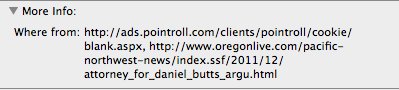
As it turns out, Safari does a nice job tagging files it downloads with extended attributes. This is done as part of Mac OSX's built-in malware prevention system http://support.apple.com/kb/HT3662. The wherefrom data can be viewed from the Finder in the Get Info window for any of the .aspx files you have downloaded.
At least in my case, every single .aspx file was coming from the same source (ads.pointroll.com).
Again, in my case, these files were generated by a flaky ad server hosted by PointRoll. I contacted PointRoll support and, to their credit, got an immediate response.
"Thank you for contacting PointRoll. This is actually a known issue and Support/DEV are working on it.
More information to follow…
Melissa Sutton Boos
Manager, Technical Operations Support"
In my case, this is affecting Mac OSX 10.6.8 with Safari 5.1.2. It is not affecting Mac OSX 10.7.x with Safari 5.1.2, or browsers other than Safari (e.g. Chrome, Firefox...etc). Also, it may not be affecting older versions of Safari (I could only reproduce the problem in Safari 5.1.2 on 10.6.8).
Hope this helps, and I hope PointRoll fixes the problem soon. In the meantime, I have been installing the AdBlock extension on client computers.



