Nikon D50

I have a nikon D50 and when i plug it in to the usb the camera display says it is connected with the computer, but no notification shows on my computer screen and there is no way to download or view my pictures. Is there any software i can download so i can transfer my photos?

G5 power mac -OTHER, Mac OS X (10.5.8)

Posted on Apr 22, 2012 2:11 PM

Reply
12 replies

Apr 22, 2012 5:18 PM in response to Fayej1234

First, do you have Nikon ViewNX 2 installed?


Second, you might check the Tools Menu on the camera to see that the USB setting is "Mass Storage" and not "PTP" since the second setting will usually not allow the data volume to be mounted by a computer. This is at page 71 of the user manual which is online. (I have been bitten on my venerable D100 by this setting, thank you very much.) Here is a clip from the user manual.


User uploaded file

Apr 22, 2012 9:14 PM in response to BDAqua

BDAqua wrote:


GReat, I think you may be onto it! 🙂


But doesn't Image Capture see PTP devices???


Apparently so. Just did a Science Fair experiment with the D100 in PTP mode, and Image Capture and Nikon Transfer saw the camera, though it is not showing up in Disk Utility. Interestingly, the transfer of one picture using Image Transfer gave me a preview icon, which Nikon Transfer does not, which is a feature lost from the earlier version of the application.


Since the D100 is USB 1, I don't transfer files from the camera, rather I slip the card into an HP Photosmart printer or use a Lexar FW CF reader.


To the OP on this thread, Image Capture should be in your Applications folder.

Apr 23, 2012 2:49 AM in response to old comm guy

PTP is not a disk (block device) based protocol, so Disk Utility cannot see it.


PTP is a protocol where the app exchanges image specific commands with the device, such as asking for a list of images the camera has in its storage.


I never use Image Capture but I know that Preview.app can talk PTP (well, actually, it's a OSX feature, so any app making use of the modern OSX APIs can use the PTP features).

Apr 23, 2012 2:35 PM in response to Fayej1234

Fayej1234 wrote:


I have a nikon D50 and when i plug it in to the usb the camera display says it is connected with the computer, but no notification shows on my computer screen and there is no way to download or view my pictures. Is there any software i can download so i can transfer my photos?


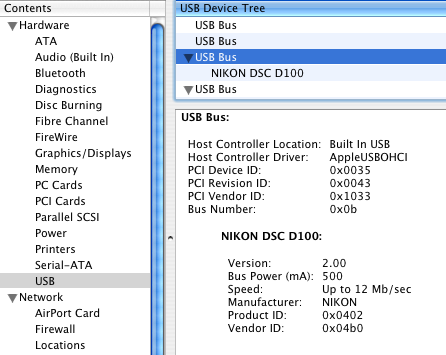
OK, let's back up a step and ask the following question: What does System Profiler tell you when you connect the camera and turn it on? Connect the camera and turn it on, then launch System Profiler from the Utilities folder (fastest way is while in the finder, do cmd-shift-U). By clicking the USB item under Hardware, you should see all USB devices that the computer sees. You can then click the item in the USB Device Tree that has the camera listed to get full information. If you do not see the camera listed, then you have a problem in either the camera, the USB cable or the computer. The USB cable is the most likely suspect. (See the example of a Tiger System Profiler listing below with a D11 connected and set to PTP mode.)


If you do see the camera in System Profiler, then there is a software issue we need to wring out.


If you haven't downloaded Nikon ViewNX 2, you probably should. It needs Leopard, which you indicate you have, so you shouldn't have a problem with the latest version.

User uploaded file


BTW, I mentioned earlier that the D100 was USB 1 only, which is confirmed by the speed listing in SP.

This thread has been closed by the system or the community team. You may vote for any posts you find helpful, or search the Community for additional answers.

Nikon D50

Welcome to Apple Support Community
A forum where Apple customers help each other with their products. Get started with your Apple Account.

