Hi Guanilo,
en and em spaces may be found in the Character palette. The en space is unicode 2002 (HEX), the em space is unicode 2003 (HEX). They may not be included in all fonts.
The easiest way to replace all spaces in your document with en (or em) spaces is to open the Find/Replace dialogue (press command-F), type a space in the Find box, drag an en space (or em space) from the Character Palette window to the Replace with box, then click Replace All.
You'll find as I did, though, that the em space—a character as wide as the height of a capital M—is much wider than a 'regular' space (unicode 0020 (HEX) ), and the en space—half the width of an em space—is also wider than a 'regular' space. Here's an example using two copies of the same text, both in 12 point Helvetica Neue. In the top copy, words (and sentences) are separated by a single 'regular' space. In the lower copy, the 'regular' spaces have replaced with en spaces. The words in blue in the upper paragraph are the words that end consecutive lines in the en-spaced copy below.
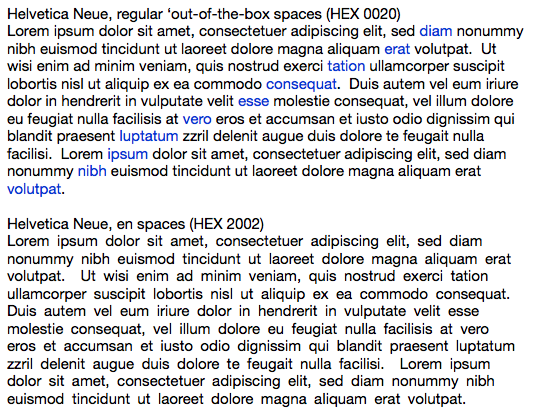
The em space is not accessible from the keyboard. You can type an en space using option-space, according to one article on the web, but the results is actually a non-breaking space.
The 2000 (HEX) line of the code table contains several other space characters of various widths which may be more useful to you.
Regards,
Barry

