This is how you will remove or not show the extra mailboxes in Mail under the gmail folder.
At the gmail website, check the box for just the folders you want last column (Show in IMAP- meaning what will be listed under gmail in the sidebar). The second column (Show in Label List) is what you see at the gmail site. You can show or hide folders you want there.

The bottom portion of this window (not shown) is for mailboxes you create at the gmail site besides the default listed in the top part. Unless you use any, you can delete all of them.
Your main goal from you post is to remove duplicate messages from Mail. Since all of you IMAP mailboxes are listed under the gmail imap account folder, that means none are mapped to the main mailbox (except inbox which is done by default and is why it doesn't appear under the gmail folder). That means the rest of the folders under Mail's main mailboxes are local folders. So moving messages from the inbox to the trash in mail creates a local copy in mail's trash, and a copy in gmail's imap deleted items folder. You can empyt the trash on the mac and it will not affect the message in the imap folder.
Here's where gmail is confusing. The first deletion in gmail's trash (under the gmail folder) moves the message to the deleted items folder. Deleting it again moves it to the trash. The third deletion should get rid of it.
You can choose to leave it as is and deal only with the IMAP inbox on you computer and not show any other imap folders in IMAP. That means you will have to go to the gmail site from time to time to clear out the messages there.
Here's what I suggest to make gmail act more like what you mac's main mailboxes will do and will sync at the site. You need to map the Sent Mail from the gmail folder to Mail's main Sent mailbox. To do this, select the Sent Mail under gmail's folder and highlight it. Go to Mailboxes in the menu and select Use This Mailbox for and choose Sent. This will move the Sent Mail mailbox from the gmail folder to Mail's Sent mailbox. If you have a local mailbox for that account already, it will push it out of the main to the sidebar under ON My Mac (you can check any messages in it, move or delete them, and also then delete the local mailbox).
You should repeat the process for the Trash mailbox also. I do not suggest doing that for drafts or Spam.
Once that's done, change these settings at the gmail site as per the illustration below. I think this is under the Accounts tab.
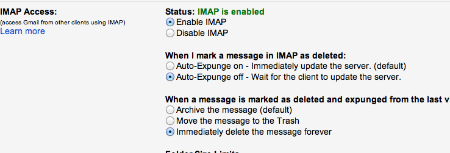
After making these changes, go back to Mail's preferences under the Accounts tab. Select mailbox behavior.
Choose these settings (change your time limited to your desired):
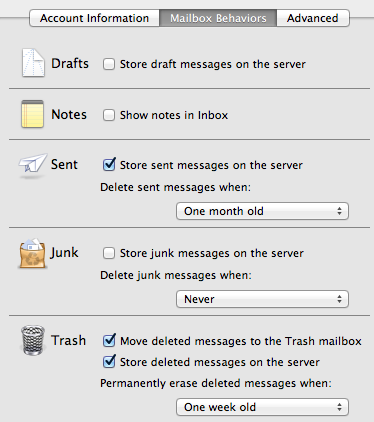
If you do this correctly, this should sync to the website and you shouldn't have duplicate messages anymore.
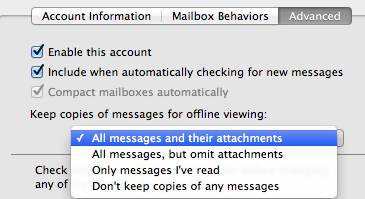
There is one more option you can set. In the illustration below, you can select to not keep any copies of messages locally for offline viewing. Problem is you will have to be online to view them and I don't know how slow that might be.