Hi kiki,
Your printer driver may offer the ability to scale printing to fit multiple pages on a single sheet. Press command-P to open the Print dialogue, then check the 'Copiers and Pages' pop-up menu for 'Layout':
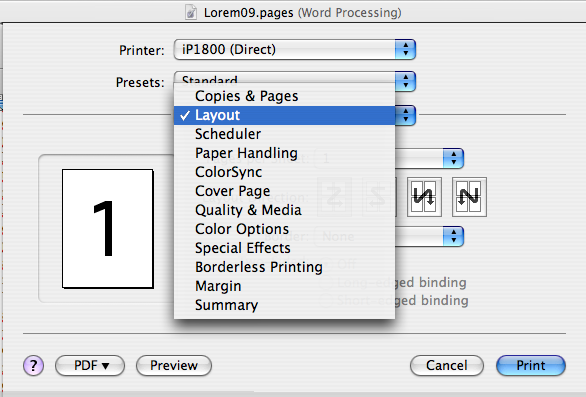
This will scale the pages to fit, and place 2 or 4 (or more) onto one side of a single sheet.
What it will NOT do, though is 'impose' the document; change the order of pages to place them in correct order in a booklet made from several sheets of paper, printed on both sides.
Peter Breis has written a set of instructions for imposing pages here. Scroll to near the end of the page, or use command-F to Find 'imposing pages'.
Peter also includes links to several software solutions for imposing pages from Pages documents. They're at the end of the article.
Regards,
Barry
