
how to enter the new rupee symbol on an ipad/iphone?

I've tried several searches on the web and could not find how to enter the new rupee symboil on an Apple keyboard or on the virtual keyboard on my ipad. Anyone knows how to enter this new currency symbol? Mind you, there are ore than 1 billion Indians

iPad, iOS 5.1.1
Posted on Dec 26, 2012 4:53 PM

Reply
1 reply

Sep 12, 2013 11:51 PM in response to snrwo1

Type Rupee symbol ₹ in iPhone.


Steps:(For iOS 6)
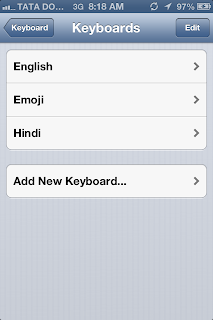
1. Go to settings > general > keyboard.
2. Select keyboards > add new keyboard > Hindi


User uploaded file

3. Now go back to keyboard.

4. (Scroll down) Add new shortcut.

User uploaded file

5.. In "Phrase" press long "$" and select "₹".
6. In "Shortcut" type "Rs" and save it.

User uploaded file

4. Now you can remove the hindi keyboard.
and whenever you type "Rs" it will automatically change to "₹".


User uploaded file


This thread has been closed by the system or the community team. You may vote for any posts you find helpful, or search the Community for additional answers.

how to enter the new rupee symbol on an ipad/iphone?

Welcome to Apple Support Community
A forum where Apple customers help each other with their products. Get started with your Apple Account.