problems with amd gpu on early 2011 macbook pro

hey


been having problems for the last couple of weeks on lion os and now mountain lion and need some advice

i'm guessing its the graphics card a amd 6750m as when it swithches to the gpu the screen glitches and freezes, ive tried the apple hardware test and it passed that

then i did a gpu test with a novatech bench test and crashed nearly straight away

User uploaded file

it's nearly 2 years old and out of apple warranty but i'm sure under EU law it should be 2 years

whats my options

cheers

MacBook Pro, OS X Mountain Lion (10.8.2)

Posted on Dec 27, 2012 1:58 PM

Reply
571 replies

Sep 11, 2013 1:40 PM in response to djanderz

I spent some time investigating this issue and I think the problem is hardware failure due production problems in the heating dissipation system. Not design problem but pure incompetance in manual assembly of the components PLUS a unstable GPU.


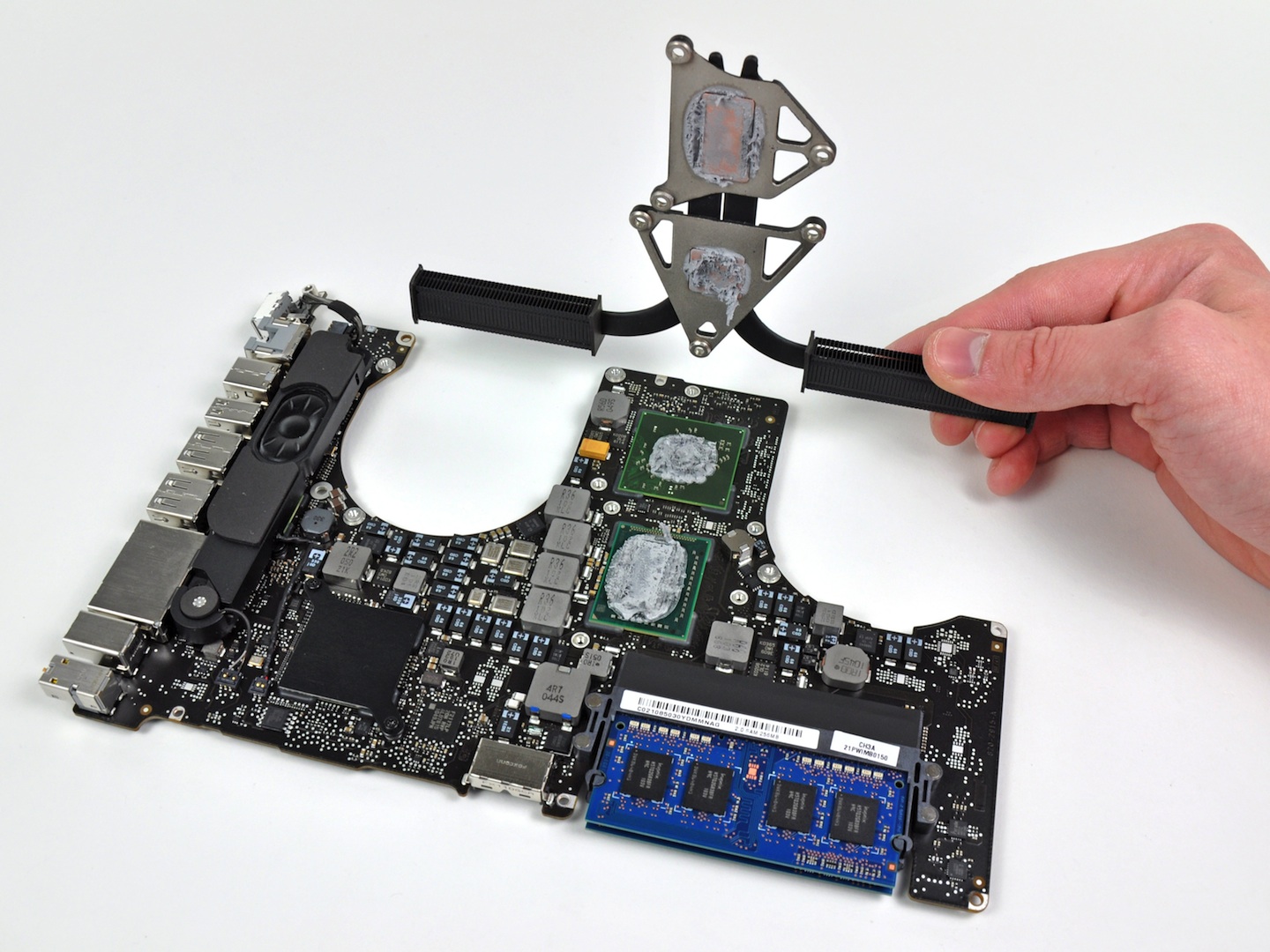
I found some concerning pictures of the MBP 15 early '11 tear-down, where we can view things that are away beyond the lack of quality control, such as thermal paste spread like "butter over the bread" all over the processor's board, as well as losen ZIF connectors, etc...


In terms of design, GPU and CPU shares the same cooling pipe and the graphic switching processor has it's own, which is different from previous mid '10 MBP logicboard design.

So, I think the GPU is overheating way faster than CPU and, when fan throtles in (controled by CPU temp) it's not enoght to keep GPU temperature threshold and cause GPU to fail.


After GPU fails, it corrupts some part of the NVRAM which prevents the machine to boot up even after temperature is OK. The way I found to boot up again is by running Apple Hardware test. Besides the test itself doesn't points out any hardware failure (even running the test with display messed up!), I found that after running the test I was able to boot the computer again. But it don't works all the times and I need to run it twice.


Just after the boot, installed gfxCardStatus to prevent the machine to change from Intel (integrated GPU) to AMD (discrete GPU) and installed SMCfanControl to throtle the fans up to 5500RPM.


After, I have (so far) a stable machine, even after changing from integrated to discrete GPU (by disabling gfxCardStatus and opening Photobooth and VMWare running WinCAD), and after many boot cycles, but with downside of higher fan noise.


Of course IT IS NOT a solution, just try to make a point that problem is not related to FW or SW problem, neither from a single machine but affects all machines with this HW and the time frame for this problem to occurr is related to some very subjective issue: basically the amount and the way of thermal paste was applied to the processors and heat sink at each individual machine and the tolerance to temperature of GPU.


This of course may not apply to all machines.


_____UPDATE


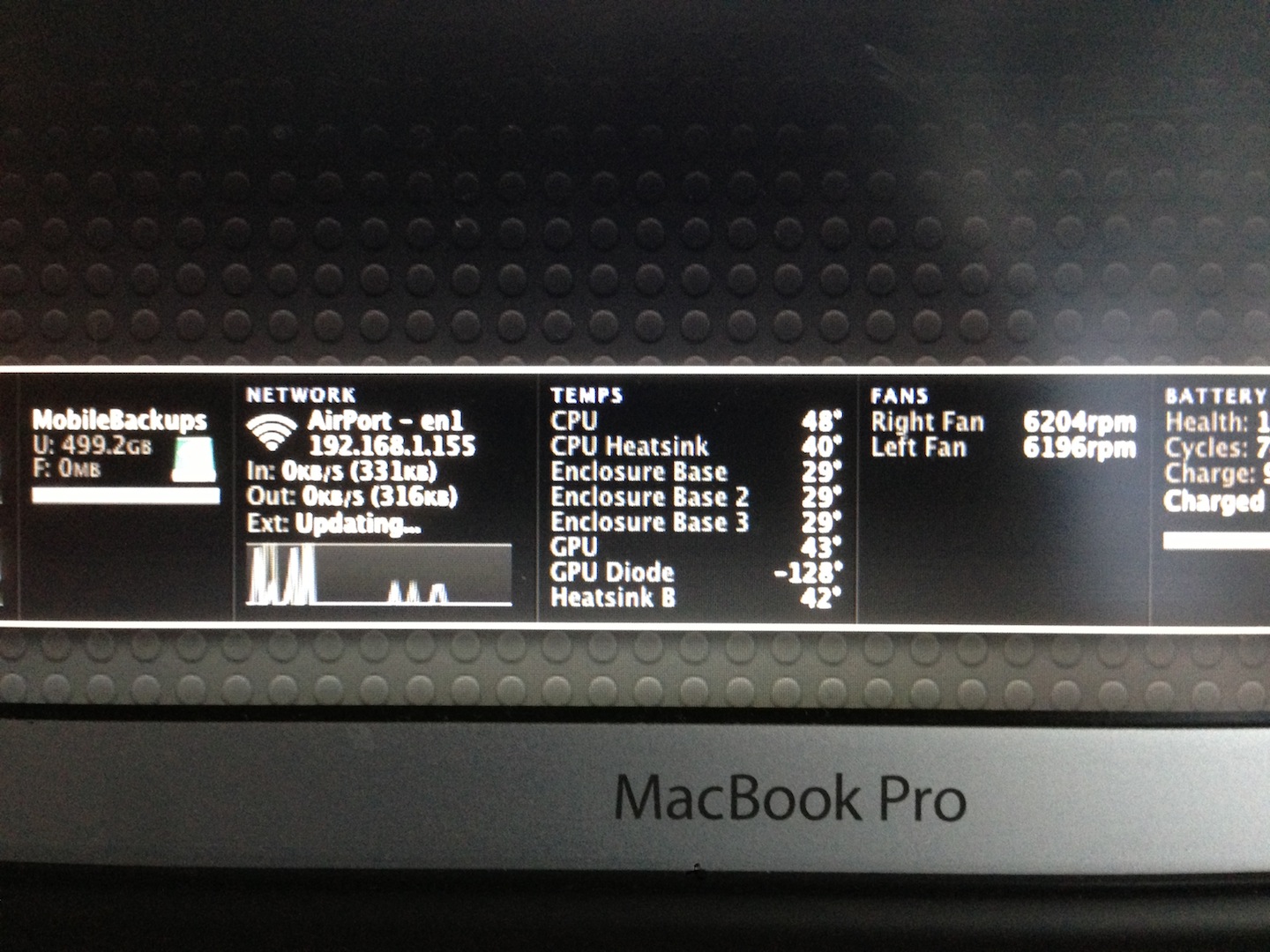
Now I was looking at iStat widget and GPU temp is 43 deg and GPU Diode temp droped from 25 to 3 to -128 (whow, ...). Even not been a reliable tool, istat takes information from the on board sensors so... something is not right..

Follow some pictures


User uploaded file


User uploaded file

Sep 11, 2013 3:41 PM in response to RioMacUser

Yeah, there has repeatedly been a popular opinion in the longer thread about this issue that it's got to be hardware-related - for very similar reasons to yours as well as the fact that there are people who have had some flavor of this problem since the initial release of the machine, and people have had it under every combination of hardware, OS version, and firmware update. There's no apparent uptick in GPU issues after any major OS or firmware update. It's just a pretty steady flow of unhappy owners coming to these forums to lament their issues, from March 2011 to present. The thermal paste is a popular suspect among many, though I'm cautious to point at something specific without more info when there are a lot of parts packed into a hot space that gets jostled around a lot.


We really need to get more information about the 2011 iMac GPU recall, specifically what they're repairing/replacing - I suspect that might be informative for our situation. So far, I'm not really finding anything useful online from people whose iMacs have been repaired under that program. Ironically, that program gets mentioned more in our threads about MacBook Pros than anywhere else on here! 😉


gfxCardStatus has been a lifesaver for a number of people, but some folks cannot seem to boot reliably enough (even after trying tricks like yours) to get in and switch it to integrated only. I suspect we're seeing GPUs at different levels of failure, and some are just too far gone to play nicely with our attempted solutions. It also concerns me that the Genius Bar diagnostics pretty much never see anything wrong with our GPUs when they run their tests, which makes it (a) hard to get them to believe there's something really wrong with them (look at how often they blame software, a hard drive, RAM, etc.), and (b) deeply concerning that Apple likes using refurbished hardware in their repairs, and might just put bad old GPUs right back in because they tested fine. It's not like they're replacing individual chips or cleaning up globs of thermal paste, either.


I'm off to pick up my thrice-repaired machine again - since this was a depot repair, I don't know what all they may have replaced. Wish me luck...

Oct 21, 2013 1:46 PM in response to Airbum88

Airbum88 wrote:


Has there been more problems with the iMacs than the Macbooks? I wonder why Apple decided to fix the iMacs instead.


It's a mystery, since we don't know exactly how Apple determines the scope and seriousness of a problem - I've assumed that it's some combination of customer feedback, repair data (i.e. how many people are getting the same part(s) repaired on the same models), and the visibility of the issue (i.e. how much damage to the company's reputation could come from media coverage). Since all of those things are pretty much only known to Apple... then we have no way to compare 2011 iMacs to MacBook Pros.


I can say that when Googling, the MBP problems come up a lot more frequently. But that doesn't even remotely capture the repair data, which is probably the most crucial to Apple. They've repeatedly told MBP owners that they have seen no indication that our issues are widespread enough to be considered endemic to the models.


<Edited by Host>

Sep 11, 2013 4:01 PM in response to saramwrap

Of course... they apparently also told the 2011 iMac users for years that their problems weren't widespread, either. And then eventually it all reached a tipping point where they announced a replacement program for the GPUs - suddenly those iMac problems became real. Maybe they'll do the same for us someday. And while it's cold comfort - these programs almost always come with refunds for people who can demonstrate that they paid for repairs that would've been solved through the replacement program. So perhaps I'll someday see the $550+ that has gone into my laptop for logic board replacements...


But I also want to caution people against getting too excited about replacement programs, because when the iMac program was announced, it wasn't as big of a victory for iMac users as you'd think. It was only for a very limited range of models, and there are people with similar iMacs who have similar issues and no free replacement program. So I also worry that if we got a MBP program, it might only cover a subset of the affected 2011 models. These programs also only last a limited amount of time, and only repair computers that are actively showing the problem in very specific ways when you bring it in for diagnosis. I'm not sure all of us would even qualify.


I'd far rather nail down what's causing the issue so we can remedy it, regardless of whether Apple acknowledges our problems as widespread and decides to foot the bill for repairs.

Sep 12, 2013 3:26 PM in response to djanderz

I'm having the same problem. I think it's radeon as well. Changed my logic board already. Still has the problem so it's definitely not changing the logic board .The technicians reinstalled OS Mountain lion, upgraded the hardware (not really sure about this i think the firmware or something) and it has lesser problems now but I just had a hang now. I think I'm still going to return it. I've been going back 5 times now to the service center.


2011 15 inch macbook pro entry 2.0ghz i7

Sep 16, 2013 12:39 AM in response to djanderz

Same problem; May 2011 mac book pro i7 blue screen during normal use, no working recovery hd, reinstall of osx resulted in blue screen at first restart. Feedback form completed and visiting local store today....Very very disappointed in reading all these posts and the apparent lack of interest shown by apple. I will definitely be stopping elsewhere in the future and advising only buy (if you have too) with aftercare.

Oct 21, 2013 2:11 PM in response to djanderz

Folks,

I am an expat here,hence I don't know my rights,but people in their home countries can take this drastic but justified action.This is a Global problem & Apple has to take some action. Media will highlight this & Apple will be forced to take corrective actions to protect their Brand Value.& Sorry unless & untill Apple solves this I will continue educating my friends/family not to buy any Apple Product,not even the Iphone 5s😠


Thanks & Rgds.


<Edited By Host>

This thread has been closed by the system or the community team. You may vote for any posts you find helpful, or search the Community for additional answers.

problems with amd gpu on early 2011 macbook pro

Welcome to Apple Support Community
A forum where Apple customers help each other with their products. Get started with your Apple Account.