First, you should carefully think why you'd need to resize. You can export from FCP X to the standard sizes, both HD and SD. Do you really need some nonstandard size?
Keep in mind that usually you'll get the best quality if you edit in the desired final size, rather than resizing afterwards.
If you do need to create a video in some nonstandard size, like, say 1080x1920 (i.e. in "portrait" form), there is a way to do it:
http://library.creativecow.net/articles/payton_t/FCPX_Custom-Resolution-Timeline s/video-tutorial
With Compressor you have many pre-made defaults for different kinds of devices. Also, you can export to Quicktime and tweak the settings to get a desired size.
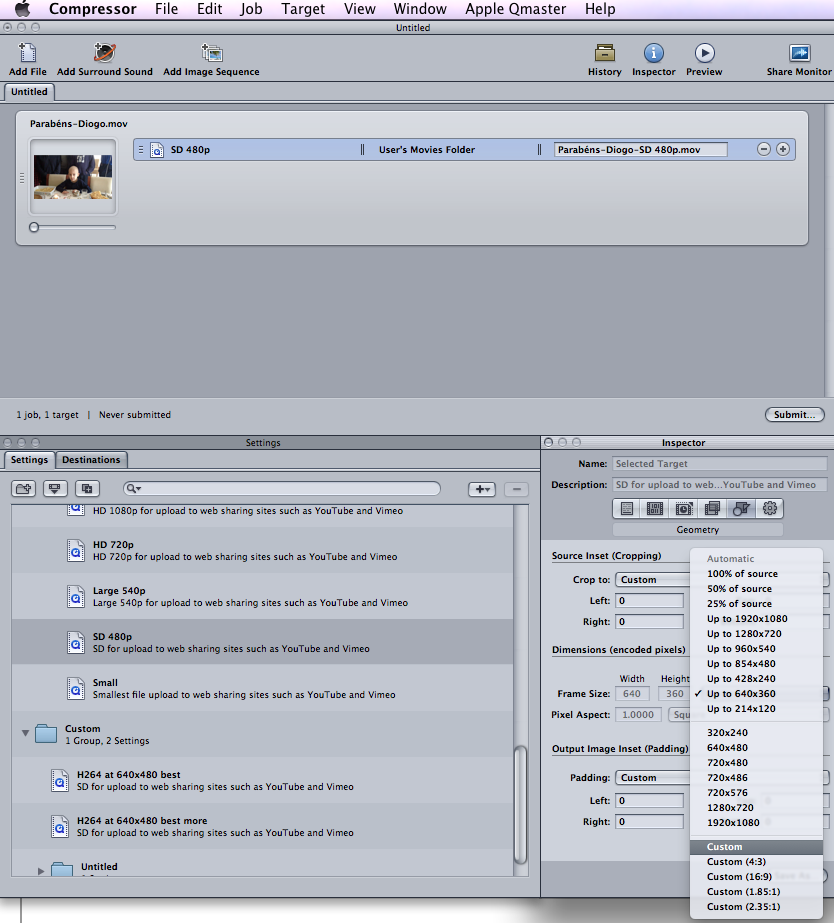
1-Drag one of the existing settings (in the example below, I used SD 480p)
2-Select it
3-In the Inspector, select the "Geometry" tab
4-Choose "Custom" and enter the desired size.
5-Change the other properties (such as codec, under the "Encoder" tab), as needed
5-Choose "Save As..." and save it (give a suggestive name, say "Portrait") so that you can later reuse it as needed.