emoticons for mac

How do I access all of the emoticons (that are available in messages on ios) in messages on my mac? The little drop down menu has a very limited selection, yet the mac must support all of the others because it can show them if they are sent from a phone...


Is there an option to show more? Or is there a third party app that can give me more selection?


Also, I find the text to be a bit small. How can I enlarge everything in the app? I can press command+ but that just makes the conversation bigger, not the unsent text box and not any of the other conversations... Can I make the default text size larger?

MacBook, OS X Mountain Lion

Posted on Feb 9, 2013 6:18 PM

Reply
6 replies

Feb 10, 2013 1:41 PM in response to appleiser

Hi,


Messages Menu > Messages.

Size can be a Font Selection thing (Such as Marker Felt is 48 point) or a size of a particular Font as in making the default Helvetica 14point or larger.

Your Buddy will only see Fonts that they have.

You have to Set the Balloon Colour to change some of these choices in Messages


There is also an Incoming Override you can set if Buddies and Contacts use different, smaller fonts to you.


Generally put dark fonts on Light Balloon colours or light coloured Fonts on dark balloons.


The iPhone has Emoji Fonts

It seems that the iOS version of Messages sends the Pics in the iMessages.

Generally AIM and Jabber conversations rely on "converting" the keystrokes needed for the regular Smilies into to the Smilies you see.


If you type a colon followed by a close parentheses on these boards then the software running them converts that into a Smiley like 😁.

It works similar in AIM and Jabber chats in Messages (I have not tried Yahoo)


If you go to Messages > Edit Menu > Special Characters you bring up the Character Pallet.

This may show you have the Emoji set on your computer
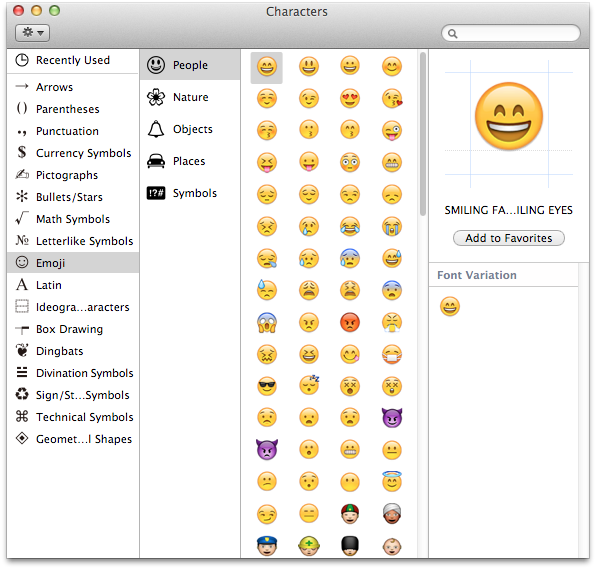
User uploaded file


I seem to have a vague memory that I had to change a setting somewhere to expand what is normally on View.


User uploaded file
9:41 PM Sunday; February 10, 2013

Please, if posting Logs, do not post any Log info after the line "Binary Images for iChat"


 iMac 2.5Ghz 5i 2011 (Mountain Lion 10.8.2)
 G4/1GhzDual MDD (Leopard 10.5.8)
 MacBookPro 2Gb (Snow Leopard 10.6.8)
 Mac OS X (10.6.8),
 Couple of iPhones and an iPad
"Limit the Logs to the Bits above Binary Images."  No, Seriously

Feb 11, 2013 9:40 PM in response to Ralph-Johns-UK

Hi, thanks for the info. I have changed those fonts in preferences and will see how my conversations look over the next couple of days...


That special characters pallet is what I was looking for, however I am a bit disappointed with its usability. It is a window that is open and in front of every other window, regardless of what application is active, which is a bit annoying considering its size and that the category menus cant be hidden to make it more discrete. Is there a way I can make this emoji set appear when I press the little smiley face in the messages text box, instead of the limited set it currently shows?

Feb 12, 2013 12:20 PM in response to appleiser

HI,


The Smileys are held within the iChat or Messages app itself.

There is a sub-routine that uses a .plist which has the variants for the keystrokes and converts the Text into a Pic.

Generally though the Text is sent and the App at the other end converts your Text into the Pic.


There have been add on packs of extra Smileys before from iChat 2 onwards.

Both ends need the same Smiley pack to get the same pics.


Although the Character pallet does not show the two diagonal arrows bottom right when trying to grab the corner you can in fact make it smaller.User uploaded file


User uploaded file
8:19 PM Tuesday; February 12, 2013

Please, if posting Logs, do not post any Log info after the line "Binary Images for iChat"


 iMac 2.5Ghz 5i 2011 (Mountain Lion 10.8.2)
 G4/1GhzDual MDD (Leopard 10.5.8)
 MacBookPro 2Gb (Snow Leopard 10.6.8)
 Mac OS X (10.6.8),
 Couple of iPhones and an iPad
"Limit the Logs to the Bits above Binary Images."  No, Seriously

This thread has been closed by the system or the community team. You may vote for any posts you find helpful, or search the Community for additional answers.

emoticons for mac

Welcome to Apple Support Community
A forum where Apple customers help each other with their products. Get started with your Apple Account.
