How do you create a stack?

How do you create a stack? Did I miss something in the article about "Learn how to add and remove folders and files to Stacks in the Dock."? This article seems to only explain how to use existing stacks.

MACBOOK PRO (RETINA, 13-INCH,EARLY 2013), OS X Mountain Lion (10.8.2)

Posted on Mar 2, 2013 10:53 AM

Reply
4 replies

Mar 2, 2013 12:59 PM in response to VikingOSX

Thanks, VikingOSX. I had actually done what you suggested, but I guess I should have been asking what is a stack? As I was trying to get the idea into my head as to what a stack is, I assumed it to be a collection of things you want to group into an easily accessable "stack". Now, I am under the impression that a "stack" is simply a folder placed on the dock for easy access with several ways to be viewed, not a collection of aliases to files, folders and programs placed in a "stack" on the dock for ease of access. Would you agree that a stack is simply a shortcut to a folder?


If so, I suppose one could create a folder specifically for use on the dock and place desired aliases in that folder.


Again, thanks for the reply.

Mar 2, 2013 1:41 PM in response to kMacPilot

When you drag and drop a folder onto the dock, the icon on the dock of that folder is an alias back to the original folder location. The default is to make that folder dock icon a stack. When you drag and drop files into the original folder, the dock alias of that folder (the stack) bounces and you now see a fan fold of the files that were dropped in the original folder.


By example, I created a new folder in my login directory. Called it Foobar, and dragged it to the Dock right next to the Trash icon. By default, it made itself a stack. I now dragged three arbitrary files onto the original folder. The Foobar dock icon bounced once. When I clicked on it, a new stack revealed the files that were copied into the Foobar folder. The result looks like this:
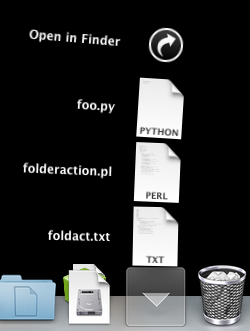

User uploaded file

If you were to click on any one of these files, it would be opened by the default application for that file type. If one of these had been an installer, you could click on the installer and it would open in a window as you would expect an installer to do.

This thread has been closed by the system or the community team. You may vote for any posts you find helpful, or search the Community for additional answers.

How do you create a stack?

Welcome to Apple Support Community
A forum where Apple customers help each other with their products. Get started with your Apple Account.