Then you've got a corrupted plist or data file. I'm not sure where to start deleting. I really haven't poked around in Calendar's innards.
I just tried this, and it worked.
Back up your Calendars by using the Export>Calendar archive from the file menu.
Quit Calendar.
In your user/Library/Calendars folder is a bunch of folders ending with .calendar. Those are your On My Mac calendars.
First, try deleting the Calendar Cache file from in that folder, then restart Calendar and try to delete the calendars the normal way.
If that doesn't stick, try deleting all the On My Mac Calendar folders, then the Calendar Cache file.
To determine which calendars those are, open a folder and select the info.plist file and press spacebar. Towards the bottom it will have Title tags and the name of the Calendar. Use that to figure out which folders to delete.
Here's and example of how to find the name of the Calendar inside the folder:
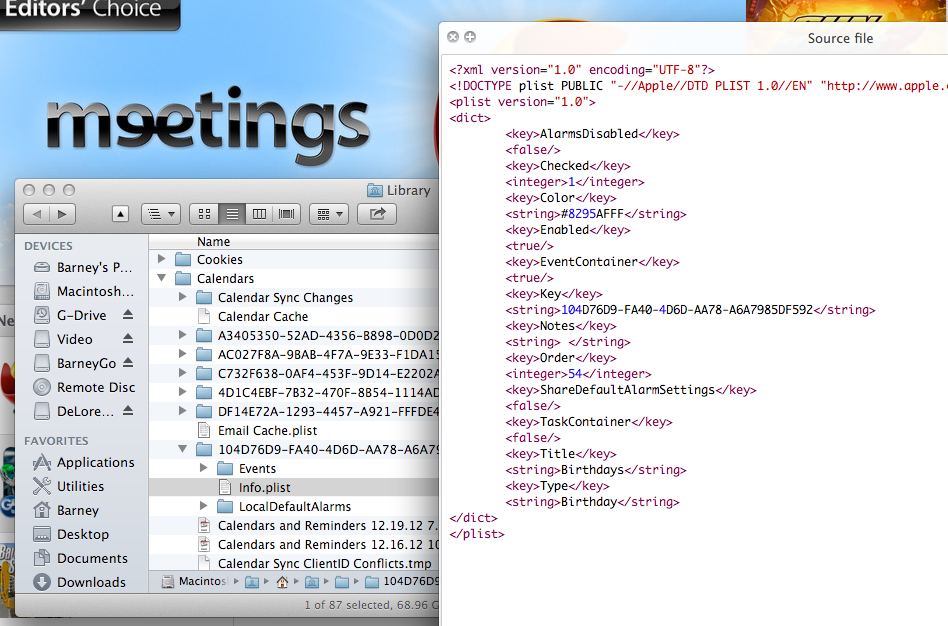
The name of the Calendar is right next to the highlighted Info.plist folder in the background.




