Hi Matt, and thanks Narayan for the question.
I am running Windows 8 on my Macbook Pro (2012) via Parallels 8. After quite a bit of patience tested with patches and updates, everything worked fine. But as with Windows, after an update, there will be problems with programs. Running Parallels is very cool, but the downside and truth is that every now and then you will find that the Windows 8 virtual machine does not work as it would on a conventional PC. My iTunes (v11+) worked fine until it detected a potential conflict with another CD/DVD app I installed (either VLC or PowerDVD) and everytime I launched it, an alert would indicate that the Registry for iTunes has a problem as a result and that I should reinstall iTunes. I hesitated doing that because for the most part, my iTunes worked fine (synchs my iPhone 5 on Windows), while my Mac iTunes synchs my iPod Classic 160GB. Now, I have tried three times to down and install iTunes in my Windows 8 virtual machine but three alert window pop-ups appear, and all result in a failed installation. This means, I will not be able to synch my iPhone 5 to my Outlook for the time being and poses a real serious problem in my day to day lifestyle.
First window alert after trying to open installation package:
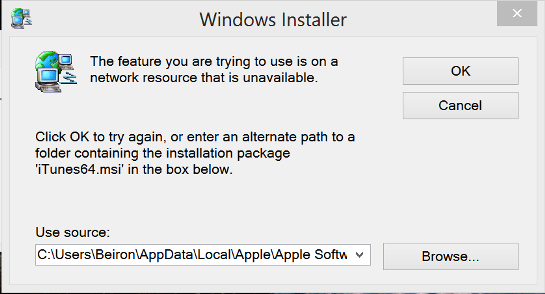
Because I had cleared my cache with the earlier version of iTunes installed, using Browse, I could not locate those files. So clicking OK, leads to:
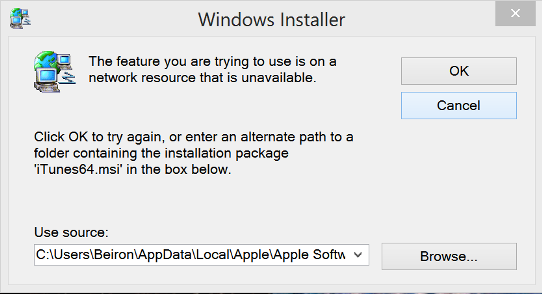
Then after clicking OK to clear this message, it leads to:

I am not an engineer and can't tell what the software implication is for these messages. I suppose, it is a Windows and not a iTunes problem, and I may have to take this problem to a Windows Support community. But I just thought to post it here in case, someone has a solution and might just share it still.
Now, I am going to try and remove my VLC program and try re-installing iTunes. But the way I understand the last two window messages, there seems to be a problem with the software trying to connect with Apple while the installation is taking place ("network resource") although my Internet access is definitely working at the time.
Any ideas? Unless this is another Parallels 8 issue, and neither Windows 8 or iTunes!
Tom

